Loading
Form preview
  • US Legal Forms
  • Other Templates
  • Tax Forms
  • Montana Tax Forms
  • Mt Dor Apls101f 2017

Get Mt Dor Apls101f 2017-2026

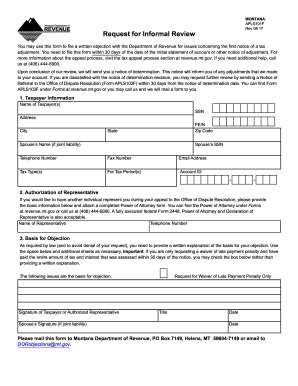
Clear Form Request for Informal Review MONTANA APLS101F Rev 08 17 You may use this form to file a written objection with the Department of Revenue for issues concerning the first notice of a tax adjustment. You need to file this form within 30 days of the date of the initial statement of account or other notice of adjustment. For more information about the appeal process visit the tax appeal process section at revenue. mt. gov* If you need additional help call us at 406 444-6900. Upon conclusion.

How it works

  1. Open form

    Open form follow the instructions

  2. Easily sign form

    Easily sign the form with your finger

  3. Share form

    Send filled & signed form or save

How to fill out the MT DoR APLS101F online

The MT DoR APLS101F is a crucial form for filing a written objection with the Department of Revenue regarding tax adjustments. This guide provides step-by-step instructions on how to complete the form online, ensuring users can navigate the process with ease.

Follow the steps to successfully complete the MT DoR APLS101F form.

  1. Press the ‘Get Form’ button to access the MT DoR APLS101F. This action will load the form in your browser, ready for you to fill out.
  2. Begin with the 'Taxpayer Information' section. Enter the name of the taxpayer(s), social security number (SSN), address, city, state, zip code, and phone number. If there is a spouse involved in the liability, their name and SSN must also be included.
  3. Provide the applicable tax type(s) and the period for which the adjustment is in question. Additionally, include the email address and account ID for reference.
  4. If someone is representing you during this process, fill in the 'Authorization of Representative' section with their name and telephone number. Remember to attach a completed Power of Attorney form, if applicable.
  5. In the 'Basis for Objection' section, provide a detailed written explanation of your objection. If relevant, check the box for a waiver of late payment penalty if you have paid the assessed amount within 30 days of the notice.
  6. Ensure that the signature of the taxpayer or authorized representative, as well as the spouse's signature (if applicable), is included at the end of the form along with the date.
  7. Once you complete all sections, review the form for accuracy. You can then save changes, download a copy, print, or share the completed form as needed.

Complete your MT DoR APLS101F online today to ensure your objections are filed promptly.

Get form

Experience a faster way to fill out and sign forms on the web. Access the most extensive library of templates available.
Get form

Related content

Request for Informal Review
Form APLS102F is available at MTRevenue.gov. Filing this form. Email this form and...
Learn more
Mont. Admin. r. 42.2.510 - REVIEW OF NOTICE OF ...
Information provided on the NOA shall advise the taxpayer of the requirement to file a...
Learn more

Related links form

ZA ALV 2005 AU Form 1194 2014 AU Form 1196S 2011 Canada OPG 5521 2008

Questions & Answers

Get answers to your most pressing questions about US Legal Forms API.

Contact support

An EIN is not the same as a state tax ID; they serve different purposes. The EIN is a federal identification number required by the IRS, while a state tax ID is necessary for state tax filings and compliance. If you're managing a business in Montana, both IDs may be critical for your tax responsibilities. For further clarification, the MT DoR APLS101F resources on our site can help answer any questions.

You can obtain a Montana state tax ID number by completing the application available on the Montana Department of Revenue’s website. Generally, you will need to provide details such as your business structure and federal EIN. This ID is essential for fulfilling your state tax obligations and ensuring smooth business operations in Montana. For organized support, consider the MT DoR APLS101F resources available on our platform.

Eligibility for the Montana tax rebate generally includes residents who have filed individual income tax returns and meet certain income criteria set by the state. Specific guidelines can vary based on the fiscal year and any legislative changes. Make sure to check the latest information from the Montana Department of Revenue to confirm your eligibility. For easy access to updates and assistance, explore our MT DoR APLS101F resources.

No, your Employer Identification Number (EIN) is not the same as your Montana state tax ID. The EIN is used for federal tax identification purposes, whereas the state tax ID is specific to your state tax obligations. You will need to apply for a separate state tax ID through the Montana Department of Revenue to ensure proper compliance. If you're unsure how to proceed, consider exploring the MT DoR APLS101F resources on our site.

To register for Montana withholding tax, you will need to complete the appropriate application form, which you can find on the Montana Department of Revenue's website. Be sure to provide necessary information such as your business name and federal EIN. This step is crucial for compliance with Montana state tax laws and will help you manage your tax obligations effectively. For more assistance, visit the MT DoR APLS101F section on our platform.

To fill in a customs declaration form for MT DoR APLS101F, begin by disclosing your travel history and the goods you are bringing into the US. Provide accurate descriptions of items, including their value and purpose. Ensure the form is signed to complete the customs declaration process.

When filling out a declaration form for MT DoR APLS101F, include your full name, contact information, and purpose of the declaration. Be specific about the information you are declaring, whether it relates to income, assets, or legal obligations. Make sure to sign the form to validate your declaration.

Filling out a payroll deduction form under MT DoR APLS101F involves entering your employee details at the top of the form. Specify the deduction type, such as retirement contributions or health insurance premiums. Lastly, review your form and submit it to your payroll department for processing.

To fill out the declaration and authorization form for MT DoR APLS101F, start with your personal details and the purpose of the declaration. Clearly state what you are authorizing, whether it's a person or an entity. Review the entries to ensure all information is accurate, and sign to finalize the document.

Filling out the US Customs Declaration form for MT DoR APLS101F requires you to disclose your travel details and any items you are bringing into the country. Include information like the total value of goods and any items that require special declaration. After entering the necessary details, sign the form before presenting it to Customs.

Get This Form Now!

Use professional pre-built templates to fill in and sign documents online faster. Get access to thousands of forms.
Get form
If you believe that this page should be taken down, please follow our DMCA take down processhere.
Get MT DoR APLS101F
Get form
  • Adoption
  • Bankruptcy
  • Contractors
  • Divorce
  • Home Sales
  • Employment
  • Identity Theft
  • Incorporation
  • Landlord Tenant
  • Living Trust
  • Name Change
  • Personal Planning
  • Small Business
  • Wills & Estates
  • Packages A-Z
  • Affidavits
  • Bankruptcy
  • Bill of Sale
  • Corporate - LLC
  • Divorce
  • Employment
  • Identity Theft
  • Internet Technology
  • Landlord Tenant
  • Living Wills
  • Name Change
  • Power of Attorney
  • Real Estate
  • Small Estates
  • Wills
  • All Forms
  • Forms A-Z
  • Other Templates
  • Legal Hub
  • About Us
  • Help Portal
  • Legal Resources
  • Blog
  • Affiliates
  • Contact Us
  • Delete My Account
  • Site Map
  • Industries
  • Forms in Spanish
  • Localized Forms
  • State-specific Forms
  • Forms Kit
  • Real Estate Handbook
  • All Guides
  • Notarize
  • Incorporation services
  • For Consumers
  • For Small Business
  • For Attorneys
  • USLegal
  • FormsPass
  • pdfFiller
  • signNow
  • altaFlow
  • DocHub
  • Instapage
Form Packages
  • Adoption
  • Bankruptcy
  • Contractors
  • Divorce
  • Home Sales
  • Employment
  • Identity Theft
  • Incorporation
  • Landlord Tenant
  • Living Trust
  • Name Change
  • Personal Planning
  • Small Business
  • Wills & Estates
  • Packages A-Z
Form Categories
  • Affidavits
  • Bankruptcy
  • Bill of Sale
  • Corporate - LLC
  • Divorce
  • Employment
  • Identity Theft
  • Internet Technology
  • Landlord Tenant
  • Living Wills
  • Name Change
  • Power of Attorney
  • Real Estate
  • Small Estates
  • Wills
  • All Forms
  • Forms A-Z
  • Other Templates
Customer Service
  • Legal Hub
  • About Us
  • Help Portal
  • Legal Resources
  • Blog
  • Affiliates
  • Contact Us
  • Delete My Account
  • Site Map
  • Industries
  • Forms in Spanish
  • Localized Forms
  • State-specific Forms
  • Forms Kit
Legal Guides
  • Real Estate Handbook
  • All Guides
Prepared for you
  • Notarize
  • Incorporation services
Our Customers
  • For Consumers
  • For Small Business
  • For Attorneys
Our Sites
  • USLegal
  • FormsPass
  • pdfFiller
  • signNow
  • altaFlow
  • DocHub
  • Instapage
Social Media
Call us now toll free:
+1 833 426 79 33
As seen in:
© Copyright 1999-2026 airSlate Legal Forms, Inc. 17 Station Street, Suite 303, Brookline, MA 02445
  • Your Privacy Choices
  • Terms of Service
  • Privacy Notice
  • Content Takedown Policy
  • Bug Bounty Program