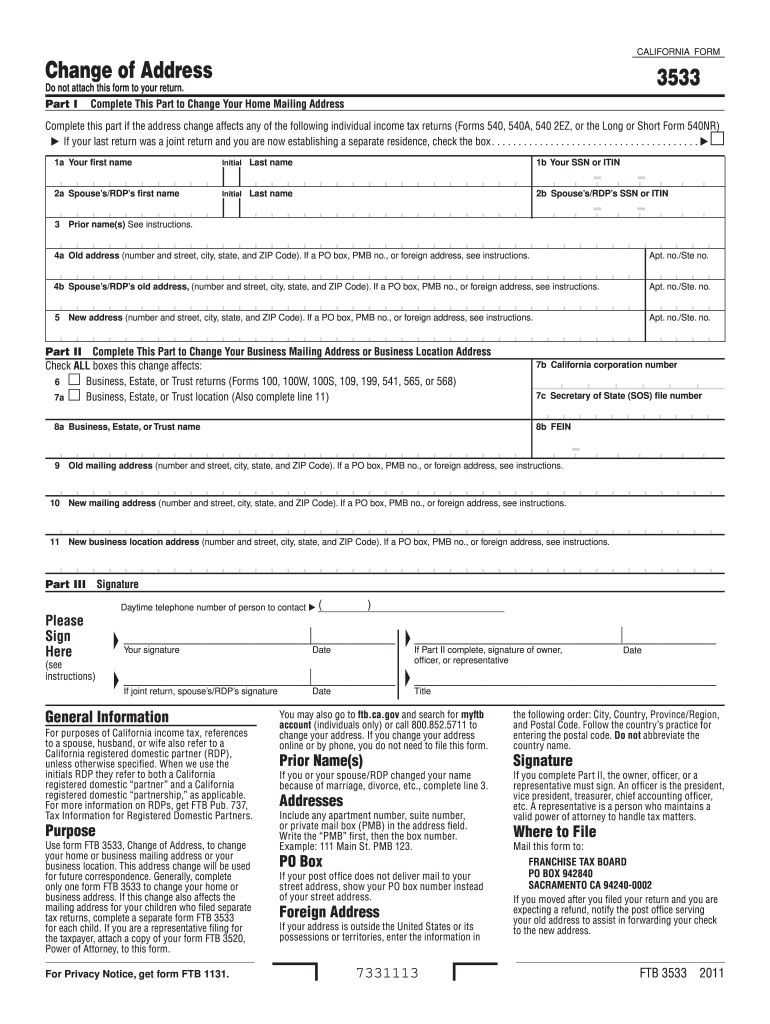
Ng address or your business location. This address change will be used for future correspondence. Generally, complete only one form FTB 3533 to change your home or business address. If this change also affects the mailing address for your children who filed separate tax returns, complete a separate form FTB 3533 for each child. If you are a representative filing for the taxpayer, attach a copy of your form FTB 3520, Power of Attorney, to this form. For Privacy Notice, get form FTB 1131. Date T.

Open form follow the instructions

Easily sign the form with your finger

Send filled & signed form or save
How to fill out the CA FTB 3533 online
The CA FTB 3533 form allows users to update their home or business mailing address with the California Franchise Tax Board. Completing this form online can ensure that your correspondence is directed to the correct location. This guide provides a step-by-step overview of how to fill out the CA FTB 3533 effectively.
Follow the steps to fill out the CA FTB 3533 online:
- Click the ‘Get Form’ button to obtain the CA FTB 3533 form and open it in the online editor.
- Begin with Part I to change your home mailing address. Fill in your first name, middle initial, and last name in the designated fields.
- Provide your Social Security Number (SSN) or Individual Taxpayer Identification Number (ITIN) in the specified space.
- Enter your spouse’s or registered domestic partner’s (RDP) first name, middle initial, last name, and their SSN or ITIN in the corresponding fields.
- If applicable, list prior names you may have used in the space provided.
- Fill in your old mailing address, including street number, city, state, ZIP code, and any apartment or suite number. Review the instructions if using a PO Box or foreign address.
- Repeat the previous step for your spouse’s or RDP’s old address, ensuring all information is correct.
- Next, record your new mailing address in the specified fields. Again, follow the instructions if using a PO Box or foreign address.
- For Part II, if changing a business mailing address or location, check all applicable boxes indicating the nature of the change and fill in the business information as required.
- In Part III, ensure you sign and date the form. If applicable, ensure your spouse's or RDP’s signature is also provided.
- Finally, review all entered information carefully, then save your changes. You can choose to download, print, or share the completed form as needed.
Complete your CA FTB 3533 online today to ensure your mailing address is up-to-date!
Experience a faster way to fill out and sign forms on the web. Access the most extensive library of templates available.
Related content
Complete form FTB 3533 only if you file any of the following individual income tax...
Jun 3, 2020 — You may also use form FTB 3533, Change of Address for Individuals. This...
Get answers to your most pressing questions about US Legal Forms API.
Can amended returns be filed electronically?
Yes, amended returns can be filed electronically in California. This option provides a quick and efficient way to correct any errors or update your return information. Utilizing the CA FTB 3533 form online enhances your experience and reduces processing time. For a seamless filing process, consider leveraging the resources available on USLegalForms.
Can amended California return be filed electronically?
Indeed, you can file amended California returns electronically. This feature helps you avoid the delays often associated with paper submissions. By using the CA FTB 3533 online, you can ensure that your corrections are processed quickly and accurately. If you need help, USLegalForms offers tools and resources to support your e-filing.
What is form 3533?
CA FTB form 3533 is an amended tax return form used by California taxpayers to make corrections to previously filed returns. It allows you to update your tax information efficiently, ensuring your records are accurate. Completing this form is crucial for maintaining compliance with state tax regulations. For ease of use during the amendment process, USLegalForms can provide you with detailed assistance.
Can CA form 109 be filed electronically?
Yes, CA form 109 can be filed electronically, making it easier for you to manage your tax obligations. When you file electronically, you often receive prompt confirmation and can track your submission easily. By utilizing the CA FTB 3533 online filing system, you can enjoy a streamlined experience. Consider using USLegalForms to ensure everything is done accurately.
Can you electronically file a California amended return?
Yes, you can electronically file an amended return in California. The process for submitting your amended return using CA FTB 3533 is simple and efficient, allowing you to make corrections without extra hassle. Remember to keep track of any changes in tax laws regarding amended returns by visiting the FTB website. If you need help with electronic filing, USLegalForms offers solutions tailored for your needs.
Where to file FTB form 3533?
You can file CA FTB form 3533 electronically through the California Franchise Tax Board's e-file system. If you prefer to submit a paper form, ensure you mail it to the appropriate address provided in the form's instructions. Always double-check the FTB website to confirm any recent updates related to the filing process. Using USLegalForms can guide you through correctly submitting your form.
Is California accepting e-file returns?
Yes, California is accepting e-file returns for many taxpayers. This option simplifies the filing process and ensures quick processing times. When you file using the CA FTB 3533 electronically, you can typically expect faster confirmation and refunds. If you're unsure how to start, consider using USLegalForms for easy e-filing.
Where do I send my California franchise tax board?
You can send your forms to the California Franchise Tax Board (FTB) at their designated mailing address based on the type of return you are filing. Typically, for personal income tax returns, you would mail them to the address specified on the form or within the instructions. It's essential to check the latest guidelines on the CA FTB website to ensure you have the correct information. If you're looking for assistance with filing, USLegalForms can help you navigate the process smoothly.
What should I put for withholding allowances?
When determining the number of withholding allowances to claim, consider factors such as your filing status, number of dependents, and any deductions you anticipate. Accurate information helps optimize your tax withholding, preventing overpayment or underpayment. Utilize the CA FTB 3533 form to guide you through the process effectively.
How can I avoid FTB underpayment penalty?
To avoid the FTB underpayment penalty, ensure that your tax payments meet or exceed the minimum requirements set by the California Franchise Tax Board. You can achieve this by reviewing your withholding and estimated tax payments throughout the year. Additionally, utilizing tools like CA FTB 3533 can help you properly calculate your withholding.
Use professional pre-built templates to fill in and sign documents online faster. Get access to thousands of forms.
If you believe that this page should be taken down, please follow our DMCA take down process here.
This form is available in several versions. Select the version you need from the drop-down list below.