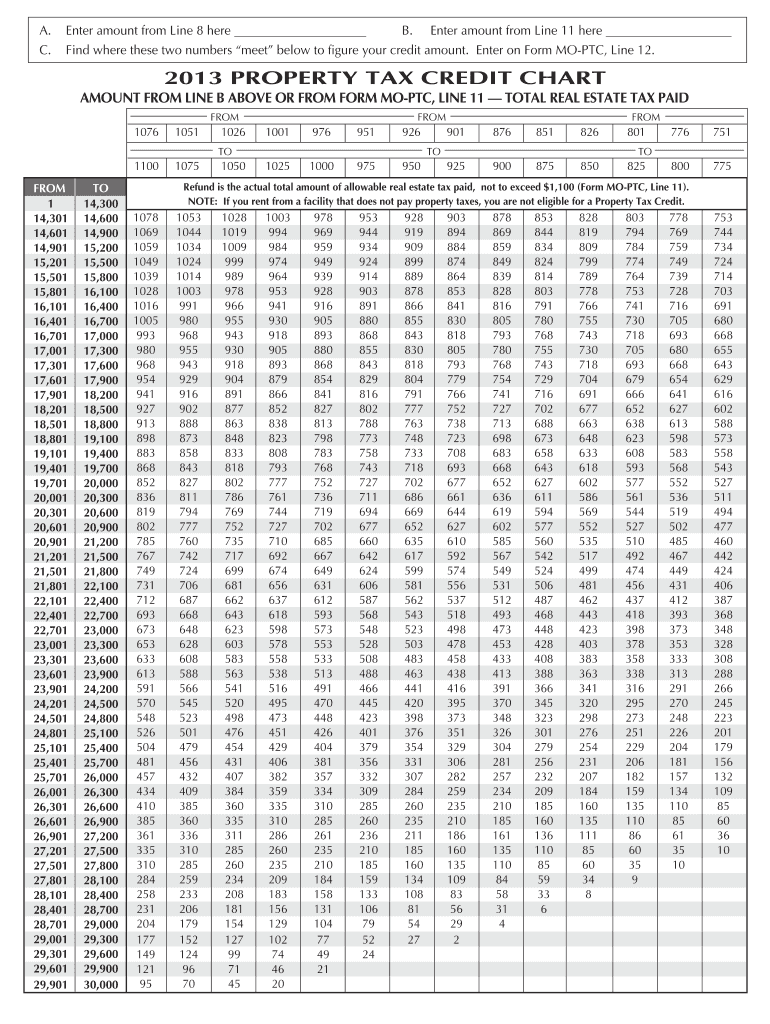
Enter on Form MO-PTC, Line 12. 2013 PROPERTY TAX CREDIT CHART AMOUNT FROM LINE B ABOVE OR FROM FORM MO-PTC, LINE 11 TOTAL REAL ESTATE TAX PAID FROM 1076 1051 1100 1075 1026 FROM 1001 976 951 926 1025 1000 975 950 TO FROM 1 14,301 14,601 14,901 15,201 15,501 15,801 16,101 16,401 16,701 17,001 17,301 17,601 17,901 18,201 18,501 18,8.
Loading

Open form follow the instructions

Easily sign the form with your finger

Send filled & signed form or save
How to fill out the MO MO-PTC Chart online
This guide provides clear and comprehensive instructions on completing the MO MO-PTC Chart online. Whether you are new to this process or need a refresher, these steps will help you navigate the form with ease.
Follow the steps to successfully complete the form.
- Press the ‘Get Form’ button to access the MO MO-PTC Chart and open it for editing.
- In Line A, enter the amount that you obtained from Line 8 of your previous documentation.
- In Line B, input the amount recorded on Line 11 of your previous documents.
- Refer to the chart provided below to locate where the amounts entered in Line A and Line B intersect to determine your potential credit amount.
- Write the resulting credit amount as indicated on the chart in Line 12 of the MO MO-PTC Form.
- Review all entered information for accuracy before finalizing.
- Finally, save your changes, download a copy for your records, print, or share the completed form as necessary.
Complete your MO MO-PTC Chart online today to ensure you can benefit from your property tax credit.
Experience a faster way to fill out and sign forms on the web. Access the most extensive library of templates available.
Related content
Refund is the actual total amount of allowable real estate tax paid, not to exceed $1,100...
To determine your credit, use the 2021 Property Tax. Credit Chart on pages 17 through 19...
35 & 40 Ton Compressor Oil Filter Replacement Chart. 50 & 60 Ton Compressor Oil Filter...
Get answers to your most pressing questions about US Legal Forms API.
How do I claim my MO PTC property tax credit?
To claim your MO PTC property tax credit, you need to complete a specific application form which references guidelines in the MO MO-PTC Chart. Generally, this involves gathering necessary documentation, such as proof of income and property information. You will submit the form to your local tax authority, ensuring all details are accurate. Using the MO MO-PTC Chart helps you navigate this process smoothly and increases your chance of receiving your credit.
What is the income limit for PTC in Missouri?
The income limit for the MO Personal Tax Credit (PTC) varies based on your filing status and age, as discussed in the MO MO-PTC Chart. Generally, the limit is set to assist low-income residents in managing their property taxes. Staying updated with the MO MO-PTC Chart ensures you have the latest figures and understand your position relative to this limit. It's essential information when planning your finances.
How do I become exempt from property taxes in Missouri?
Becoming exempt from property taxes in Missouri often depends on meeting specific criteria laid out in the MO MO-PTC Chart. Common exemptions include those for seniors, individuals with disabilities, and certain organizations. To pursue an exemption, you typically need to file an application with the county assessor’s office. The MO MO-PTC Chart can guide you through the essential steps.
At what age do you stop paying property taxes in Missouri?
In Missouri, individuals may qualify for property tax exemptions at age 65 or older, but specifics can depend on factors like total income and property value, as outlined in the MO MO-PTC Chart. This benefit allows seniors to significantly ease their financial responsibilities. To understand your eligibility fully, refer to the details in the MO MO-PTC Chart. It's a valuable resource for seniors navigating property taxes.
How to avoid personal property tax in Missouri?
Avoiding personal property tax in Missouri may involve understanding exemptions available to you; the MO MO-PTC Chart can help clarify these options. For instance, certain vehicles or property types may qualify for tax exemptions. Additionally, some income-based credits can also significantly reduce your tax burden. Consulting the MO MO-PTC Chart can provide the guidance you need.
Who qualifies for MO PTC?
To qualify for the MO Personal Tax Credit (PTC), you must meet certain criteria including age, residency, and income limits, as outlined in the MO MO-PTC Chart. Generally, you must be a resident of Missouri and have an income below a specified threshold. Additionally, certain groups such as seniors and individuals with disabilities also qualify for the PTC. Always review the latest MO MO-PTC Chart for the most accurate requirements.
What is the income limit for child care subsidy in Missouri?
The income limit for child care subsidies in Missouri is based on a percentage of the federal poverty level, which varies by family size. Families that meet these income guidelines can receive financial assistance for child care costs. To learn about the specifics, check the MO MO-PTC Chart, where you will find the necessary financial thresholds.
How to get property tax exemption in Missouri?
To obtain a property tax exemption in Missouri, you typically need to submit an application to your local assessment office. Requirements may vary based on whether you are a senior, disabled, or a veteran. The MO MO-PTC Chart provides detailed guidelines, making it easier for you to navigate the application process successfully.
Who is eligible for the PTC tax credit?
Eligibility for the Property Tax Credit (PTC) tax credit in Missouri generally includes individuals who are elderly, permanently disabled, or have dependent children. Additionally, you must meet income requirements outlined in the MO MO-PTC Chart. Understanding these qualifications can help you take advantage of the financial relief opportunities available.
At what age do seniors stop paying property taxes in Missouri?
In Missouri, seniors do not automatically stop paying property taxes at a specific age. However, property tax relief programs, like the Senior Citizens Property Tax Credit, can offer benefits starting at age 65. It’s beneficial to explore the MO MO-PTC Chart for information on tax breaks and credits available to seniors.
Use professional pre-built templates to fill in and sign documents online faster. Get access to thousands of forms.
If you believe that this page should be taken down, please follow our DMCA take down process here.
This form is available in several versions. Select the version you need from the drop-down list below.