Loading
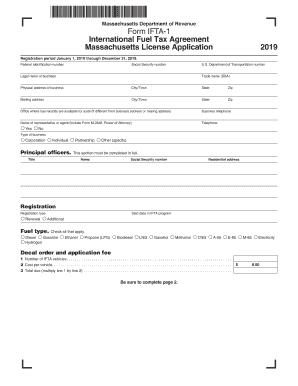
Get Ma Dor Ifta-1 2019
How it works
-

Open form follow the instructions
-

Easily sign the form with your finger
-

Send filled & signed form or save
How to fill out the MA DoR IFTA-1 online
Filling out the MA DoR IFTA-1 form for the International Fuel Tax Agreement is an essential step for businesses engaging in interstate fuel operations. This guide provides a clear, step-by-step approach to help you complete the application accurately and efficiently.
Follow the steps to complete your application smoothly.
- Click ‘Get Form’ button to obtain the form and open it in the editor.
- Enter your Federal Identification number or Social Security number if a Federal number has not been issued. This is crucial for identifying your business.
- Provide the U.S. Department of Transportation number if applicable, ensuring compliance with federal regulations.
- Fill in the legal name of your business. This should be the name registered with the state or as acknowledged in your partnership agreement.
- Enter any trade name you use, known as 'doing business as' (DBA). This information will further establish your account.
- Complete your physical business address, including the city or town, state, and zip code.
- Provide your mailing address where you would like to receive licenses, decals, and returns. Ensure this is accurate to avoid any disruptions.
- Indicate the office where fuel records are available for audit, if different from your business address.
- Fill in your business telephone number for contact purposes.
- If you are giving power of attorney to an agent or representative, complete their name and contact information in the appropriate section.
- Select the type of business from the options provided, including Corporation, Individual, Partnership, and Others.
- Enter details of principal officers, including their names, social security numbers, and residential addresses.
- Determine if you are renewing your registration or if this is a new application. Provide a start date in the IFTA program if necessary.
- Check all types of fuel your business uses, such as diesel, gasoline, or any other applicable fuel types.
- Indicate the number of IFTA vehicles and calculate the total fees based on the cost per vehicle, ensuring compliance with payment requirements.
- Select the jurisdictions where your vehicles will travel by filling in the appropriate ovals.
- If you maintain bulk storage, indicate 'Yes' and list the jurisdictions. Otherwise, select 'No'.
- Indicate any previous IFTA jurisdictions in which you were registered, or state 'None' if applicable.
- Respond to the question about whether your IFTA license has ever been revoked, and list any relevant jurisdictions.
- Review the declaration section, ensuring that you have examined the application and that all information provided is true and accurate.
- Once completed, obtain the authorized signature on the application, ensuring the signatory is documented in the principal officers’ section.
- Review your application for completeness, verification of the check amount, and ensure that it is signed. Incomplete applications will delay processing.
- Finally, after ensuring all steps are correctly followed, submit your application according to the provided mailing instructions.
Complete your MA DoR IFTA-1 application online today!
Get form
Experience a faster way to fill out and sign forms on the web. Access the most extensive library of templates available.
To file your IFTA online, visit the Massachusetts Department of Revenue's website and access the e-filing portal. Fill out the IFTA-1 form electronically, ensuring all information is accurate before submission. Online filing is efficient and often quicker than traditional methods, helping you manage your IFTA responsibilities with ease.
Get This Form Now!
Use professional pre-built templates to fill in and sign documents online faster. Get access to thousands of forms.