Loading
Form preview
  • US Legal Forms
  • Other Templates
  • Tax Forms
  • Missouri Tax Forms
  • Mo Dor 149 2018

Get Mo Dor 149 2018

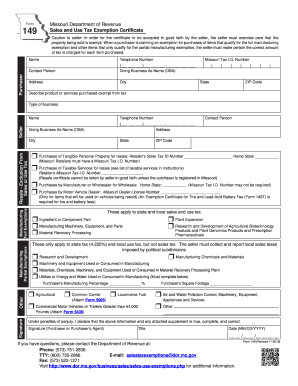
At the above information and any attached supplement is true, complete, and correct. Signature (Purchaser or Purchaser s Agent) Title Date (MM/DD/YYYY) / / If you have questions, please contact the Department of Revenue at: Phone: (573) 751-2836 TTY: (800) 735-2966 E-mail: salestaxexemptions dor.mo.gov Fax: (573) 522-1271 Visit http://www.dor.mo.gov/business/sales/sales-use-exemptions.php for additional information. Form 149 (Revised 11-2018).

How it works

  1. Open form

    Open form follow the instructions

  2. Easily sign form

    Easily sign the form with your finger

  3. Share form

    Send filled & signed form or save

How to fill out the MO DoR 149 online

Filling out the Missouri Department of Revenue Form 149 is a straightforward process aimed at claiming sales and use tax exemptions. This guide provides a clear, step-by-step approach to ensure you correctly complete each section of the form online.

Follow the steps to successfully complete the MO DoR 149 online.

  1. Press the ‘Get Form’ button to access the form and open it in your editor.
  2. Begin by entering the 'Purchaser' information. Fill in your name, contact person, telephone number, and doing business as (DBA) name, followed by the complete address, including city, state, and ZIP code.
  3. In the next section, provide your Missouri Tax ID Number. Ensure to double-check this number for accuracy to avoid any issues.
  4. Describe the products or services you are purchasing that are exempt from tax. Include details about your business and its contact information.
  5. Select the appropriate exemption category by checking the correct boxes. Be sure to review the listed exemptions under 'Manufacturing - Full Exemptions' and 'Manufacturing - Partial Exemptions' to determine which applies to your situation.
  6. If applicable, complete any additional fields that pertain to utilities or energy used in manufacturing. Provide the purchaser's manufacturing percentage and indicate your square footage.
  7. Sign the form where indicated. Ensure your signature is accompanied by your title and the date formatted as MM/DD/YYYY.
  8. Once all necessary information is completed, you can save your changes, download the form, print it, or share it as needed.

Take the next step and complete your tax exemption documentation online today.

Get form

Experience a faster way to fill out and sign forms on the web. Access the most extensive library of templates available.

Related content

149 - Sales and Use Tax Exemption Certificate
Caution to seller: In order for the certificate to be accepted in good faith by the...
Learn more
Missouri Sales and Use Tax Exemption Certificate
Purchases of Tangibie Personal Property for resale: Retailers that are purchasing tangible...
Learn more
Sistema TVR™ MANUAL TÉCNICO - Trane Residencial
AVISO DE SEGURANÇA. Apenas pessoal qualificado deve instalar e realizar a manutenção no...
Learn more

Related links form

KS DoR K-41 2019 KS K-99CSV 2019 KS DoR K-40 2019 KS DoR KS-1216 2019

Questions & Answers

Get answers to your most pressing questions about US Legal Forms API.

Contact support

To receive a Missouri tax-exempt letter, you must first apply for tax-exempt status by submitting Form 149. Upon approval, the Missouri Department of Revenue will issue your tax-exempt letter. Keep this document safe, as it will be essential for tax-related matters. You may also want to utilize legal platforms that assist with such applications to ensure everything is filled out correctly.

To obtain a Missouri tax ID number, visit the Missouri Department of Revenue website. You'll need to complete an application form, which typically requires your business details and the type of ownership. Following the instructions on the site will guide you through the process seamlessly. Having this tax ID number is vital for proper tax reporting and compliance.

Filing Form 149 in Missouri involves completing the form accurately and submitting it to the Department of Revenue. Ensure all required information is provided, including details about your agricultural activities. You can file the form online or via mail, depending on your preference. Checking for updates and submission guidelines on the Missouri DoR website can be very helpful.

An agricultural exemption in Missouri applies to properties that are used primarily for farming or related activities. This includes growing crops, breeding animals, and other agricultural practices. Tax exemption status can be obtained through proper completion and submission of Form 149. This not only simplifies your qualification process but also ensures compliance with state regulations.

In Missouri, various organizations and entities qualify for tax-exempt status, including nonprofits and certain agricultural uses. For agricultural exemptions, you must meet criteria defined by the Department of Revenue. Using Form 149 is key to demonstrating your case effectively. This ensures that you comply with all regulations necessary for receiving tax exemptions.

To achieve a farm tax-exempt status in Missouri, you need to fill out and submit Form 149 to the Department of Revenue. Your application should include details about your farming activities and property use. This form serves as a formal request for tax exemption. Make sure to gather necessary supporting documents to strengthen your application.

Qualifying for a farm property tax exemption involves demonstrating that your property meets specific agricultural use criteria. Generally, you must prove that your property is primarily used for farming. Utilizing Form 149 will guide you in providing the required documentation to the Missouri Department of Revenue, ultimately securing the exemption you seek.

To obtain tax-exempt status in Missouri, you must complete the necessary paperwork. You will typically need to submit Form 149 to the Missouri Department of Revenue. This form helps confirm your eligibility for tax exemptions, and it's crucial to follow all instructions carefully. By doing so, you ensure a smoother process in acquiring tax-exempt status.

To get a sales tax exemption in Missouri, start by understanding the criteria outlined in the MO DoR 149. You may need to fill out an exemption certificate, along with providing supporting documents that affirm your eligibility. After you prepare and submit your application, the state's tax office will review it. Once granted, this exemption can significantly benefit your purchases.

Filling out a tax amendment form can seem challenging, but it is a straightforward process when you follow the guidelines. Begin by obtaining the correct amendment form from the MO DoR 149. Carefully review your original return and identify what changes need to be made, such as income adjustments or deductions. Once you properly complete the form with accurate information, send it to the tax office for processing.

Get This Form Now!

Use professional pre-built templates to fill in and sign documents online faster. Get access to thousands of forms.
If you believe that this page should be taken down, please follow our DMCA take down processhere.
Get MO DoR 149
  • Adoption
  • Bankruptcy
  • Contractors
  • Divorce
  • Home Sales
  • Employment
  • Identity Theft
  • Incorporation
  • Landlord Tenant
  • Living Trust
  • Name Change
  • Personal Planning
  • Small Business
  • Wills & Estates
  • Packages A-Z
  • Affidavits
  • Bankruptcy
  • Bill of Sale
  • Corporate - LLC
  • Divorce
  • Employment
  • Identity Theft
  • Internet Technology
  • Landlord Tenant
  • Living Wills
  • Name Change
  • Power of Attorney
  • Real Estate
  • Small Estates
  • Wills
  • All Forms
  • Forms A-Z
  • Other Templates
  • Legal Hub
  • About Us
  • Help Portal
  • Legal Resources
  • Blog
  • Affiliates
  • Contact Us
  • Delete My Account
  • Site Map
  • Industries
  • Forms in Spanish
  • Localized Forms
  • State-specific Forms
  • Forms Kit
  • Real Estate Handbook
  • All Guides
  • Notarize
  • Incorporation services
  • For Consumers
  • For Small Business
  • For Attorneys
  • USLegal
  • FormsPass
  • pdfFiller
  • signNow
  • altaFlow
  • DocHub
  • Instapage
Form Packages
  • Adoption
  • Bankruptcy
  • Contractors
  • Divorce
  • Home Sales
  • Employment
  • Identity Theft
  • Incorporation
  • Landlord Tenant
  • Living Trust
  • Name Change
  • Personal Planning
  • Small Business
  • Wills & Estates
  • Packages A-Z
Form Categories
  • Affidavits
  • Bankruptcy
  • Bill of Sale
  • Corporate - LLC
  • Divorce
  • Employment
  • Identity Theft
  • Internet Technology
  • Landlord Tenant
  • Living Wills
  • Name Change
  • Power of Attorney
  • Real Estate
  • Small Estates
  • Wills
  • All Forms
  • Forms A-Z
  • Other Templates
Customer Service
  • Legal Hub
  • About Us
  • Help Portal
  • Legal Resources
  • Blog
  • Affiliates
  • Contact Us
  • Delete My Account
  • Site Map
  • Industries
  • Forms in Spanish
  • Localized Forms
  • State-specific Forms
  • Forms Kit
Legal Guides
  • Real Estate Handbook
  • All Guides
Prepared for you
  • Notarize
  • Incorporation services
Our Customers
  • For Consumers
  • For Small Business
  • For Attorneys
Our Sites
  • USLegal
  • FormsPass
  • pdfFiller
  • signNow
  • altaFlow
  • DocHub
  • Instapage
Social Media
Call us now toll free:
+1 833 426 79 33
As seen in:
© Copyright 1999-2026 airSlate Legal Forms, Inc. 17 Station Street, Suite 303, Brookline, MA 02445
  • Your Privacy Choices
  • Terms of Service
  • Privacy Notice
  • Content Takedown Policy
  • Bug Bounty Program
MO DoR 149
This form is available in several versions.
Select the version you need from the drop-down list below.
2022 MO DoR 149
Select form
  • 2022 MO DoR 149
  • 2019 MO DoR 149
  • 2018 MO DoR 149
  • 2015 MO DoR 149
  • 2013 MO DoR 149
  • 2012 MO DoR 149
  • 2008 MO DoR 149
  • 2005 MO DoR 149
  • MO DoR 149_DSA
Select form