Loading
Get Mo 5095 2013-2026
How it works
-

Open form follow the instructions
-

Easily sign the form with your finger
-

Send filled & signed form or save
How to fill out the MO 5095 online
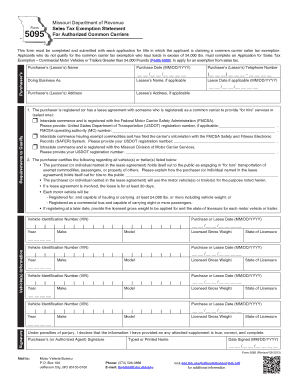
Filling out the MO 5095 online can be a straightforward process when you understand each component of the form. This guide provides you with detailed, step-by-step instructions to help you complete the Sales Tax Exemption Statement for Authorized Common Carriers effectively.
Follow the steps to complete the MO 5095 online.
- Click ‘Get Form’ button to access the MO 5095 and open it for editing.
- Begin by filling in the purchaser’s (lessor’s) name in the designated field. This should be the individual or entity applying for the sales tax exemption.
- Enter the purchase date using the format MM/DD/YYYY. Ensure that the date reflects the actual date of the transaction.
- Provide the purchaser’s (lessor’s) telephone number. Include the area code for clarity.
- If applicable, fill in the ‘Doing Business As’ section to specify any trade name used by the purchaser.
- If there is a lessee, please provide their name in the corresponding field, along with the lease date, if applicable.
- Complete the address fields for both the purchaser and the lessee, if relevant. This includes providing a complete mailing address.
- Address the requirements to qualify by selecting one of the commerce options that applies to the purchaser. Enter the required registration numbers where needed.
- Certify the usage of the vehicles or trailers by explaining how the purchaser engages in 'for hire' transportation. Be thorough in your explanation to meet eligibility criteria.
- Fill in vehicle information, including Vehicle Identification Number (VIN), year, make, model, purchase or lease date, licensed gross weight, and state of licensure for each vehicle listed.
- Sign and date the form in the designated signature field, ensuring that the name is clearly typed or printed for validation.
- After completing the form, save any changes made. You can then download, print, or share the filled MO 5095 as necessary.
Complete your forms online today for a streamlined experience.
Related links form
To secure a no tax due letter in Missouri, you must confirm that all your tax obligations are settled. Reach out to the Missouri Department of Revenue and request a letter using the MO 5095 form. After providing the required details and verification of your account, the department will process your request. You will receive your no tax due letter via your preferred method of communication.