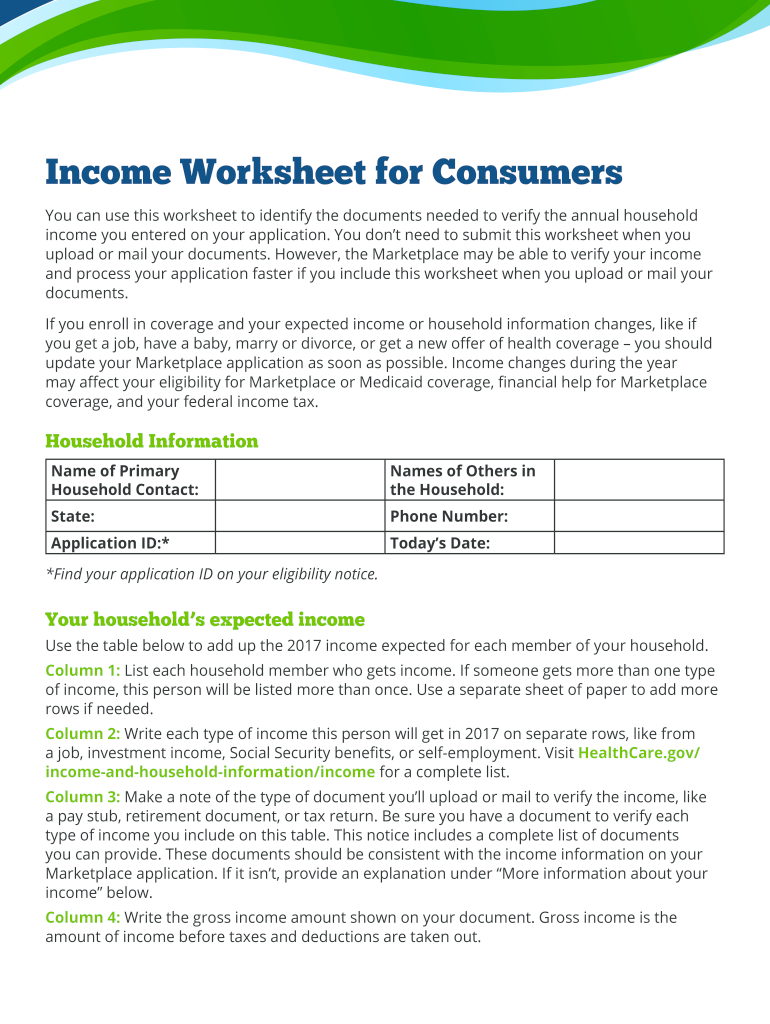
Eet when you upload or mail your documents. However, the Marketplace may be able to verify your income and process your application faster if you include this worksheet when you upload or mail your documents. If you enroll in coverage and your expected income or household information changes, like if you get a job, have a baby, marry or divorce, or get a new offer of health coverage – you should update your Marketplace application as soon as possible. Income changes during the year may affect .
Loading

Open form follow the instructions

Easily sign the form with your finger

Send filled & signed form or save
How to fill out the CMS Product 12001 online
The CMS Product 12001 is an important form used to verify your household income for the Marketplace application. This guide provides a clear and supportive step-by-step approach to help you accurately complete the form online.
Follow the steps to successfully fill out the CMS Product 12001.
- Click 'Get Form' button to access the CMS Product 12001 online.
- Begin by entering the household information, including the name of the primary household contact, the names of others in the household, your state, phone number, and application ID.
- Next, indicate your household's expected income by utilizing the provided table. For each member of your household, list their name and any types of income they will receive for the year, such as job income or benefits.
- For each type of income listed, specify the verification documents you will upload or mail, such as pay stubs or tax returns, and ensure these documents match the information provided in your application.
- Enter the gross income amount for each type of income, which is the total income before any taxes or deductions.
- Indicate how frequently each household member receives their income. This may include options such as weekly or monthly, and remember to multiply the gross income by the frequency to calculate the annual total.
- After documenting the income for all household members, add the annual totals from the income section to determine your expected total household income.
- If you or any household member is self-employed, complete the self-employment chart by providing details about their income and expenses. Calculate the net income to report accurately.
- Lastly, if you have additional income-related information that was not covered in the form, provide this in the 'More information about your income' section.
- Review all responses for accuracy, and once satisfied, proceed to save your changes, download, or print the form as needed.
Complete the CMS Product 12001 online today to streamline your application process.
Experience a faster way to fill out and sign forms on the web. Access the most extensive library of templates available.
Related content
The State may initiate and determine eligibility for medical assistance under the State...
All the Product Parts Lists in the catalog are listed under a subhead and in numerical...
Get answers to your most pressing questions about US Legal Forms API.
How to write a CPT code with modifiers?
When writing a CPT code like CMS Product 12001 with modifiers, place the modifier immediately after the main procedure code. Ensure that the modifier reflects the reason for its use, such as indicating multiple procedures or unusual circumstances. Accurate documentation is key to effective communication with payers. Platforms like UsLegalForms can guide you through the process and help ensure you submit claims correctly.
How to bill 12001?
To bill for CMS Product 12001, start by ensuring you have the correct patient information and procedure details. Fill out the relevant claim forms accurately, using CPT code 12001 as needed, while considering any required modifiers. It's crucial to verify insurance guidelines to avoid claim rejections. For step-by-step assistance, UsLegalForms offers valuable resources that simplify billing processes.
What is the ICD code for 12001?
The ICD code related to the procedure using CMS Product 12001 will depend on the diagnosis associated with your patient's condition. It's crucial to match the procedure with the correct ICD code to avoid payment delays. You can access coding resources or support on platforms like UsLegalForms to identify the proper ICD code efficiently.
Does CPT-12001 need a modifier?
12001 typically does not need a modifier in standard cases. Nevertheless, you may find exceptions based on the circumstances of the procedure. As billing requirements can differ, it is beneficial to stay updated on the latest rules. If you're uncertain, UsLegalForms can provide clarity and support to ensure accurate coding practices.
Does the CPT code 12001 need a modifier?
In most cases, the CPT code 12001 does not require a modifier. However, specific situations may make a modifier necessary for accurate billing and to convey additional information. It is essential to evaluate the context of the procedure you are billing. Always consult the billing guidelines relevant to your practice or seek help from platforms like UsLegalForms for precise instruction.
What CPT code is 12001?
The CPT code 12001 refers to a specific procedural code used for skin laceration repair that falls under the CMS Product 12001. This code helps healthcare providers communicate the type and complexity of the procedure performed. Understanding which CPT code applies is essential for accurate billing and proper medical records. Keeping this information updated helps safeguard your practice from billing complications.
What is CPR code 12001?
CPR code 12001 generally refers to a related code that is used in conjunction with coding for emergency procedures. It is an integral part of the CMS Product 12001, designed for precise documentation in medical contexts. This code helps in recording treatments accurately, which is vital for billing and patient care continuity. Correctly using CPR code 12001 can enhance your practice's efficiency and compliance.
What is the medical code for CPR?
The medical code for CPR is typically represented under various codes in medical coding systems. However, when discussing CMS Product 12001, it is essential to note that specific codes apply based on the patient's condition and treatment. This accurate coding is crucial for billing, and it helps ensure that patients receive proper documentation and care. Therefore, knowing the correct medical code for CPR supports effective healthcare delivery.
What is CPT code 12001 RVU?
CPT code 12001 RVU, or relative value unit, measures the value of services provided under the CMS Product 12001. This code is vital for healthcare professionals as it influences reimbursement rates from insurers. Understanding the RVU for CPT code 12001 allows providers to optimize their practice and ensure they receive fair compensation for their services. Thus, this code plays a significant role in healthcare economics.
What is diagnosis code 12001?
Diagnosis code 12001 refers to a specific medical classification that indicates a condition related to a skin injury. This code is part of the CMS Product 12001, which helps healthcare providers document and code various conditions accurately. Knowing this code is essential for billing and ensuring proper care. Therefore, having the right information about diagnosis code 12001 is crucial for effective medical documentation.
Use professional pre-built templates to fill in and sign documents online faster. Get access to thousands of forms.
If you believe that this page should be taken down, please follow our DMCA take down process here.