Loading
Form preview
  • US Legal Forms
  • Other Templates
  • Tax Forms
  • Minnesota Tax Forms
  • Mn Dor St3 2017

Get Mn Dor St3 2017

Icle accessory items Firefighter equipment Hospitals Libraries Local governments Metropolitan Council Nursing homes Petroleum products used by government Regionwide public safety radio communication system Solid waste disposal facility State or local government agency from another state Transit program vehicles Water used directly in providing fire protection C. Tribal government Fill in the name of the Tribe. D. Foreign diplomat.

How it works

  1. Open form

    Open form follow the instructions

  2. Easily sign form

    Easily sign the form with your finger

  3. Share form

    Send filled & signed form or save

How to fill out the MN DoR ST3 online

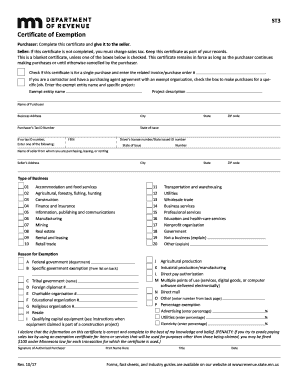
This guide provides a clear and detailed walkthrough for completing the MN Department of Revenue ST3 form online. The ST3 form, known as the Certificate of Exemption, is essential for purchasers seeking to claim tax exemptions during sales transactions.

Follow the steps to successfully complete the ST3 form online.

  1. Press the ‘Get Form’ button to obtain the ST3 form and open it in the document editor.
  2. Complete the purchaser information section, which includes your name, business address, city, state, ZIP code, and Minnesota Tax ID Number if available. If you do not have a Tax ID Number, enter your FEIN or driver’s license number.
  3. Provide the seller information by entering the seller's name, address, and type of business from the provided dropdown list.
  4. Indicate whether this certificate is for a single purchase or for multiple purchases by checking the appropriate box. If applicable, enter the related invoice or purchase order number.
  5. If you are a contractor with a purchasing agent agreement, check the designated box. Provide the name of the exempt entity and describe the specific project.
  6. Select the reason for exemption from the list provided. Answer according to your specific situation, such as federal government, charitable organization, resale, etc.
  7. If claiming percentage exemptions, specify the percentage of the exemption for advertising, utilities, or electricity in the designated fields.
  8. Sign and date the form, ensuring the signature is from an authorized individual. Print the name and title of the signer.
  9. Once the form is fully completed, save your changes. You can download, print, or share the completed form as needed.

Complete your documents online today for a streamlined filing process!

Get form

Experience a faster way to fill out and sign forms on the web. Access the most extensive library of templates available.

Related content

Sales and Use Tax Exempt Status - Minnesota.gov
The Minnesota Department of Revenue manages the state's revenue system. Functions include...
Learn more
Minnesota Certificate of Exemption, Form ST3
A completed Form ST3 is provided by colleges, universities, and the System Office to...
Learn more
82078 CHMOS Single-Chip Floppy Disk Controller
Programmable Internal Oscillator. • 16 Byte FIFO. • Floppy Drive Support Features. •...
Learn more

Related links form

WI I-111 2019 DC D-40P 2019 PA PA-20S/PA-65 D - Schedule D-I 2019 PA PA-8879 2019

Questions & Answers

Get answers to your most pressing questions about US Legal Forms API.

Contact support

You can get your sales tax exempt number by applying through the Minnesota Department of Revenue. As part of the process, provide the required details about your organization and its qualifications for exemptions. Upon approval, you will receive your exemption number, allowing you to make purchases without being charged sales tax.

To get a MN tax exempt number, start by completing the application available from the Minnesota Department of Revenue. You need to provide information about your organization, including its type and purpose. After processing your application, the MN DoR will issue your tax-exempt number to allow you to benefit from tax exemptions.

To become tax exempt in Minnesota, first assess your eligibility based on your organization's structure or purpose. Next, apply for a tax-exempt number through the Minnesota Department of Revenue by submitting the necessary documentation. Once you’re approved, you will be able to make tax-exempt purchases using the MN DoR ST3 form.

The ST3 tax form is a crucial document in Minnesota used for claiming exempt sales. It serves as proof of exemption on purchases by eligible organizations or businesses. By using the MN DoR ST3 form, buyers can avoid paying sales tax on qualifying transactions, incentivizing tax-exempt purchases.

Obtaining a MN tax ID number is a straightforward process with the Minnesota Department of Revenue. You can apply online or by submitting a paper application. When you provide the required business information, you will receive your MN tax ID number, which is essential for collecting and remitting sales tax.

To get a tax-exempt number in Minnesota, you must first complete the appropriate application with the Minnesota Department of Revenue. This involves providing necessary organization details and demonstrating your eligibility for tax exemption. Once you submit your application, the MN DoR will review it and issue your tax-exempt number if approved.

Repeating the important point, Minnesota law exempts specific items like food for home consumption, prescription drugs, and certain medical devices from sales tax. It’s essential to keep this in mind when making purchases to ensure you take full advantage of these exemptions. Use the MN DoR ST3 form to document these transactions properly.

In Minnesota, items not subject to sales tax include food for home consumption, prescription drugs, and certain services. This tax exemption helps support citizens by making essential goods more affordable. Businesses can utilize the MN DoR ST3 to document purchases of these tax-exempt items, ensuring compliance with state regulations.

Minnesota law identifies certain items as exempt from sales tax. Generally, these include most food items, prescription medications, and certain medical devices. By utilizing the MN DoR ST3 form, qualifying buyers can ensure they do not incur sales tax on these essential items, easing the financial burden on consumers.

The Minnesota state tax exemption allows certain types of purchases to be exempt from sales tax. This exemption applies to specific goods and services, which the state has identified as necessities or for particular industries. To benefit, individuals or businesses must provide the appropriate exemption certificate when making purchases. Using the MN DoR ST3 is essential for claiming these exemptions.

Get This Form Now!

Use professional pre-built templates to fill in and sign documents online faster. Get access to thousands of forms.
If you believe that this page should be taken down, please follow our DMCA take down processhere.
Get MN DoR ST3
  • Adoption
  • Bankruptcy
  • Contractors
  • Divorce
  • Home Sales
  • Employment
  • Identity Theft
  • Incorporation
  • Landlord Tenant
  • Living Trust
  • Name Change
  • Personal Planning
  • Small Business
  • Wills & Estates
  • Packages A-Z
  • Affidavits
  • Bankruptcy
  • Bill of Sale
  • Corporate - LLC
  • Divorce
  • Employment
  • Identity Theft
  • Internet Technology
  • Landlord Tenant
  • Living Wills
  • Name Change
  • Power of Attorney
  • Real Estate
  • Small Estates
  • Wills
  • All Forms
  • Forms A-Z
  • Other Templates
  • Legal Hub
  • About Us
  • Help Portal
  • Legal Resources
  • Blog
  • Affiliates
  • Contact Us
  • Delete My Account
  • Site Map
  • Industries
  • Forms in Spanish
  • Localized Forms
  • State-specific Forms
  • Forms Kit
  • Real Estate Handbook
  • All Guides
  • Notarize
  • Incorporation services
  • For Consumers
  • For Small Business
  • For Attorneys
  • USLegal
  • FormsPass
  • pdfFiller
  • signNow
  • altaFlow
  • DocHub
  • Instapage
Form Packages
  • Adoption
  • Bankruptcy
  • Contractors
  • Divorce
  • Home Sales
  • Employment
  • Identity Theft
  • Incorporation
  • Landlord Tenant
  • Living Trust
  • Name Change
  • Personal Planning
  • Small Business
  • Wills & Estates
  • Packages A-Z
Form Categories
  • Affidavits
  • Bankruptcy
  • Bill of Sale
  • Corporate - LLC
  • Divorce
  • Employment
  • Identity Theft
  • Internet Technology
  • Landlord Tenant
  • Living Wills
  • Name Change
  • Power of Attorney
  • Real Estate
  • Small Estates
  • Wills
  • All Forms
  • Forms A-Z
  • Other Templates
Customer Service
  • Legal Hub
  • About Us
  • Help Portal
  • Legal Resources
  • Blog
  • Affiliates
  • Contact Us
  • Delete My Account
  • Site Map
  • Industries
  • Forms in Spanish
  • Localized Forms
  • State-specific Forms
  • Forms Kit
Legal Guides
  • Real Estate Handbook
  • All Guides
Prepared for you
  • Notarize
  • Incorporation services
Our Customers
  • For Consumers
  • For Small Business
  • For Attorneys
Our Sites
  • USLegal
  • FormsPass
  • pdfFiller
  • signNow
  • altaFlow
  • DocHub
  • Instapage
Social Media
Call us now toll free:
+1 833 426 79 33
As seen in:
© Copyright 1999-2026 airSlate Legal Forms, Inc. 17 Station Street, Suite 303, Brookline, MA 02445
  • Your Privacy Choices
  • Terms of Service
  • Privacy Notice
  • Content Takedown Policy
  • Bug Bounty Program
MN DoR ST3
This form is available in several versions.
Select the version you need from the drop-down list below.
2019 MN DoR ST3
Select form
  • 2019 MN DoR ST3
  • 2017 MN DoR ST3
  • 2015 MN DoR ST3
  • 2013 MN DoR ST3
  • 2012 MN DoR ST3
  • 2010 MN DoR ST3
  • 2009 MN DoR ST3
Select form