Nd complete to the best of my knowledge and belief. Signature of Broker Signature of Preparer Print Name of Preparer Date Daytime Phone Date Daytime Phone Mail to: Minnesota Revenue, Mail Station 1780, St. Paul, MN 55145-1780 (Rev. 11/17) I authorize the Minnesota Department of Revenue to discuss this tax return with the preparer. IG260 page 2 2018 Nonadmitted Insurance Premium Tax Return for Surplus Lines Brokers (continued) A NAIC Number B C Name of Insurer Policy.

Open form follow the instructions

Easily sign the form with your finger

Send filled & signed form or save
How to fill out the MN DoR IG260 online
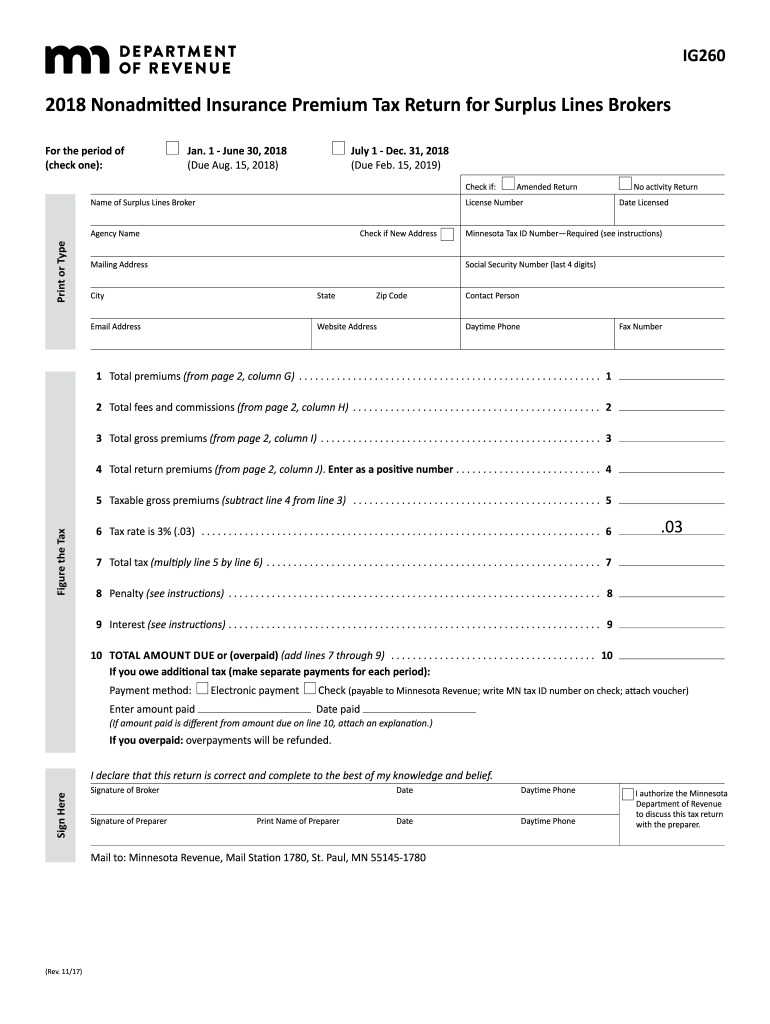
The MN DoR IG260 is the Nonadmitted Insurance Premium Tax Return for Surplus Lines Brokers. This guide provides a detailed overview of how to fill out this form online, ensuring users can complete it accurately and efficiently.
Follow the steps to complete the MN DoR IG260 online.
- Click ‘Get Form’ button to obtain the MN DoR IG260 and open it in the editor.
- Specify the period for the tax return by selecting either 'Jan. 1 - June 30, 2018' (due Aug. 15, 2018) or 'July 1 - Dec. 31, 2018' (due Feb. 15, 2019).
- Check the appropriate boxes for whether this is an Amended Return or a No Activity Return.
- Fill in the Name of Surplus Lines Broker, Agency Name, License Number, and Mailing Address. Ensure you provide the Minnesota Tax ID Number and Social Security Number (last four digits).
- Enter your Email Address, Website Address, and Contact Person’s details, including Daytime Phone and Fax Number.
- Proceed to report financial details: enter Total premiums, Total fees and commissions, Total gross premiums, and Total return premiums as instructed.
- Calculate the Tax: determine Taxable gross premiums by subtracting Total return premiums from Total gross premiums and multiply this by the Tax rate of 3% to find Total tax.
- If applicable, include any Penalties or Interest in the designated sections, and calculate the TOTAL AMOUNT DUE or (overpaid).
- Complete the signature section, confirming the return is correct, and then provide the signature of the Broker and the Preparer, along with their printed names and dates.
- Once completed, save any changes made to the form, then download, print, or share the form as needed.
Complete your MN DoR IG260 form online today for a smooth filing process.
Experience a faster way to fill out and sign forms on the web. Access the most extensive library of templates available.
Related content
by TT Schansman · 1972 — Several government- sponsored study and development efforts...
White painted pottery is a widespread phenomenon in prehistoric Western Anatolia both in...
Get answers to your most pressing questions about US Legal Forms API.
What happens if I don't fill out W-8BEN?
If you do not fill out the W-8BEN form, U.S. payers may withhold taxes at the maximum rate on your payments. This can significantly reduce your income from U.S. sources. To avoid this, take the time to complete the form correctly, following the MN DoR IG260 for guidance.
Where to put 0 or 1 on W4?
On the W4 form, you place '0' or '1' in the allowances section, depending on how much you want withheld from your paycheck. A '0' indicates more withholding, while a '1' means less. Understanding the implications of these choices is essential, and the MN DoR IG260 offers valuable insights.
Is SSN required for W8BEN?
An SSN is generally required for completing the W8BEN form to identify yourself properly. If you do not have an SSN, you may provide a foreign tax identification number. Following the specifications in the MN DoR IG260 can clarify your options regarding identifying information.
Who should fill out a W8BEN form?
Individuals who are not U.S. citizens or residents and who receive income from U.S. sources should fill out the W8BEN form. This form allows you to claim a reduction or exemption from withholding tax under an applicable treaty. Consult the MN DoR IG260 for conditions and eligibility.
How to fill out a tax amendment form?
Filling out a tax amendment form requires you to provide your original tax information and the changes you wish to make. Be thorough with the modifications and consider using the guidance available in the MN DoR IG260 to ensure accuracy in your amendment.
How to fill out a w8ben form?
To fill out a W-8BEN form, start by entering your name and address, followed by your taxpayer identification number. Explain the purpose of your claim clearly and accurately to avoid issues. For optimal results, refer to the guidelines provided in MN DoR IG260.
What does 3 allowances mean?
Claiming 3 allowances generally indicates you expect to have less tax withheld from your paycheck. This option can benefit individuals with multiple deductions or dependents. Understanding the implications of these allowances through the MN DoR IG260 can help you make informed decisions.
How to fill out a withholding exemption form?
To complete a withholding exemption form, provide your personal information and specify the exemption you are claiming. Ensure that your situation qualifies for exemption, as outlined in the MN DoR IG260. This form is crucial for optimizing your paycheck.
What should I put for withholding allowance?
The withholding allowance you claim depends on your financial situation, dependents, and other factors. Generally, a larger number of allowances means less withholding, while fewer allowances lead to more withholding. Make sure to assess your needs carefully and consider consulting the MN DoR IG260 for precise guidance.
How to fill out the W-8BEN form?
Filling out the W-8BEN form involves entering your personal details, including your name and country of citizenship. You also need to state the reason you are claiming tax benefits. Be sure to refer to MN DoR IG260 for specific instructions that apply to your situation.
Use professional pre-built templates to fill in and sign documents online faster. Get access to thousands of forms.
If you believe that this page should be taken down, please follow our DMCA take down process here.
This form is available in several versions. Select the version you need from the drop-down list below.