Loading
Form preview
  • US Legal Forms
  • Other Templates
  • Legal Forms
  • Vermont Legal Forms
  • Vt Pg82 2014

Get Vt Pg82 2014-2026

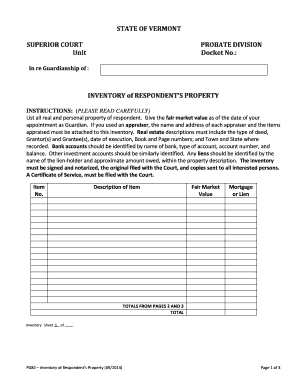
S PROPERTY INSTRUCTIONS: (PLEASE READ CAREFULLY) List all real and personal property of respondent. Give the fair market value as of the date of your appointment as Guardian. If you used an appraiser, the name and address of each appraiser and the items appraised must be attached to this inventory. Real estate descriptions must include the type of deed, Grantor(s) and Grantee(s), date of execution, Book and Page numbers;.

How it works

  1. Open form

    Open form follow the instructions

  2. Easily sign form

    Easily sign the form with your finger

  3. Share form

    Send filled & signed form or save

How to fill out the VT PG82 online

The VT PG82 form is essential for guardians managing the property of a person under guardianship. This guide provides a clear and supportive step-by-step process for filling out the VT PG82 online, ensuring accuracy and compliance.

Follow the steps to complete the VT PG82 form online.

  1. Press the ‘Get Form’ button to access the form and open it for editing.
  2. Begin by entering the name of the respondent for whom you are a guardian in the designated field.
  3. Fill in the docket number, which is essential for identifying your case within the court system.
  4. List all real and personal property belonging to the respondent. Provide a detailed description, ensuring to include the fair market value as of the date of your appointment.
  5. For each item, specify whether it is real estate or personal property. Real estate descriptions must include deed type, grantor(s), grantee(s), date of execution, and the town and state of recording.
  6. Identify bank accounts by the name of the bank, account type, account number, and balance.
  7. Include details for any investment accounts similarly by providing the name, type, account number, and current balance.
  8. If there are any liens against property, clearly identify the name of the lien-holder and the approximate amount owed in the property description.
  9. Once all items are listed, calculate the total fair market value of the property and enter this in the total field.
  10. Sign the inventory, ensure it is notarized, and prepare to file the original with the court, while keeping copies for all interested parties.
  11. Finally, ensure that a Certificate of Service is completed and filed with the court to confirm that all interested parties have been notified.
  12. You may now save the changes to your completed form, download it for your records, print, or share it as needed.

Complete the VT PG82 form online today to ensure proper guardianship management.

Get form

Experience a faster way to fill out and sign forms on the web. Access the most extensive library of templates available.
Get form

Related content

Vermont Highway Safety Office 2020 Annual Report
pg. 82 events for colleges that had over 170 young adults and university ... annual AGC/VT...
Learn more
Memoir 1, Page 82, Confederate Loyalties
While little evidence of Gustavus A. Henry's Unionist loyalties have been found, the other...
Learn more
Cooper Lighting Stock Guide
pg 82. Wraparounds ... VT LATCH. VAPOR-TITE LATCHES. 0.545. 080083565740. 2100. 25...
Learn more

Related links form

TX Statement of Fact to Correct Error on Title - Travis County 2019 SC DoR ABL-946 2019 SC DoR ABL-920 2019 AL ADV-MVA1 2019

Questions & Answers

Get answers to your most pressing questions about US Legal Forms API.

Contact support

After taxes, an income of $50,000 in Vermont typically results in around $38,000 to $40,000, depending on deductions and credits. Vermont's tax rates vary, and effective tax rates may apply. To accurately calculate your after-tax income, consider using tax calculator tools available online. For guidance, you can explore options with USLegalForms to ensure you account for all necessary factors under VT PG82.

A person can file taxes online through various e-filing services and IRS-approved platforms. Online filing is efficient and allows for faster processing and refunds. Make sure to choose a service that aligns with VT PG82 requirements, which uslegalforms fulfills. This way, you can focus on what matters most while staying tax compliant.

Yes, you can file your taxes electronically by yourself using online tax software. Many platforms guide you through the questions, ensuring that you capture all necessary information. If you prefer a simpler process, consider services like USLegalForms that provide easy-to-use solutions and help ensure compliance with VT PG82.

To mail your Vermont tax return, send it to the Department of Taxes, PO Box 547, Montpelier, VT 05601-0547. Make sure to use the correct address based on your form type and filing status. It is beneficial to use certified mail for tracking purposes to ensure your return arrives safely. For assistance with mailing guidelines, use resources from USLegalForms related to VT PG82.

Yes, you can file Vermont state taxes online through the state’s tax department website or with various tax preparation software. This method is convenient, quick, and helps you avoid paperwork. Ensure that the platform you choose supports VT PG82 compliance for a seamless filing experience. Consider using USLegalForms for a straightforward online filing process.

In Vermont, you can file for a tax extension by submitting Form IN-151 by the original due date of your return. This form grants you an additional six months to file your tax return but does not extend your payment deadline. You should also estimate your tax due to avoid interest and penalties. Services like USLegalForms can help you navigate the VT PG82 extension process effortlessly.

The 1040EZ was designed to be one of the simplest tax forms for individuals with uncomplicated tax situations. However, with its discontinuation, former users may find transitioning to the standard 1040 more challenging. If you feel overwhelmed, UsLegalForms offers support and resources that can simplify your tax filing experience, making managing your VT PG82 a breeze.

No, the IRS no longer utilizes the 1040EZ form as of recent tax law changes. The IRS merged it with the 1040 form family, providing a streamlined approach for taxpayers. If you're seeking to simplify your tax filing process and are unsure of what to use, UsLegalForms can help you navigate the updated forms effectively while ensuring compliance and ease.

To fill out the EZ tax form, start by entering your personal information and income details required by the form. Follow the structured sections for total income, adjustments, and credits. For guidance, UsLegalForms provides step-by-step resources, making it easier to navigate the form, ensuring that you use the available sections effectively when filing your VT PG82.

Taxable income on the 1040EZ is calculated by taking your total income and subtracting any allowable deductions. This calculation is fairly straightforward since the 1040EZ is designed for simple tax situations. Keep in mind that you should account for any tax credits applicable to you, as these can further reduce your owed amount, thus providing an easier path through filing your VT PG82.

Get This Form Now!

Use professional pre-built templates to fill in and sign documents online faster. Get access to thousands of forms.
Get form
If you believe that this page should be taken down, please follow our DMCA take down processhere.
Get VT PG82
Get form
  • Adoption
  • Bankruptcy
  • Contractors
  • Divorce
  • Home Sales
  • Employment
  • Identity Theft
  • Incorporation
  • Landlord Tenant
  • Living Trust
  • Name Change
  • Personal Planning
  • Small Business
  • Wills & Estates
  • Packages A-Z
  • Affidavits
  • Bankruptcy
  • Bill of Sale
  • Corporate - LLC
  • Divorce
  • Employment
  • Identity Theft
  • Internet Technology
  • Landlord Tenant
  • Living Wills
  • Name Change
  • Power of Attorney
  • Real Estate
  • Small Estates
  • Wills
  • All Forms
  • Forms A-Z
  • Other Templates
  • Legal Hub
  • About Us
  • Help Portal
  • Legal Resources
  • Blog
  • Affiliates
  • Contact Us
  • Delete My Account
  • Site Map
  • Industries
  • Forms in Spanish
  • Localized Forms
  • State-specific Forms
  • Forms Kit
  • Real Estate Handbook
  • All Guides
  • Notarize
  • Incorporation services
  • For Consumers
  • For Small Business
  • For Attorneys
  • USLegal
  • FormsPass
  • pdfFiller
  • signNow
  • altaFlow
  • DocHub
  • Instapage
Form Packages
  • Adoption
  • Bankruptcy
  • Contractors
  • Divorce
  • Home Sales
  • Employment
  • Identity Theft
  • Incorporation
  • Landlord Tenant
  • Living Trust
  • Name Change
  • Personal Planning
  • Small Business
  • Wills & Estates
  • Packages A-Z
Form Categories
  • Affidavits
  • Bankruptcy
  • Bill of Sale
  • Corporate - LLC
  • Divorce
  • Employment
  • Identity Theft
  • Internet Technology
  • Landlord Tenant
  • Living Wills
  • Name Change
  • Power of Attorney
  • Real Estate
  • Small Estates
  • Wills
  • All Forms
  • Forms A-Z
  • Other Templates
Customer Service
  • Legal Hub
  • About Us
  • Help Portal
  • Legal Resources
  • Blog
  • Affiliates
  • Contact Us
  • Delete My Account
  • Site Map
  • Industries
  • Forms in Spanish
  • Localized Forms
  • State-specific Forms
  • Forms Kit
Legal Guides
  • Real Estate Handbook
  • All Guides
Prepared for you
  • Notarize
  • Incorporation services
Our Customers
  • For Consumers
  • For Small Business
  • For Attorneys
Our Sites
  • USLegal
  • FormsPass
  • pdfFiller
  • signNow
  • altaFlow
  • DocHub
  • Instapage
Social Media
Call us now toll free:
+1 833 426 79 33
As seen in:
© Copyright 1999-2026 airSlate Legal Forms, Inc. 17 Station Street, Ste. 203, Brookline, MA 02445
  • Your Privacy Choices
  • Terms of Service
  • Privacy Notice
  • Content Takedown Policy
  • Bug Bounty Program