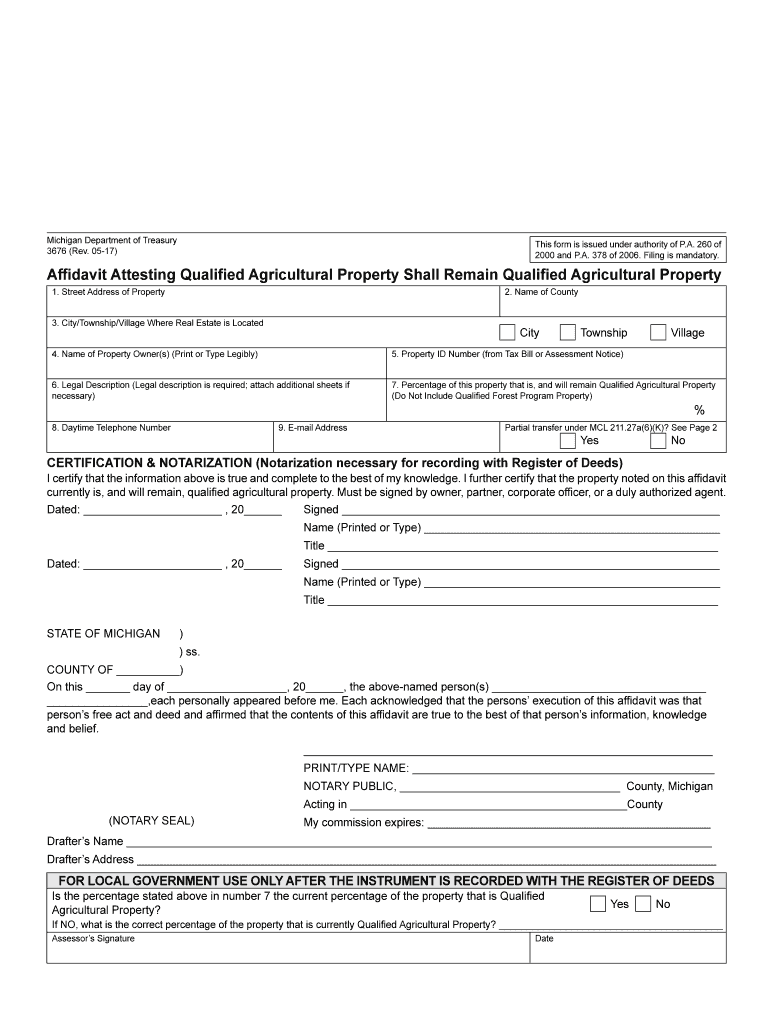
Ty Shall Remain Qualified Agricultural Property This form must be filed to claim that a transfer of property is not a statutory transfer of ownership because the property will continue to be qualified agricultural property. This form must be filed with the register of deeds for the county in which the qualified agricultural property is located and then with the assessor of the local tax collecting unit where this property is located. This affidavit must be signed by the owner(s), by a duly autho.
Loading

Open form follow the instructions

Easily sign the form with your finger

Send filled & signed form or save
How to fill out the MI DoT 3676 online
The MI DoT 3676 form is essential for declaring that certain properties will continue to qualify as agricultural properties after a transfer. This guide provides a straightforward, step-by-step approach to help users fill out the form accurately and efficiently online.
Follow the steps to complete the MI DoT 3676 form online.
- Click ‘Get Form’ button to access the form and open it in your preferred document editor.
- Begin filling out the form by entering the street address of the property in the provided field at the top of the form. Ensure you type this information clearly and accurately.
- Next, select the name of the county where the property is located from the given options. This is crucial for proper documentation.
- Indicate the city, township, or village where the real estate is situated. Choose the appropriate designation to ensure accurate processing.
- In the next field, print or type the name of the property owner(s) legibly. Include all relevant owners to ensure no one is omitted.
- Enter the Property ID Number. This number can be found on the tax bill or assessment notice associated with the property.
- Provide a legal description of the property. If more space is needed, you may attach additional sheets to ensure completeness.
- Specify the percentage of the property that is, and will remain, qualified agricultural property. Make sure this figure does not include any property related to the Qualified Forest Program.
- Fill in the daytime telephone number where the property owner can be reached. This is helpful for any required follow-up regarding the form.
- Input an email address for correspondence related to the affidavit and any potential inquiries.
- Indicate whether there is a partial transfer under MCL 211.27a(6)(K) by selecting ‘Yes’ or ‘No’. Refer to page 2 of the form as necessary for additional context.
- Proceed to the certification and notarization section. Here, users must sign and date the affidavit, certifying the truth of the information provided. If there are multiple owners, all must sign.
- Ensure a notary public is present to notarize the document after signing, which is necessary for recording the affidavit with the register of deeds.
- After completing all sections, review the form for any errors or omissions. Once satisfied, you can save any changes made, download a copy, print it for your records, or share the completed form as required.
Complete your MI DoT 3676 form online today to ensure your property maintains its qualified status.
Experience a faster way to fill out and sign forms on the web. Access the most extensive library of templates available.
Related content
ACTIVE: The entity's US DOT number is active ... 3676. COMPANY INFORMATION. Legal Name:...
3676 with the assessor and the register of deeds. Page 19. - 18 -. A parcel that is...
... MI and TI output display accuracy ... 3676. Control 4: Optimization/Depth. Low/5.1...
Get answers to your most pressing questions about US Legal Forms API.
How do I get a tax clearance in Michigan?
To obtain a tax clearance in Michigan, you must complete a specific request form available through the Michigan Department of Treasury. Provide all necessary identification and details regarding your tax status to facilitate the process. After submission, you will receive confirmation from the Treasury once your clearance is processed. Resources from USLegalForms can guide you through requirements related to MI DoT 3676.
How do I file a principal residence exemption in Michigan?
Filing a principal residence exemption in Michigan requires completing a specific exemption form designated for this purpose. Submit the form to your local tax assessor's office to qualify for reduced property taxes. To ensure your submission meets all requirements, you can refer to guidelines available on USLegalForms which are particularly useful when dealing with MI DoT 3676.
How to file Michigan Form 5081?
To file Michigan Form 5081, also known as the Sales, Use and Withholding Tax form, first ensure you have the specific details for the tax period you are filing. Complete the form accurately before submitting it online or mailing it to the Michigan Department of Treasury. For your convenience, consider using services like USLegalForms that offer support and templates for MI DoT 3676 filings.
How do I get a Michigan tax form?
To obtain a Michigan tax form, visit the Michigan Department of Treasury’s website where you can download various taxpayer forms. You can also request forms directly from their office or use USLegalForms to access a variety of tax forms tailored for Michigan residents. Keeping these forms handy ensures you are ready for any tax filing related to MI DoT 3676.
How do I file a foreign LLC in Michigan?
Filing a foreign LLC in Michigan involves submitting an Application for Certificate of Authority to Transact Business in Michigan. This application requires detailed information about your LLC’s formation and operations. After completing the form, you can submit it online or by mail, along with the necessary fees. For guidance on this process, check out the templates offered by USLegalForms, which include resources relevant to MI DoT 3676.
How to file a MI sales tax return online?
To file a Michigan sales tax return online, visit the Michigan Department of Treasury website and access the e-file portal. You will need your sales tax account information for login and submission. This online method provides a quick way to manage your sales tax obligations. If you find the process complex, consider leveraging resources available on USLegalForms, especially those related to MI DoT 3676.
How do I file an amended tax return with the state of Michigan?
Filing an amended tax return with Michigan requires you to complete Form 1040X or the appropriate state form. After filling it out, submit the form to the Michigan Department of Treasury along with any required documents that support your amendments. Make sure to clearly outline the changes and reasons for the amendment. Utilizing USLegalForms can simplify this process and help clarify the requirements related to MI DoT 3676.
How do I file form 163 in Michigan?
To file Form 163 in Michigan, gather the necessary information regarding your personal or business tax details. Then, download the form from the Michigan Department of Treasury's website or use the USLegalForms platform for a streamlined filing experience. Ensure you review the completed form for accuracy before submitting it to the appropriate address. Consider consulting a tax professional if you have specific concerns regarding the MI DoT 3676.
Are USDOT and dot number the same?
Yes, the USDOT number and DOT number refer to the same identifier assigned to trucking companies and drivers involved in interstate commerce. This number is crucial for maintaining compliance with federal regulations. It helps track safety and operational performance across the industry. If you're navigating these regulations, resources such as USLegalForms can be invaluable in understanding and fulfilling the requirements.
How to look up a company's dot number?
Looking up a company's DOT number is straightforward. You can visit the FMCSA's website and enter the company's name or details in the search field. This search will yield important information, including the DOT number, safety ratings, and compliance history. For users seeking more comprehensive resources, USLegalForms can simplify the process with easy-to-follow instructions.
Use professional pre-built templates to fill in and sign documents online faster. Get access to thousands of forms.
If you believe that this page should be taken down, please follow our DMCA take down process here.
This form is available in several versions. Select the version you need from the drop-down list below.