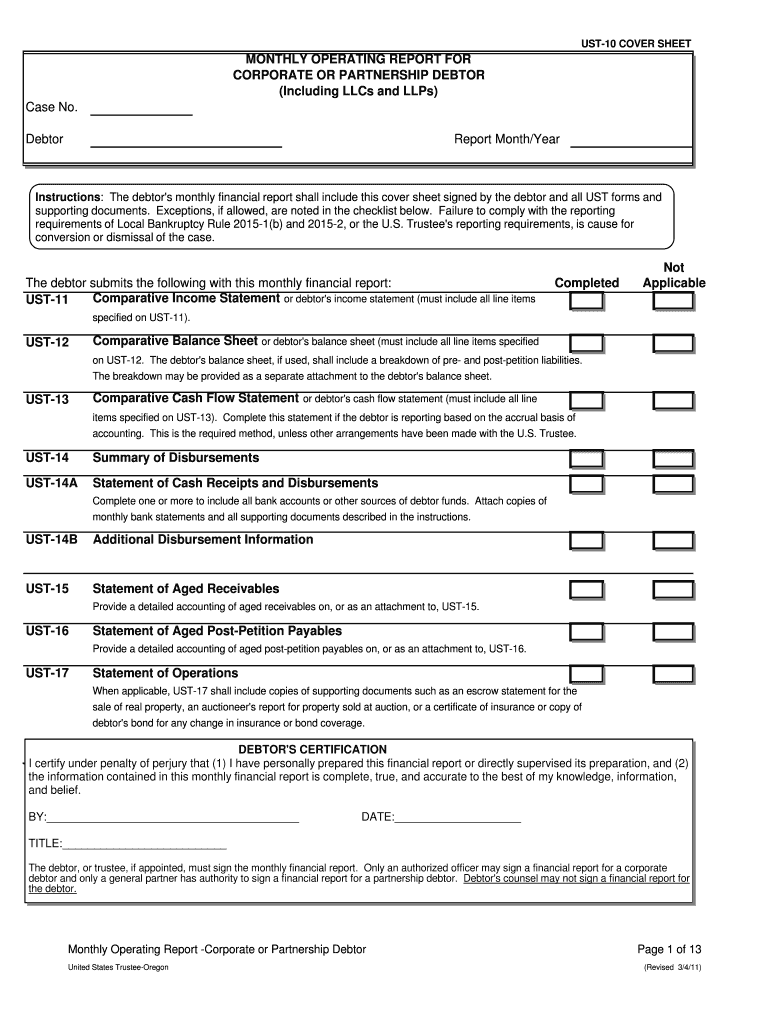
All include this cover sheet signed by the debtor and all UST forms and supporting documents. Exceptions, if allowed, are noted in the checklist below. Failure to comply with the reporting requirements of Local Bankruptcy Rule 2015-1(b) and 2015-2, or the U.S. Trustee's reporting requirements, is cause for conversion or dismissal of the case. The debtor submits the following with this monthly financial report: Comparative Income Statement or debtor's income statement (must include all line item.
Loading

Open form follow the instructions

Easily sign the form with your finger

Send filled & signed form or save
How to use or fill out the OR UST-10 Cover Sheet online
Filling out the OR UST-10 Cover Sheet is a critical step in submitting a monthly operating report for corporate or partnership debtors. This guide provides clear and straightforward instructions on how to complete each section of the cover sheet online, ensuring you meet the necessary requirements.
Follow the steps to successfully complete the OR UST-10 Cover Sheet online.
- Press the ‘Get Form’ button to acquire the form and open it for editing.
- Enter the case number, which uniquely identifies your bankruptcy case.
- Fill in the debtor's name accurately to ensure proper identification.
- Specify the report month and year, which should correspond to the financial report period.
- Review the certification statement. Ensure it is completed by an authorized individual. Only the debtor or trustee can sign the report, as specified.
- Attach all required UST forms and supporting documents, as detailed in the cover sheet instructions.
- Once all fields are completed and forms are attached, save your changes.
- Download, print, or share the completed OR UST-10 Cover Sheet as needed.
Complete your documents online today for accurate and timely submissions.
Experience a faster way to fill out and sign forms on the web. Access the most extensive library of templates available.
Related content
UST-10 (Cover). A, B, C, D, E, F, G, H, I, J, K, L, M, N, O, P. 2, UST-10 COVER SHEET. 3...
A cover letter with sufficient white space, a simple, reasonably sized font, and an...
Cases that meet the criteria in this policy do not require further corrective action and...
Get answers to your most pressing questions about US Legal Forms API.
How to make a cover sheet?
To make a cover sheet, begin by selecting a design that reflects the context of your message. Include crucial information such as contact details and a clear header, particularly if you are preparing an OR UST-10 Cover Sheet. The layout should be clean and professional, facilitating ease of reading. Utilize platforms like USLegalForms for additional templates and resources to enhance your cover sheet creation.
Can I make my own fax cover sheet?
Yes, you can absolutely create your own fax cover sheet tailored to your needs. Start from scratch or modify an existing template to suit the specifics of your OR UST-10 Cover Sheet requirements. Ensure you include all necessary details such as contact information and a brief message. Crafting your own sheet gives you control over the presentation and content.
How to make a fax cover letter?
Making a fax cover letter involves including essential information that identifies the sender, the recipient, and the fax details. Begin with a professional header for your OR UST-10 Cover Sheet, followed by a brief message summarizing the contents of the fax. This approach fosters understanding and allows for an efficient review by the recipient.
How do I make a cover sheet for a fax?
Creating a cover sheet for a fax is straightforward. Start with a template or use a blank document to include your OR UST-10 Cover Sheet information. Clearly list the sender's details, recipient’s information, and any relevant notes. This practice enhances clarity and ensures proper processing of your fax.
How do I insert a cover page in Word from another document?
To insert a cover page from another document in Word, open both documents. Copy the content you wish to use from the original document and then switch to the one where you want to insert it. Place the cursor at the desired location and paste the content. By customizing this pasted content, you can create your OR UST-10 Cover Sheet with ease.
Does Word have a fax cover sheet template?
Yes, Microsoft Word offers several fax cover sheet templates, which can streamline your faxing process. You can personalize these templates to include details relevant to your OR UST-10 Cover Sheet needs. Using a template not only saves time but also ensures consistency in your communication documents. Explore Word's built-in options for an efficient way to craft your cover sheet.
Can you send a fax without a cover sheet?
Yes, you can send a fax without a cover sheet. However, including an OR UST-10 Cover Sheet is beneficial as it provides essential details about the sender and the recipient. This ensures that your fax is correctly identified and appropriately managed. A cover sheet enhances communication and professionalism.
What is a Texas information sheet?
A Texas information sheet is a document that summarizes important details about a civil case. This sheet aids in effective case management and helps the court and involved parties keep track of key information. When you prepare this document, including the OR UST-10 Cover Sheet can enhance its professionalism and organization.
Is the civil case information sheet no longer required in Texas?
Currently, the civil case information sheet is still required for certain types of cases in Texas. However, there have been updates, and it is important to verify the latest requirements from the court. For assistance, using the OR UST-10 Cover Sheet can help clarify your submissions and ensure that you meet all necessary criteria.
How to fill out sum 100?
To fill out a Form SUM 100, you need to provide essential information regarding the case, including details about the plaintiff and defendant. Ensure that every section is filled accurately to avoid any issues. Pairing this form with the OR UST-10 Cover Sheet helps maintain organization and clarity, simplifying the submission.
Use professional pre-built templates to fill in and sign documents online faster. Get access to thousands of forms.
If you believe that this page should be taken down, please follow our DMCA take down process here.