Yr2 ( ) Yr3 ( ) Yr4 ( ) Yr1 ( ) Yr2 ( ) Yr3 ( ) Yr4 ( ) Yr1 ( ) Yr2 ( ) Yr3 ( ) Yr4 ( ) Yr1 ( ) Yr2 ( ) Yr3 ( ) Yr4 ( ) Yr1 ( ) Yr2 ( ) Yr3 ( ) Yr4 ( ) 18. F acilitate the sale of tangible personal property by allowing purchasers to pick up or return tangible personal property sold by the company at an office, distribution facility, warehouse, storage place, or similar place of business maintained by that person in Michigan? Yr1 ( ) Yr2 ( ) Yr3 ( ).
Loading

Open form follow the instructions

Easily sign the form with your finger

Send filled & signed form or save
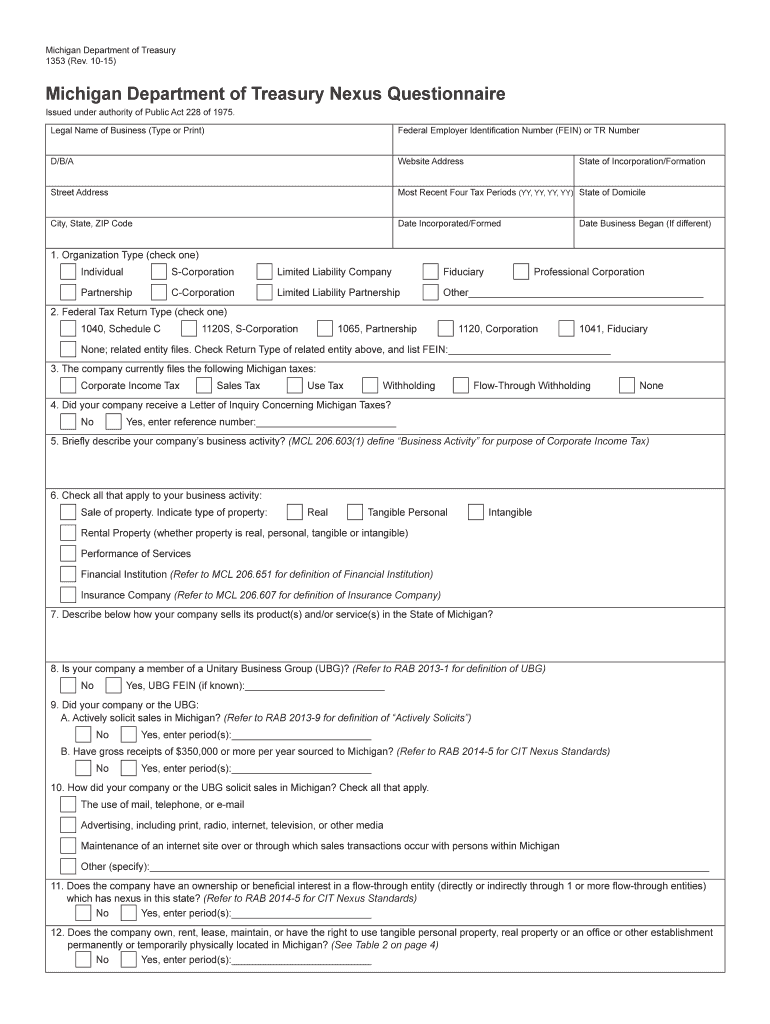
How to fill out the MI DoT 1353 online
Filling out the MI DoT 1353 form is an essential step for businesses that need to report nexus and tax responsibilities in Michigan. This guide will provide you with clear and supportive instructions to ensure a smooth online completion of the form.
Follow the steps to successfully complete the MI DoT 1353 form online.
- Press the ‘Get Form’ button to access the MI DoT 1353 form and open it in your preferred online editor.
- In the 'Legal Name of Business' field, type or print the full legal name of your business as registered with the state.
- Enter your Federal Employer Identification Number (FEIN) or TR Number accurately in the corresponding field.
- If your business operates under a different name, fill in the 'D/B/A' (Doing Business As) section with your assumed name.
- Provide your business's website address to facilitate verification and communication.
- Fill in the street address, including city, state, and ZIP code for your business's physical location, ensuring all details are correct.
- List your most recent four tax periods in the designated format (YY, YY, YY, YY) to indicate your filing history.
- Specify your state of domicile, which is the state where your business is primarily established.
- Indicate the date your business was incorporated or formed, along with the state of incorporation or formation.
- If your business commenced operations at a different date than incorporation, enter that date in the given field.
- Check the appropriate box to identify your organization type, choosing from options such as Individual, S-Corporation, Limited Liability Company, etc.
- Select the federal tax return type that corresponds to your business structure by checking the relevant box.
- Indicate which Michigan taxes your company currently files by checking all applicable options, including Corporate Income Tax and Sales Tax.
- Answer whether your company received a Letter of Inquiry Concerning Michigan Taxes and if so, provide the reference number.
- Briefly describe your company’s business activity to comply with the requirements of the Corporate Income Tax.
- Check all business activities that apply, such as sale of property or performance of services, aligning with the definitions provided.
- Detail how your company sells its products or services within the state of Michigan.
- Answer whether your company is a member of a Unitary Business Group (UBG) and provide the UBG FEIN if known.
- Indicate if your company or UBG actively solicits sales in Michigan and enter the relevant periods if applicable.
- Report any gross receipts sourced to Michigan if $350,000 or more per year, specifying the periods.
- Detail how sales were solicited in Michigan, checking all applicable methods such as mail, advertising, or maintaining a website.
- Answer if the company has an ownership or interest in a flow-through entity with nexus in Michigan.
- Indicate if the company owns, rents, or maintains any property in Michigan and provide the relevant periods.
- Fill out the sections regarding activities conducted by employees or agents in Michigan for the last four tax periods.
- Finish filling out the form by providing requested information in optional fields regarding other business activities.
- Once all information is submitted, you can save your changes, download, print, or share the completed form as needed.
Start filling out the MI DoT 1353 online today to ensure your business complies with Michigan tax regulations.
Experience a faster way to fill out and sign forms on the web. Access the most extensive library of templates available.
Related content
Sep 29, 2019 — To the extent possible, agencies are strongly encouraged to submit their...
May 29, 2025 — Contact 1353 E Spring Meadow Ct today to move into your new apartment...
Cómo configuro mi DAP-1353AP sin el CD-ROM, o compruebo mi nombre de red inalámbrica...
Get answers to your most pressing questions about US Legal Forms API.
What does MDOT mean?
MDOT refers to the Michigan Department of Transportation, an essential state agency focused on enhancing and maintaining Michigan's transportation infrastructure. This agency plays a significant role in regulating various transportation initiatives and ensuring safety compliance. Understanding MDOT's functions helps when dealing with legal frameworks, especially those related to the MI DoT 1353. Using platforms like uslegalforms can assist you in navigating these regulations effectively.
What does MDOT stand for in Michigan?
MDOT stands for the Michigan Department of Transportation. This department is responsible for the planning, development, and maintenance of the state's transportation network. MDOT is critical in ensuring that roads, bridges, and transportation services are efficient and safe. When addressing transportation regulations such as the MI DoT 1353, knowing MDOT's role can guide your compliance efforts.
What does the M mean on Michigan roads?
The 'M' on Michigan roads indicates a state highway, distinguishing them from other road categories. These highways are crucial for statewide connectivity and can carry significant traffic volumes. If you're navigating or planning travel routes, understanding the significance of these markings helps ensure that you comply with regulations like the MI DoT 1353.
What is the abbreviation for Michigan dot?
The abbreviation for Michigan Department of Transportation is MDOT. This agency oversees transportation systems and infrastructure within the state, ensuring safety and efficiency. MDOT plays a vital role in maintaining roads and highways, which affects all drivers within Michigan. When dealing with regulations like the MI DoT 1353, knowing the agency's abbreviation can streamline your inquiries.
What creates Nexus in Michigan?
Nexus in Michigan refers to the connection required for state taxation purposes. Generally, a business establishes Nexus when it has a physical presence in the state, which can include having an office, employees, or inventory. However, economic factors, like sales volume in Michigan, can also create Nexus. Understanding these criteria is essential, especially when engaging with legal requirements like the MI DoT 1353.
How do I get a tax clearance in Michigan?
To obtain a tax clearance in Michigan, you must complete the appropriate form and submit it to the Michigan Department of Treasury. Make sure to include your MI DoT 1353 details, as these are crucial for the clearance process. Receiving this status can help with various business operations, such as applying for licenses or contracts.
How to file Michigan Form 5081?
Filing Michigan Form 5081 is straightforward. Obtain the form from the Michigan Department of Treasury's website, and complete it by providing the necessary information related to your MI DoT 1353. After filling out the form, follow the instructions to ensure proper submission and avoid delays in processing.
How do I file Form 163 in Michigan?
To file Form 163 in Michigan, you'll need to access the form through the Michigan Department of Treasury's website. Complete the form with relevant details about your MI DoT 1353 activities, and submit it according to the instructions provided. If you need help, uslegalforms offers resources to guide you through the process.
How do I file a principal residence exemption in Michigan?
Filing for a principal residence exemption in Michigan involves completing Form 4020 and submitting it to your local assessor's office. Ensure that you provide accurate information related to your MI DoT 1353 status. This exemption can significantly reduce the property taxes you owe, so it's important to file correctly.
How do I file an annual statement for an LLC in Michigan?
To file an annual statement for your LLC in Michigan, visit the Michigan Department of Licensing and Regulatory Affairs (LARA) website. You can complete the required form online and ensure that your MI DoT 1353 details are up to date. This filing keeps your business in good standing and minimizes potential penalties.
Use professional pre-built templates to fill in and sign documents online faster. Get access to thousands of forms.
If you believe that this page should be taken down, please follow our DMCA take down process here.
This form is available in several versions. Select the version you need from the drop-down list below.