Ities (Attach Form 502R.) . 1d. 1. 1e. Place a "Y" in this box if the amount of your investment income is more than $3,500. . . . 2. Tax-exempt interest on state and local obligations (bonds) other than Maryland . . . . . . . . . 2. 3. State retirement pickup. . . . . . . . . . . . . . . . . . . . . . . . . . . . . . . . . . . . . . . . . . . . . . . . . 3. 4. Lump sum distributions (from worksheet in Instruction 12.) . . . . . . . . . . . . . . . . . . . . . . . 4. 5. Other additi.

Open form follow the instructions

Easily sign the form with your finger

Send filled & signed form or save
How to fill out the MD Comptroller 502 online
Filling out the MD Comptroller 502, the Maryland resident income tax return, is an important process for reporting your income and determining your tax obligations. This guide provides clear, step-by-step instructions to help users complete the form accurately and efficiently.
Follow the steps to successfully complete your MD Comptroller 502 online.
- Click ‘Get Form’ button to access the MD Comptroller 502 form online and open it in your preferred editor.
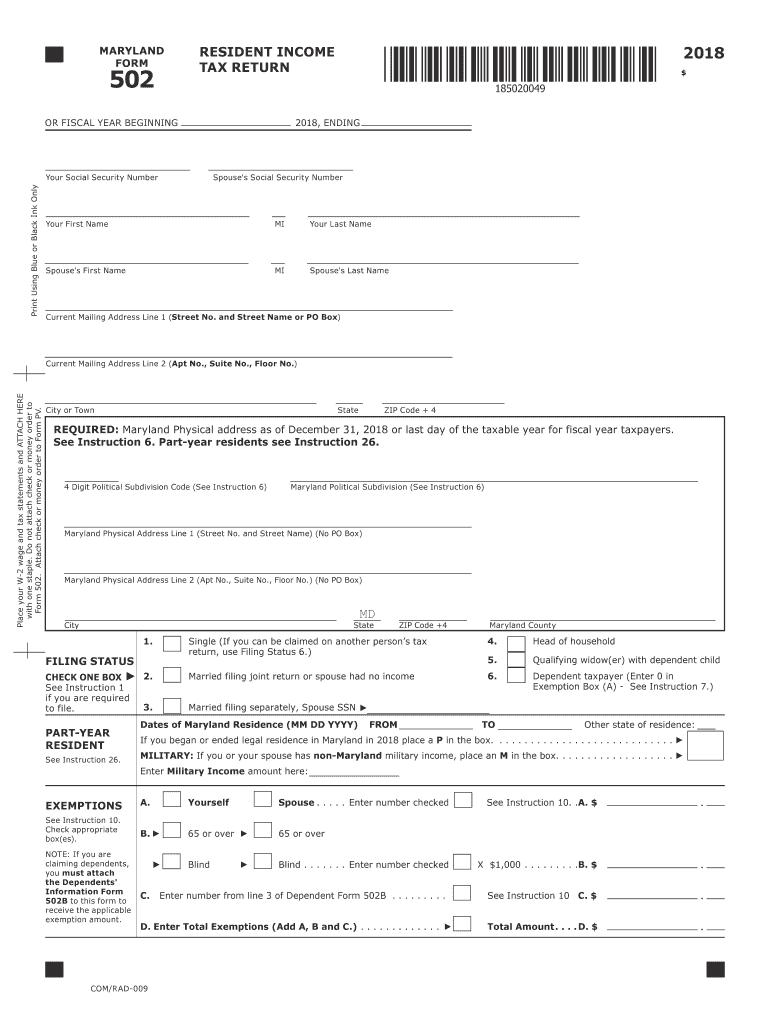
- Fill in your personal details in the designated fields, including your name, Social Security number, and current mailing address. Ensure to use blue or black ink if completing on paper.
- Indicate your filing status by checking one of the boxes. Available options include 'Single', 'Married filing jointly', 'Married filing separately', 'Head of household', or 'Qualifying widow(er)'.
- Enter your Maryland physical address as of December 31 of the tax year. This is required for residency verification.
- Complete the exemptions section, checking the appropriate boxes to claim any dependents. If claiming dependents, you must attach the Dependents' Information Form 502B.
- Fill out the income section by reporting your adjusted gross income from your federal tax return, including wages, salaries, and other income sources.
- Specify any additions and subtractions from your income, carefully following the instructions provided for reporting each item.
- Determine your deductions by choosing between the standard deduction and the itemized deduction method. Enter the applicable amounts based on your income.
- Calculate your taxable income by subtracting deductions from your adjusted gross income and report any applicable credits.
- Review the final amounts, including total taxes due and any payments or credits you may have, ensuring all values are correctly entered.
- Complete the signature section, providing your signature, date, and any signatures required from your spouse or preparer if applicable.
- Once all sections are completed, save your form changes, and ensure you have the option to download, print, or share the document if needed.
Complete your MD Comptroller 502 online and ensure your tax obligations are met efficiently.
Experience a faster way to fill out and sign forms on the web. Access the most extensive library of templates available.
Related content
Apr 2, 2025 — Maryland residents use Form 502, non-residents use nonresident forms. Form...
The battery charge temperature compensation feature allows the controller to automatically...
Get answers to your most pressing questions about US Legal Forms API.
What is the Maryland form 502R?
The Maryland form 502R is the Resident Income Tax Return, which is specifically designed for Maryland residents to report their income and calculate taxes. This form includes sections for personal information, income reporting, and deductions. Using the MD Comptroller 502R correctly helps streamline your tax filing process. If you are uncertain about any part of the form, consider using resources like UsLegalForms to effectively navigate tax filing.
What is form 502 on a Maryland income tax return?
Form 502 is the official Maryland Income Tax Return used by individuals to report income and calculate taxes owed for the year. This form covers various income types and enables taxpayers to claim deductions and credits applicable under Maryland law. Completing the MD Comptroller 502 thoroughly helps ensure that you comply with state tax requirements and avoid penalties. Remember to file it before the due date to keep your tax records in good standing.
Why am I getting a letter from the Comptroller of Maryland?
Receiving a letter from the Comptroller of Maryland may indicate that there is an issue with your tax return or that additional information is required. The letter could also inform you of changes to your申報 status or specific tax balances owed. React promptly by reviewing the letter and collecting any requested information. You can consult the MD Comptroller 502 guidelines or seek assistance from tax professionals to understand your options.
What is the personal exemption for Maryland tax return?
The personal exemption for Maryland tax returns allows taxpayers to reduce their taxable income by a fixed amount per dependent. This amount can change each year based on state regulations, so it's essential to check the current rates. Using the MD Comptroller 502 form helps you claim these exemptions effectively. Being aware of your exemptions can significantly lower your overall tax burden.
How to fill out form 502?
To fill out form 502, start by gathering all income information, including W-2s and 1099s. Carefully follow the instructions provided on the MD Comptroller 502 form to accurately report your income, claim deductions, and credits. It's vital to double-check your calculations to avoid mistakes that could lead to penalties. If you find it overwhelming, you might consider using online tools like UsLegalForms to guide you through the process.
What is a 502 form for taxes in Maryland?
The 502 form, known as the Maryland Income Tax Return, is used by residents to report their annual income. This form is essential for calculating your tax liability and claiming any applicable credits or deductions. Completing the MD Comptroller 502 correctly can prevent future tax issues. It integrates necessary tax information to ensure compliance with state requirements.
Where do I send my IRS payments by mail?
Send your IRS payments by mail according to the instructions provided on your tax return or the IRS website. Typically, payments should be directed to the address designated for your specific situation, which varies based on whether you include a form with your payment. Always check that the MD Comptroller 502 is submitted separately if your state taxes are involved. Properly addressing your payments reduces the chance of delays.
Where do I mail my estimated tax payments to?
Mail your estimated tax payments to the Comptroller of Maryland at 110 Carroll Street, Annapolis, Maryland 21411. Make sure to include your personal details and payment information to prevent any confusion. Using the MD Comptroller 502 layout will help streamline the process. Consider using certified mail for tracking purposes.
Can you electronically file a Maryland trust return?
Yes, you can electronically file a Maryland trust return. This method provides a quick and efficient way to submit your tax returns, ensuring that the MD Comptroller 502 receives your information promptly. Many users find this method convenient as it often comes with built-in checks to avoid errors. Utilize online platforms for electronic filing to benefit from added features.
How do I write a check to the comptroller of Maryland?
When writing a check to the Comptroller of Maryland, address it to 'Comptroller of Maryland' and include your tax ID or the MD Comptroller 502 form number in the memo line. Ensure you write the check for the correct amount. It’s advisable to use standard blue or black ink for clarity. Finally, mail your check to 110 Carroll Street, Annapolis, Maryland 21411 for processing.
Use professional pre-built templates to fill in and sign documents online faster. Get access to thousands of forms.
If you believe that this page should be taken down, please follow our DMCA take down process here.
This form is available in several versions. Select the version you need from the drop-down list below.