Loading
Get Or Or-65-v 2023-2026
How it works
-

Open form follow the instructions
-

Easily sign the form with your finger
-

Send filled & signed form or save
How to use or fill out the OR OR-65-V online
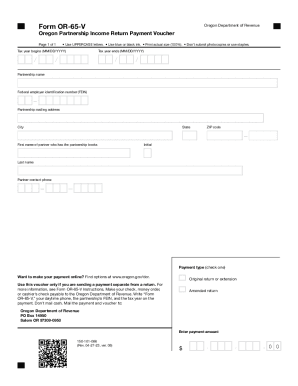
The OR OR-65-V form is essential for submitting payment for an Oregon partnership income return. This guide will help you understand each section of the form and provide step-by-step instructions for completing it online.
Follow the steps to accurately fill out the OR OR-65-V form.
- Click ‘Get Form’ button to access the form and open it in the editor.
- Fill in the tax year begins field with the starting date of the partnership's fiscal year using the MM/DD/YYYY format.
- Next, complete the tax year ends field with the ending date of the fiscal year, also in MM/DD/YYYY format.
- Enter the partnership name as it appears on official documents.
- Input the federal employer identification number (FEIN) associated with the partnership.
- Provide the partnership mailing address, including the city, state, and ZIP code.
- Fill in the first and last name of the partner who maintains the partnership books, including their initial.
- Add the contact phone number for the partner listed.
- Select the payment type by checking the appropriate box, indicating whether it is for an original return or an amended return.
- Enter the payment amount in the designated field, ensuring it is in the correct format.
- Review all the entered information for accuracy before finalizing your submission.
- Once completed, you may save your changes, download a copy of the form, print it, or share it as needed.
Complete your documents online for efficient processing and compliance.