Loading
Get Mt Gen Reg 2023-2026
How it works
-

Open form follow the instructions
-

Easily sign the form with your finger
-

Send filled & signed form or save
How to fill out the MT Gen Reg online
Filling out the MT Gen Reg form is a crucial step for individuals and businesses seeking to register in Montana. This guide provides comprehensive instructions to help users complete the form accurately and efficiently.
Follow the steps to successfully complete your MT Gen Reg.
- Press the ‘Get Form’ button to access the MT Gen Reg form and open it in your preferred online editor.
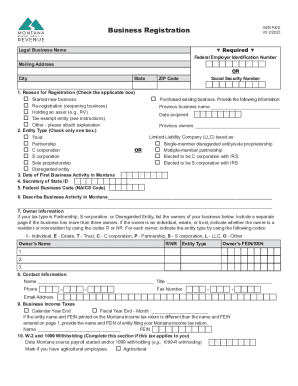
- Begin by entering your Federal Employer Identification Number and/or Social Security Number. Ensure that the numbers are accurate to avoid any processing delays.
- Provide the legal business name and your mailing address. If applicable, fill in your city, state, and ZIP code.
- Select the reason for registration by checking the applicable box. Options include starting a new business, purchasing an existing business, or marking as a tax-exempt entity.
- Indicate your entity type by checking the appropriate box. Make sure to choose only one option that best describes your business structure.
- Enter the date of your first business activity in Montana using the specified date format.
- If you have a Secretary of State ID, provide it in the respective field. If you do not, leave this blank.
- Fill in the Federal Business Code, which corresponds to your business's principal activity according to the NAICS.
- Describe your business activity in Montana in the provided space, ensuring to capture the essence of your operations.
- Complete the owner information section. List the owners of the business, indicating their residency status (R for resident, NR for nonresident) and their entity type.
- Provide contact information for the person who can answer questions about this form, including their name, title, phone number, and email address.
- Indicate your business income tax filing preference, either calendar year or fiscal year, and include relevant details if necessary.
- Complete sections for W-2 and 1099 withholding and mineral royalty withholding if applicable to your business.
- If your business is subject to miscellaneous taxes, specify which of these taxes apply and provide necessary information.
- Enter business equipment tax information if applicable.
- Review the declaration section, ensuring it is signed and dated by the appropriate authorized representative.
- Once all sections of the form are completed, save your changes, options to download, print, or share the completed form are available.
Complete your MT Gen Reg online today to ensure your business is registered in Montana.
Related links form
A disregarded entity is a business entity that is disregarded for federal income tax purposes. Instead, income from the business is included on its owner's income tax return.