Loading
Form preview
  • US Legal Forms
  • Form Library
  • Tax Forms
  • Massachusetts Tax Forms
  • Ma St-13 2006

Get Ma St-13 2006-2026

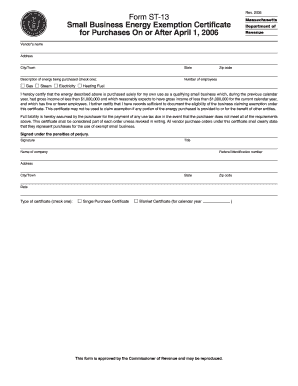
Number of the small business claiming the exemption, the sales price of each sale and a copy of Form ST-13. For further information regarding the requirements for retaining records, see Massachusetts Regulation 830 CMR 62C.25.1. Instructions to Purchasers A purchaser ordinarily must present this certificate to the vendor for each calendar year on or before the date of its first purchase of taxable fuel in each new calendar year. If a purchaser presents the certificate after this date, the cert.

How it works

  1. Open form

    Open form follow the instructions

  2. Easily sign form

    Easily sign the form with your finger

  3. Share form

    Send filled & signed form or save

How to fill out the MA ST-13 online

The MA ST-13 form serves as the Small Business Energy Exemption Certificate, enabling eligible small businesses to exempt certain energy purchases from sales tax. This guide will provide step-by-step instructions for completing the form online, ensuring that users, regardless of legal experience, can navigate the process with ease.

Follow the steps to efficiently complete the MA ST-13 online.

  1. Click the ‘Get Form’ button to obtain the MA ST-13 form and open it in the designated editor.
  2. Enter the vendor's name and address, including city or town, state, and zip code in the corresponding fields.
  3. Indicate the type of energy being purchased by checking the appropriate box next to 'Gas,' 'Steam,' 'Electricity,' or 'Heating Fuel.'
  4. Input the number of employees in your business in the provided field.
  5. Carefully read and complete the certification statement, confirming your business qualifies as a small business under the specified income and employee parameters.
  6. Provide your signature, title, and name of the company. Additionally, enter the federal identification number in the relevant section.
  7. Fill out the business address, city or town, state, and zip code fields.
  8. Select the type of certificate you are claiming by checking either the 'Single Purchase Certificate' or 'Blanket Certificate' for the calendar year.
  9. Review all entered information for accuracy, then proceed to save changes, download, print, or share the completed form as needed.

Complete your MA ST-13 form online today to take advantage of the small business energy exemption.

Get form

Experience a faster way to fill out and sign forms on the web. Access the most extensive library of templates available.
Get form

Related content

Form ST-13 Small Business Energy Exemption...
Apr 1, 2006 — Any purchaser which seeks this exemption must complete Form. ST-13, Small...
Learn more
EVEREST Bundles - Campaign 13 - MAST Archive
2024 MAST Summer Webinar. EVEREST Bundles - Campaign 13. Page banner image. Breadcrumbs...
Learn more
RD 5700
Telescoping mast sections nest to reduce truck length. Heavier mast cross bracing design...
Learn more

Related links form

Onsite Participant Claim Form 2011 OSC-11 2014 PA Identity Theft Victim’s Complaint and Affidavit PBGC 715 2019

Questions & Answers

Get answers to your most pressing questions about US Legal Forms API.

Contact support

Filling out the Massachusetts employee withholding exemption certificate involves entering your personal details, including your name, address, and the total amount of exemptions you are claiming. Be sure to follow the instructions carefully to avoid errors. This form significantly impacts your state tax withholdings, so reviewing MA ST-13 will provide important insights. For ease of completion, explore templates available on uslegalforms.

To qualify for a tax exemption in Massachusetts, you must meet certain eligibility criteria set by state laws. Common qualifications include being a non-profit organization, meeting specific income thresholds, or engaging in qualifying business activities. It's crucial to review the requirements detailed in MA ST-13 to ensure compliance. Resources from uslegalforms can assist you in understanding these qualifications.

On your employee's withholding exemption certificate, you should include your full name, address, and the number of exemptions you wish to claim. If you have dependents or specific circumstances affecting your tax situation, mention those as well. Correctly completing this certificate ensures accurate tax withholdings. Don't forget to consult the MA ST-13 for any updates or changes.

To fill out the Massachusetts employee's withholding exemption certificate, you need to provide your personal details, including your name and address. Additionally, indicate the number of exemptions you are claiming based on your financial situation. This certificate is vital for your employer to withhold the right amount of state tax from your paycheck. Make sure to reference MA ST-13 for the latest forms and guidelines.

Filling out a certificate of exemption requires you to provide specific information about your business and the nature of the transaction. You will need to include your name, business address, and the reason for the exemption. Ensure that you check the applicable exemptions under MA ST-13 to claim them correctly. For detailed guidance, consider exploring resources on uslegalforms.

The number of exemptions you should claim in Massachusetts depends on your personal situation. Generally, you can claim exemptions based on your filing status, number of dependents, and any adjustments you may qualify for. It is advisable to consider your overall tax liability when determining exemptions. Tools like the MA ST-13 can help you better understand your exemptions.

To obtain a sales tax certificate in Massachusetts, you must register for a Retail Sales Certificate through the Massachusetts Department of Revenue. You can complete this process online or by submitting a paper application. Once your application is approved, you will receive your certificate, which is essential for collecting sales tax. This process is critical for businesses needing compliance with MA ST-13 regulations.

To obtain tax-exempt status in Massachusetts, you typically need to complete the appropriate forms and meet specific eligibility criteria outlined by the state. Organizations often use the MA ST-13 form as part of this process to demonstrate their exempt purposes. Additionally, staying up to date with state regulations can ease the application process. Consider consulting resources available through platforms like uslegalforms for guidance in applying correctly.

MA no tax status refers to the situation where certain individuals or entities do not owe any Massachusetts income tax due to low earnings or qualifying deductions. This status can be beneficial, as it simplifies the tax filing process. Utilizing resources like the MA ST-13 can help you assess your eligibility for this designation. Staying informed about your income levels and possible deductions is crucial for maintaining your no tax status.

Individuals who typically qualify for no tax status in Massachusetts include low-income earners, dependents, and certain elderly taxpayers. Additionally, specific deductions and credits can play a significant role in determining tax status. The MA ST-13 form can be a useful resource for understanding your qualifications and ensuring you take advantage of any applicable benefits. It's wise to assess your financial situation annually to maintain proper compliance.

Get This Form Now!

Use professional pre-built templates to fill in and sign documents online faster. Get access to thousands of forms.
Get form
If you believe that this page should be taken down, please follow our DMCA take down processhere.
Get MA ST-13
Get form
  • Adoption
  • Bankruptcy
  • Contractors
  • Divorce
  • Home Sales
  • Employment
  • Identity Theft
  • Incorporation
  • Landlord Tenant
  • Living Trust
  • Name Change
  • Personal Planning
  • Small Business
  • Wills & Estates
  • Packages A-Z
  • Affidavits
  • Bankruptcy
  • Bill of Sale
  • Corporate - LLC
  • Divorce
  • Employment
  • Identity Theft
  • Internet Technology
  • Landlord Tenant
  • Living Wills
  • Name Change
  • Power of Attorney
  • Real Estate
  • Small Estates
  • Wills
  • All Forms
  • Forms A-Z
  • Form Library
  • Legal Hub
  • About Us
  • Help Portal
  • Legal Resources
  • Blog
  • Affiliates
  • Contact Us
  • Delete My Account
  • Site Map
  • Industries
  • Forms in Spanish
  • Localized Forms
  • State-specific Forms
  • Forms Kit
  • Real Estate Handbook
  • All Guides
  • Notarize
  • Incorporation services
  • For Consumers
  • For Small Business
  • For Attorneys
  • USLegal
  • FormsPass
  • pdfFiller
  • signNow
  • altaFlow
  • DocHub
  • Instapage
Form Packages
  • Adoption
  • Bankruptcy
  • Contractors
  • Divorce
  • Home Sales
  • Employment
  • Identity Theft
  • Incorporation
  • Landlord Tenant
  • Living Trust
  • Name Change
  • Personal Planning
  • Small Business
  • Wills & Estates
  • Packages A-Z
Form Categories
  • Affidavits
  • Bankruptcy
  • Bill of Sale
  • Corporate - LLC
  • Divorce
  • Employment
  • Identity Theft
  • Internet Technology
  • Landlord Tenant
  • Living Wills
  • Name Change
  • Power of Attorney
  • Real Estate
  • Small Estates
  • Wills
  • All Forms
  • Forms A-Z
  • Form Library
Customer Service
  • Legal Hub
  • About Us
  • Help Portal
  • Legal Resources
  • Blog
  • Affiliates
  • Contact Us
  • Delete My Account
  • Site Map
  • Industries
  • Forms in Spanish
  • Localized Forms
  • State-specific Forms
  • Forms Kit
Legal Guides
  • Real Estate Handbook
  • All Guides
Prepared for you
  • Notarize
  • Incorporation services
Our Customers
  • For Consumers
  • For Small Business
  • For Attorneys
Our Sites
  • USLegal
  • FormsPass
  • pdfFiller
  • signNow
  • altaFlow
  • DocHub
  • Instapage
Social Media
Call us now toll free:
+1 833 426 79 33
As seen in:
© Copyright 1999-2026 airSlate Legal Forms, Inc. 17 Station Street, Suite 303, Brookline, MA 02445
  • Your Privacy Choices
  • Terms of Service
  • Privacy Notice
  • Content Takedown Policy
  • Bug Bounty Program