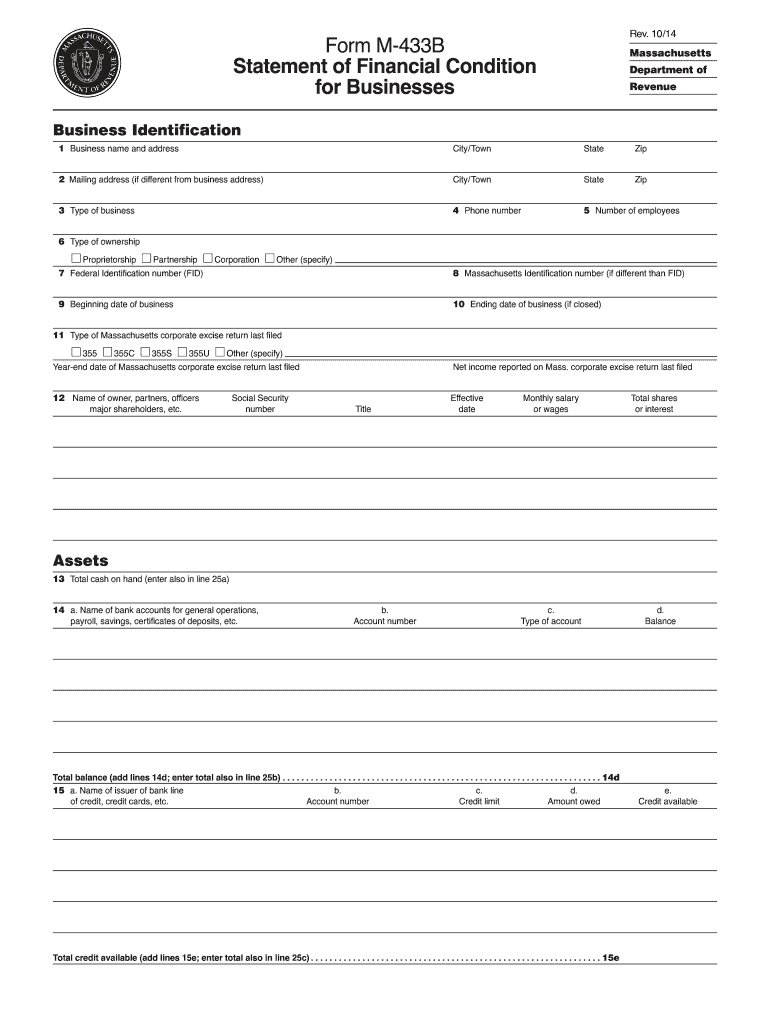
8 Massachusetts Identification number (if different than FID) 19 Beginning date of business 10 Ending date of business (if closed) 11 Type of Massachusetts corporate excise return last filed 355 355C 355S 355U Other (specify) Year-end date of Massachusetts corporate excise return last filed 12 Name of owner, partners, officers major shareholders, etc. Social Security number Net income reported on Mass. corporate excise return last filed Title Effective date Monthly salary or.

Open form follow the instructions

Easily sign the form with your finger

Send filled & signed form or save
How to fill out the MA M-433(B) online
This guide provides a comprehensive overview of how to complete the MA M-433(B) form, also known as the Statement of Financial Condition for Businesses, online. Following these steps will help ensure accurate and efficient filing.
Follow the steps to successfully complete the MA M-433(B) form online.
- Press the 'Get Form' button to access the MA M-433(B) form and open it in your online editing tool.
- Enter your business identification information in section 11, including your business name and address, as well as the city, state, and zip code.
- If your mailing address differs from the business address, provide that in section 12, including the corresponding city, state, and zip code.
- Specify the type of business in section 13, and provide the phone number in section 4.
- Fill out the number of employees in section 5 and select the type of ownership in section 16.
- Input your Federal Identification Number (FID) in section 17, and provide the Massachusetts Identification number if different in section 8.
- Enter the beginning and ending dates of your business in sections 19 and 10, respectively.
- Indicate the type of Massachusetts corporate excise return last filed in section 11, and input the year-end date of that return.
- List the names and pertinent details of owners, partners, officers, and major shareholders in section 12, including their Social Security numbers and titles.
- Provide your total cash on hand in section 13, and detail your bank accounts in section 14, including balances.
- Continue filling in sections regarding assets, liabilities, income, and expense analysis by following the prompt instructions within each section.
- Once all sections are completed, save your changes, and utilize online options to download, print, or share the MA M-433(B) form as needed.
Complete your MA M-433(B) form online for efficient processing today.
Experience a faster way to fill out and sign forms on the web. Access the most extensive library of templates available.
Related content
Mail this application to Massachusetts Department of Revenue, Collections. Bureau, PO Box...
Bayesian search for low-mass planets around nearby M dwarfs - estimates for occurrence...
O e-SUS AB é uma estratégia do Departamento de Atenção Básica (DAB) para reestruturar...
Get answers to your most pressing questions about US Legal Forms API.
How to fill out a W-4 form for exempt?
To fill out a W-4 form for exempt status, you need to confirm that you had no tax liability in the previous year and expect none this year. Write 'Exempt' in the form where indicated, and ensure that you meet the criteria outlined in the MA M-433(B) form for exemption. By doing this, you can avoid withholding federal income tax from your paycheck.
How to fill out a W-8BEN form?
To fill out a W-8BEN form, start by providing your name and country of citizenship. Then, include your permanent address and mailing address if different. Ensure you understand the tax residency requirements, as the accurate completion of the MA M-433(B) may impact your tax obligations on income sourced from the U.S., especially if you are not a U.S. resident.
What is the IRS form 433 B used for?
The IRS Form 433-B is primarily used for financial disclosure. This form helps individuals and businesses report their financial status to the IRS. If you owe taxes and need to propose a payment plan or settle your debt, completing the MA M-433(B) is essential for your negotiations. It provides a clear picture of your income, expenses, and assets.
How to file form 433 F?
Filing Form 433 F involves documenting your financial situation accurately, including personal and business income, assets, and expenses. This form is typically used to apply for an installment agreement with the IRS. You can submit it online through the IRS website or by mailing a physical copy to the appropriate address. For further guidance, consider utilizing platforms like uslegalforms to simplify the process.
How to file form 8288?
To file Form 8288, you must complete it accurately and submit it to the IRS along with the appropriate payment. This form is used primarily for foreign investment in U.S. real property, and it is crucial to follow the instructions carefully. Filing can be done electronically or via mail, depending on your specific situation. For more support in filing, you might consider resources available at uslegalforms.
What is MA form 2G?
MA Form 2G relates to the Massachusetts tax return specifically for income earned from sources outside the state. It is designed for non-residents who need to report their income earned in Massachusetts. Completing Form 2G correctly helps ensure compliance with state tax law. If you have questions about this form, uslegalforms can provide clarity and assistance.
Where do I file my MA form 2?
You can file your MA Form 2 either electronically or via mail, depending on your preference. If you choose to file electronically, you can use various tax software or the Massachusetts Department of Revenue’s e-file system. For mail submissions, use the address provided in the form instructions. Ensuring timely filing can help you avoid penalties, so consider using platforms like uslegalforms for ease of access.
Where do I mail my MA tax form?
To mail your Massachusetts tax form, you need to send it to the address specified in the form instructions. Different forms have different mailing addresses, so double-check which one applies to your situation. If you're using Form MA M-433(B) for estimated payments, it will guide you on where to send your documents. Mailing to the wrong address can lead to processing delays, so take the time to verify.
What is MA state tax form 2?
MA state tax form 2 is a tax return form used by individuals or entities residing in Massachusetts to report their taxable income. This form is essential for calculating your state tax liability accurately. It allows for deductions and credits that can lower your overall tax bill. You can typically find Form 2 on the Massachusetts Department of Revenue website or through platforms like uslegalforms for easy access.
Where to send Massachusetts estimated tax payments?
You can send your Massachusetts estimated tax payments to the appropriate address provided by the Massachusetts Department of Revenue. Typically, you would use Form MA M-433(B) for guidance on where to mail your payments. It's important to ensure that you send your payment to the correct location to avoid any delays or issues with processing. For the latest mailing addresses and instructions, you can visit the state tax website.
Use professional pre-built templates to fill in and sign documents online faster. Get access to thousands of forms.
If you believe that this page should be taken down, please follow our DMCA take down process here.
This form is available in several versions. Select the version you need from the drop-down list below.