Loading
Form preview
  • US Legal Forms
  • Form Library
  • Tax Forms
  • Massachusetts Tax Forms
  • Ma Form 121a 2012

Get Ma Form 121a 2012

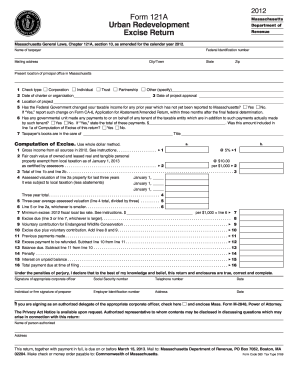
Date of charter or organization 3 Date of project approval Location of project Has the Federal Government changed your taxable income for any prior year which has not yet been reported to Massachusetts? Yes No. If Yes, report such change on Form CA-6, Application for Abatement/Amended Return, within.

How it works

  1. Open form

    Open form follow the instructions

  2. Easily sign form

    Easily sign the form with your finger

  3. Share form

    Send filled & signed form or save

How to fill out the MA Form 121A online

The MA Form 121A is an essential document for urban redevelopment and excise return in Massachusetts. This guide provides a clear and supportive overview on how to successfully complete this form online, ensuring users understand each component and step involved.

Follow the steps to fill out the MA Form 121A online effectively.

  1. First, locate and click the ‘Get Form’ button to access the form and open it in your selected editor.
  2. Enter your name in the provided field labeled 'Name of taxpayer.' Ensure accuracy in spelling and formatting.
  3. Fill in your Federal Identification number in the designated area, as this is critical for the tax identification process.
  4. Provide your mailing address, including city/town, state, and zip code accurately to avoid any correspondence issues.
  5. Specify the present location of your principal office in Massachusetts to ensure proper jurisdiction.
  6. Indicate the type of entity by checking the appropriate box: Corporation, Individual, Trust, Partnership, or Other.
  7. Enter the date of charter or organization and the date of project approval in the specified fields to document key timelines.
  8. List the location of the project in detail. Make sure to include all relevant information for clear identification.
  9. Respond to the inquiry about changes in taxable income by selecting 'Yes' or 'No.' If applicable, ensure to report any changes on Form CA-6.
  10. In the computation section, start with gross income from all sources for 2012. Follow the instructions to compute the related excise as per the guidelines.
  11. Proceed with entering values for leased real and tangible personal property after confirming from assessors for accuracy.
  12. Continue filling out the rest of the excise computation lines, ensuring to perform all necessary calculations as guided.
  13. Review the declaration under penalties of perjury carefully, and provide all signatures required, ensuring that social security and telephone numbers are correctly entered.
  14. Finally, ensure the form is complete, save your changes, and prepare to download, print, or share the document as necessary.

Complete your MA Form 121A online today to ensure timely and accurate submission.

Get form

Experience a faster way to fill out and sign forms on the web. Access the most extensive library of templates available.

Related content

2024 Instructions for Massachusetts Urban...
Every entity subject to taxation under MGL ch. 121A must file an annual return on Form...
Learn more
DIA alphabetical form list | Mass.gov
Jun 8, 2022 —...
Learn more
Epson AcuLaser M2300/M2310/M2400/M2410 Series
lista pendente Form Pre-Settings (Pré-definições de Página) na caixa de diálogo Form...
Learn more

Related links form

CJA-24 Instructions 2008 Client Questionnaire For Non-Business Debtor Codicil to Will Conditional Waiver and Release on Progress Payment 2012

Questions & Answers

Get answers to your most pressing questions about US Legal Forms API.

Contact support

To file a corporate extension in Massachusetts, you need to complete and submit the appropriate extension form prior to your due date, usually MA Form 355E. If you need additional time to prepare your tax filings, don’t hesitate to take advantage of this option. USLegalForms provides valuable resources that can guide you through this process. Filing for an extension can provide you with the time you need to gather all necessary documentation.

You do not need to send a copy of your federal return when you file your Massachusetts state return, including MA Form 121A. However, keeping a copy for your records is always a good practice. If you want to ensure everything is filed correctly, check platforms like USLegalForms for tips. They can help you navigate the state filing requirements easily.

To file your WI Form 1, send it to the Wisconsin Department of Revenue. Similar to Massachusetts forms, you can file either by mail or electronically. If you're unsure about the mailing process, USLegalForms can provide guidance and resources to help you through the filing. Staying organized can make this process smoother for you.

You should file your MA Form 1 with the Massachusetts Department of Revenue. You can send it by mail or electronically if you meet the qualifications for e-filing. Be sure to check the mailing address on the form, as it can change. Using resources like USLegalForms can simplify this process and ensure you file correctly.

MA state tax form 2 is the tax return for a partnership or a limited liability company treated as a partnership. This form allows businesses to report their income, deductions, and pass through their earnings to the partners. For more detailed instructions, check resources like MA Form 121A, which will help guide you through this process.

To file your taxes in Massachusetts, you typically need MA Form 1 or MA Form 1-NR, depending on your residency status. Additional forms might include schedules and other relevant documents to support your claims. For a complete list and assistance, explore the resources provided through platforms discussing MA Form 121A.

You should send your Massachusetts estimated tax payments to the appropriate address based on your payment method, whether it is online or by mail. If you opt for mailing, ensure you verify the latest addresses provided by the Massachusetts Department of Revenue. Information about estimated tax payments can also be found in documentation like MA Form 121A.

You should file your MA Form 2 with the Massachusetts Department of Revenue, either electronically or by mail. The specific filing option depends on your situation and the preferences you have regarding tax submissions. For a more streamlined filing process, consider using tools associated with MA Form 121A.

The Massachusetts non-resident income tax form is known as MA Form 1-NR. This form is for individuals who earn income from Massachusetts sources but do not reside in the state. To ensure compliance, view the features and instructions associated with this form through relevant resources like MA Form 121A.

To mail your MA tax form, you should send it to the Massachusetts Department of Revenue. The mailing address varies based on whether you are filing a personal income tax return or a business tax return. For precise details, consider visiting the official Massachusetts Department of Revenue website or checking out resources related to MA Form 121A.

Get This Form Now!

Use professional pre-built templates to fill in and sign documents online faster. Get access to thousands of forms.
If you believe that this page should be taken down, please follow our DMCA take down processhere.

Industry-leading security and compliance

US Legal Forms protects your data by complying with industry-specific security standards.
  • In businnes since 1997
    25+ years providing professional legal documents.
  • Accredited business
    Guarantees that a business meets BBB accreditation standards in the US and Canada.
  • Secured by Braintree
    Validated Level 1 PCI DSS compliant payment gateway that accepts most major credit and debit card brands from across the globe.
Get MA Form 121A
  • Adoption
  • Bankruptcy
  • Contractors
  • Divorce
  • Home Sales
  • Employment
  • Identity Theft
  • Incorporation
  • Landlord Tenant
  • Living Trust
  • Name Change
  • Personal Planning
  • Small Business
  • Wills & Estates
  • Packages A-Z
  • Affidavits
  • Bankruptcy
  • Bill of Sale
  • Corporate - LLC
  • Divorce
  • Employment
  • Identity Theft
  • Internet Technology
  • Landlord Tenant
  • Living Wills
  • Name Change
  • Power of Attorney
  • Real Estate
  • Small Estates
  • Wills
  • All Forms
  • Forms A-Z
  • Form Library
  • Legal Hub
  • About Us
  • Help Portal
  • Legal Resources
  • Blog
  • Affiliates
  • Contact Us
  • Delete My Account
  • Site Map
  • Industries
  • Forms in Spanish
  • Localized Forms
  • State-specific Forms
  • Forms Kit
  • Real Estate Handbook
  • All Guides
  • Notarize
  • Incorporation services
  • For Consumers
  • For Small Business
  • For Attorneys
  • USLegal
  • FormsPass
  • pdfFiller
  • signNow
  • altaFlow
  • DocHub
  • Instapage
Form Packages
  • Adoption
  • Bankruptcy
  • Contractors
  • Divorce
  • Home Sales
  • Employment
  • Identity Theft
  • Incorporation
  • Landlord Tenant
  • Living Trust
  • Name Change
  • Personal Planning
  • Small Business
  • Wills & Estates
  • Packages A-Z
Form Categories
  • Affidavits
  • Bankruptcy
  • Bill of Sale
  • Corporate - LLC
  • Divorce
  • Employment
  • Identity Theft
  • Internet Technology
  • Landlord Tenant
  • Living Wills
  • Name Change
  • Power of Attorney
  • Real Estate
  • Small Estates
  • Wills
  • All Forms
  • Forms A-Z
  • Form Library
Customer Service
  • Legal Hub
  • About Us
  • Help Portal
  • Legal Resources
  • Blog
  • Affiliates
  • Contact Us
  • Delete My Account
  • Site Map
  • Industries
  • Forms in Spanish
  • Localized Forms
  • State-specific Forms
  • Forms Kit
Legal Guides
  • Real Estate Handbook
  • All Guides
Prepared for you
  • Notarize
  • Incorporation services
Our Customers
  • For Consumers
  • For Small Business
  • For Attorneys
Our Sites
  • USLegal
  • FormsPass
  • pdfFiller
  • signNow
  • altaFlow
  • DocHub
  • Instapage
Social Media
Call us now toll free:
+1 833 426 79 33
As seen in:
© Copyright 1999-2026 airSlate Legal Forms, Inc. 3720 Flowood Dr, Flowood, Mississippi 39232
  • Your Privacy Choices
  • Terms of Service
  • Privacy Notice
  • Content Takedown Policy
  • Bug Bounty Program
MA Form 121A
This form is available in several versions.
Select the version you need from the drop-down list below.
2020 MA Form 121A
Select form
  • 2020 MA Form 121A
  • 2019 MA Form 121A
  • 2018 MA Form 121A
  • 2017 MA Form 121A
  • 2014 MA Form 121A
  • 2013 MA Form 121A
  • 2012 MA Form 121A
Select form