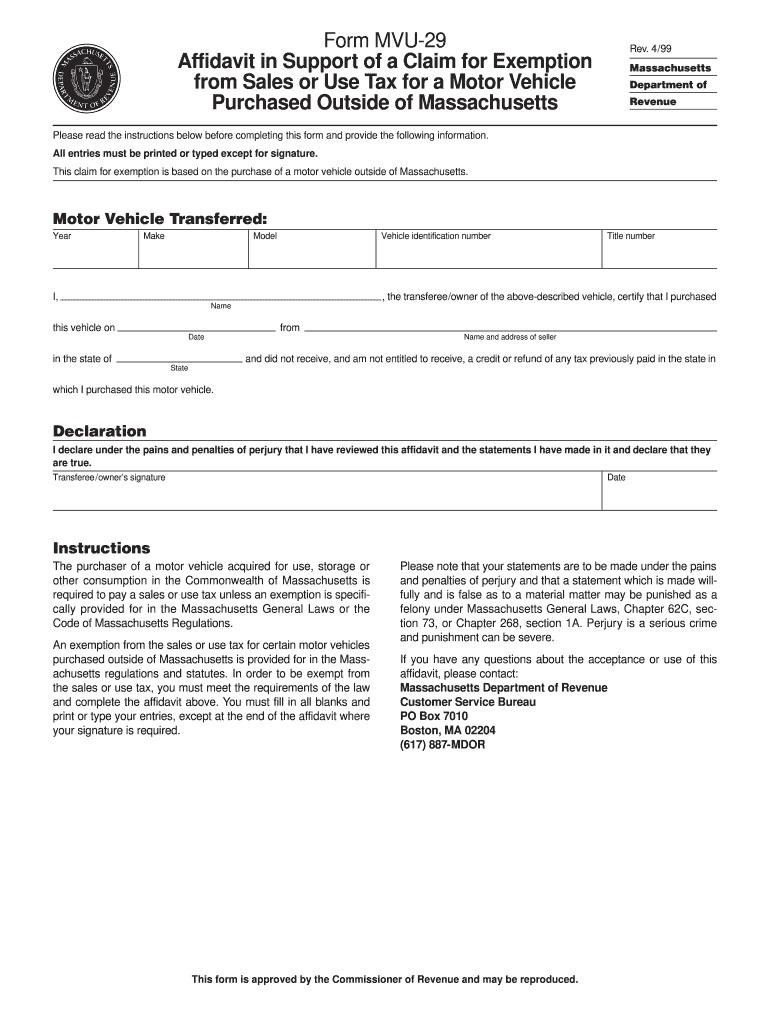
Form MVU-29 Affidavit in Support of a Claim for Exemption from Sales or Use Tax for a Motor Vehicle Purchased Outside of Massachusetts Rev. 4/99 Massachusetts Department of Revenue Please read the instructions below before completing this form and provide the following information. All entries must be printed or typed except for signature. This claim for exemption is based on the purchase of a motor vehicle outside of Massachusetts. Motor Vehicle Transferred Year Make Model Vehicle identificatio.
Loading

Open form follow the instructions

Easily sign the form with your finger

Send filled & signed form or save
How to fill out the MA DoR MVU-29 online
This guide provides clear and comprehensive instructions on filling out the Massachusetts Department of Revenue Motor Vehicle Use Tax Exemption form MVU-29 online. Following these steps will help ensure your application is completed accurately and efficiently.
Follow the steps to fill out the form correctly.
- Click ‘Get Form’ button to obtain the form and open it in the editor.
- Begin by entering the year of the motor vehicle in the designated field. This information is essential to identify the specific vehicle for the tax exemption.
- Next, fill in the make of the motor vehicle. This refers to the manufacturer and is necessary to ensure clarity regarding the vehicle's identity.
- Then, provide the model of the vehicle. Like the make, this detail helps to specify the vehicle for which the exemption is being claimed.
- In the following field, enter the vehicle identification number (VIN). This unique identifier is crucial for processing the exemption claim.
- Fill in the title number associated with the vehicle, which can be found on the vehicle's title document.
- Enter your name as the transferee or owner of the motor vehicle in the applicable field.
- Indicate the date of purchase. This is the date on which the vehicle was acquired.
- Specify the state in which the vehicle was purchased. This is important for establishing the exemption eligibility.
- Finally, you must sign and date the affidavit, declaring the information provided is true under the pains and penalties of perjury.
- After completing all sections of the form, review your entries for accuracy. You can then save changes, download, print, or share the finished form.
Take action now by completing the MA DoR MVU-29 form online to apply for your tax exemption.
Experience a faster way to fill out and sign forms on the web. Access the most extensive library of templates available.
Related content
Please read the instructions below before completing this form and provide the following...
May 1, 1983 — This guide is one in a series of manuals describing the GENPIR software...
Get answers to your most pressing questions about US Legal Forms API.
How to file a modification of child support in Massachusetts?
To file a modification of child support in Massachusetts, begin by determining whether a significant change in circumstances has occurred. Obtain the appropriate forms from the Massachusetts court website or from your local child support agency. Complete the forms accurately and provide supporting documentation as necessary. Utilizing USLegalForms can help streamline this process, ensuring that you meet all requirements related to your petition.
How do I file an amended Massachusetts tax return?
Filing an amended Massachusetts tax return requires you to complete Form 1-Adjusted if you are filing for personal income tax. Gather all relevant documents, including your original return and any necessary new forms. After completing the form, you can file it electronically or mail it to the Massachusetts Department of Revenue (MA DoR). For an efficient experience, check out USLegalForms for guidance and templates.
How do I file an abatement for sales tax in Massachusetts?
To file an abatement for sales tax in Massachusetts, you can use the appropriate form provided by the Massachusetts Department of Revenue (MA DoR). First, gather your supporting documents that justify the abatement. Then, complete the sales tax abatement form and submit it along with any required attachments. If you need assistance, consider using resources like USLegalForms to simplify the process.
How long does it take to get title from mass RMV?
Receiving a title from the Massachusetts RMV can take anywhere from 4 to 6 weeks. This timeframe may vary based on your specific circumstances and the volume of requests received. If you need quicker assistance, consider contacting their customer service or checking your application status online.
How do I get my excise tax refund in Massachusetts?
To claim an excise tax refund in Massachusetts, you must complete the appropriate form from the Massachusetts Department of Revenue. Submit your completed form alongside any required documentation to support your request. Your refund will be processed by the MA DoR, and the timeframe may vary based on processing times.
How long is a Massachusetts resale certificate good for?
A Massachusetts resale certificate is typically valid for a period of three years. It is essential to keep track of its expiration to ensure you can continue making purchases without paying sales tax. Regularly check with the Massachusetts Department of Revenue if you need further clarification.
How do I get a copy of my tax exempt certificate?
You can obtain a copy of your tax exempt certificate by reaching out to the Massachusetts Department of Revenue. They may require information such as your organization’s details and proof of tax-exempt status. For assistance, consider using a service like uslegalforms to help streamline the process.
How do I get a registration abatement at Massachusetts RMV?
To request a registration abatement at the Massachusetts Registry of Motor Vehicles (RMV), you must complete the required forms available on their website. Provide necessary documentation to support your request. This may include details on your vehicle or financial situation, ensuring that you follow the guidelines set by the MA DoR.
How do I get a copy of my Massachusetts resale certificate?
To obtain a copy of your Massachusetts resale certificate, you should contact the Massachusetts Department of Revenue directly. They can guide you through the process of retrieving your certificate. Alternatively, if you’ve used a platform like uslegalforms, you might find your certificate stored within your account.
How do I get a copy of my mass sales tax certificate?
If you need a copy of your Massachusetts sales tax certificate, you can request it from the Massachusetts Department of Revenue. Log in to your online account or contact their customer service for assistance. Ensure you provide any necessary identifying information to expedite the process.
Use professional pre-built templates to fill in and sign documents online faster. Get access to thousands of forms.
If you believe that this page should be taken down, please follow our DMCA take down process here.