Loading
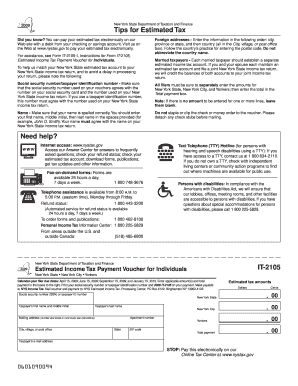
Get Ny It-2105 2009
How it works
-

Open form follow the instructions
-

Easily sign the form with your finger
-

Send filled & signed form or save
How to fill out the NY IT-2105 online
Filling out the NY IT-2105 form accurately is essential for ensuring your estimated income tax payments are processed correctly. This guide provides clear, step-by-step instructions to help you complete the form online with confidence.
Follow the steps to successfully complete your NY IT-2105 form online.
- Press the ‘Get Form’ button to access the NY IT-2105 form and open it in your editor.
- Begin by entering your social security number or taxpayer identification number exactly as it appears on your tax documents. This is crucial for accurate processing.
- Input your name in the designated fields. Enter your first name, middle initial, and last name. Ensure that your name matches the name on your New York State income tax return.
- Specify your estimated tax amounts for New York State, New York City, and Yonkers in the appropriate fields. Be sure to enter these amounts individually and then enter the total payment amount in the total payment box.
- If there are lines where no amount is applicable, leave those fields blank; do not insert a zero.
- Do not staple or clip your payment method to the voucher. Make sure to detach any check stubs before mailing.
- Review all entries for accuracy before saving your form. Once completed, you can save your changes, download, print, or share the completed form as needed.
Complete your documents online today to ensure timely filing and processing.
Get form
Experience a faster way to fill out and sign forms on the web. Access the most extensive library of templates available.
Related links form
Get This Form Now!
Use professional pre-built templates to fill in and sign documents online faster. Get access to thousands of forms.