Loading
Form preview
  • US Legal Forms
  • Other Templates
  • Tax Forms
  • Ohio Tax Forms
  • Oh Rita 37 2022

Get Oh Rita 37 2022-2026

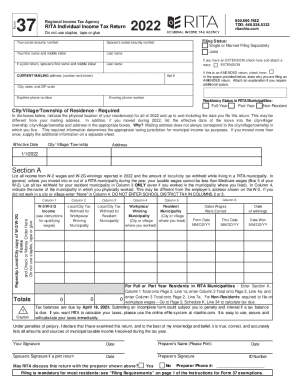
Form37Regional Income Tax AgencyRITA Individual Income Tax Return Do not use staples, tape or glue800.860.7482 TDD: 440.526.5332 Hitachi.com2022Your social security numberSpouses social security numerous.

How it works

  1. Open form

    Open form follow the instructions

  2. Easily sign form

    Easily sign the form with your finger

  3. Share form

    Send filled & signed form or save

How to fill out the OH RITA 37 online

Filling out the OH RITA 37 form can be straightforward with the right guidance. This document serves as a comprehensive guide to help you navigate each section and field of the form, ensuring you complete it accurately and efficiently.

Follow the steps to complete the OH RITA 37 form online.

  1. Use the ‘Get Form’ button to access the OH RITA 37 form and proceed to fill it out in the online editor.
  2. Enter your social security number in the designated field, followed by the same for your spouse if applicable. Fill in your names starting with your first name and middle initial, followed by your last name.
  3. Select your filing status by checking either 'Single or Married Filing Separately' or 'Joint,' depending on your situation. If you have an extension, ensure to check the appropriate box.
  4. Provide your current mailing address, including the apartment number, city, state, and ZIP code. Also include your evening and daytime phone numbers.
  5. Indicate your residency status in RITA municipalities by selecting 'Full-Year,' 'Part-Year,' or 'Non-Resident.'
  6. In the specified sections, indicate the physical location of your residence for all of 2022, including any changes in address if you moved during the year. Provide the effective date of the move.
  7. Complete Section A by listing all income from W-2 wages and W-2G winnings for 2022, along with local/city tax withheld based on the municipality where you resided.
  8. Input totals from columns for W-2/W-2G income and applicable taxes, ensuring accuracy as discrepancies can lead to penalties.
  9. Follow instructions for any amended returns if necessary, providing the reason for amendment and any additional explanation as needed.
  10. Finalize the document by signing and dating the form. If applicable, include your spouse's signature for joint returns, along with the preparer's details if someone else has filled out the form.
  11. Once all sections are complete, make sure to save your changes, then download, print, or share the OH RITA 37 form as required.

Begin completing your documents online with confidence.

Get form

Experience a faster way to fill out and sign forms on the web. Access the most extensive library of templates available.
Get form

Related content

The Regional Income Tax Agency (RITA)
... January 1, 2016 as a result of the enactment of House Bill 5 by the 130th Ohio...
Learn more
The Regional Income Tax Agency (RITA) - Cleveland...
A non- resident must file Form 37 if the non-resident conducted business in a RITA...
Learn more
NETGEAR 341U USB Modem - FTP Directory Listing
session data usage, depending on the format selected in the NETGEAR 341U Manager (...
Learn more

Related links form

Section 8 Portability Form Metro Housing Authority Contra Costa Housing Authority Porting In Form Hud Form Things You Should Know

Questions & Answers

Get answers to your most pressing questions about US Legal Forms API.

Contact support

A late filing penalty may be imposed at the rate of $25 per month (or fraction of a month) that a return, other than an estimated income tax return, remains unfiled. This late filing penalty applies regardless of the liability on the return. The late filing penalty shall not exceed $150 for each failure to timely file.

Employees of most big companies, in Ohio, seldom owe any city tax, at tax time (but they still have to file a city return), because the employer holds out exactly the right amount for both work and resident city, taking into account the credit.

Am I required to file an annual RITA tax return? Resident individuals who are 18 years of age and older must file an annual return, even if no tax is due. Non-resident individuals who have earned income in a RITA municipality that is not subject to employer withholding must file an annual return.

RITA (Regional Income Tax Agency), is an income tax (in addition to the state and county tax) that is based on the city in which you reside AND the city in which you work (which are two different cities for most people). ... RITA is one of those taxes!

Every full-year resident, part year resident and full year nonresident must file an Ohio tax return if they have income from Ohio sources. An exception is for full year nonresidents living in a border state will not have to file an Ohio tax return if wages received are from an unrelated employer.

An Ohio Regional Income Tax Return (Form 37) must be filed by: Resident individuals of a RITA Municipality who are 18 years of age and older, even if no tax is due.

Individual Taxpayers have two options to electronically file their tax returns: FastFile or MyAccount. FastFile is designed for taxpayers who are ready to file and complete their current year tax return in one session. No login or registration is necessary.

Get This Form Now!

Use professional pre-built templates to fill in and sign documents online faster. Get access to thousands of forms.
Get form
If you believe that this page should be taken down, please follow our DMCA take down processhere.
Get OH RITA 37
Get form
  • Adoption
  • Bankruptcy
  • Contractors
  • Divorce
  • Home Sales
  • Employment
  • Identity Theft
  • Incorporation
  • Landlord Tenant
  • Living Trust
  • Name Change
  • Personal Planning
  • Small Business
  • Wills & Estates
  • Packages A-Z
  • Affidavits
  • Bankruptcy
  • Bill of Sale
  • Corporate - LLC
  • Divorce
  • Employment
  • Identity Theft
  • Internet Technology
  • Landlord Tenant
  • Living Wills
  • Name Change
  • Power of Attorney
  • Real Estate
  • Small Estates
  • Wills
  • All Forms
  • Forms A-Z
  • Other Templates
  • Legal Hub
  • About Us
  • Help Portal
  • Legal Resources
  • Blog
  • Affiliates
  • Contact Us
  • Delete My Account
  • Site Map
  • Industries
  • Forms in Spanish
  • Localized Forms
  • State-specific Forms
  • Forms Kit
  • Real Estate Handbook
  • All Guides
  • Notarize
  • Incorporation services
  • For Consumers
  • For Small Business
  • For Attorneys
  • USLegal
  • FormsPass
  • pdfFiller
  • signNow
  • altaFlow
  • DocHub
  • Instapage
Form Packages
  • Adoption
  • Bankruptcy
  • Contractors
  • Divorce
  • Home Sales
  • Employment
  • Identity Theft
  • Incorporation
  • Landlord Tenant
  • Living Trust
  • Name Change
  • Personal Planning
  • Small Business
  • Wills & Estates
  • Packages A-Z
Form Categories
  • Affidavits
  • Bankruptcy
  • Bill of Sale
  • Corporate - LLC
  • Divorce
  • Employment
  • Identity Theft
  • Internet Technology
  • Landlord Tenant
  • Living Wills
  • Name Change
  • Power of Attorney
  • Real Estate
  • Small Estates
  • Wills
  • All Forms
  • Forms A-Z
  • Other Templates
Customer Service
  • Legal Hub
  • About Us
  • Help Portal
  • Legal Resources
  • Blog
  • Affiliates
  • Contact Us
  • Delete My Account
  • Site Map
  • Industries
  • Forms in Spanish
  • Localized Forms
  • State-specific Forms
  • Forms Kit
Legal Guides
  • Real Estate Handbook
  • All Guides
Prepared for you
  • Notarize
  • Incorporation services
Our Customers
  • For Consumers
  • For Small Business
  • For Attorneys
Our Sites
  • USLegal
  • FormsPass
  • pdfFiller
  • signNow
  • altaFlow
  • DocHub
  • Instapage
Social Media
Call us now toll free:
+1 833 426 79 33
As seen in:
© Copyright 1999-2026 airSlate Legal Forms, Inc. 17 Station Street, Suite 303, Brookline, MA 02445
  • Your Privacy Choices
  • Terms of Service
  • Privacy Notice
  • Content Takedown Policy
  • Bug Bounty Program