Get Ky Dor 51a105 2013
How it works
-

Open form follow the instructions
-

Easily sign the form with your finger
-

Send filled & signed form or save
How to fill out the KY DoR 51A105 online
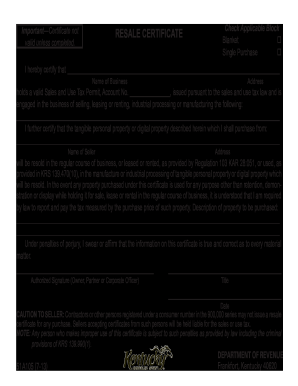
Filling out the Kentucky Department of Revenue Form 51A105, also known as the resale certificate, is a crucial step for businesses engaged in the sale, leasing, or rental of tangible personal property. This guide will walk you through each section of the form to ensure you complete it accurately online.
Follow the steps to successfully complete your resale certificate.
- Click ‘Get Form’ button to obtain the resale certificate and open it in the editor.
- Indicate the type of resale certificate by checking the applicable block: 'Blanket' or 'Single Purchase'.
- In the provided space, enter the name of your business and its complete address.
- Fill in your Sales and Use Tax Permit number in the designated area.
- Describe the nature of your business, including details about what you are selling, leasing, or renting.
- Next, provide the name and address of the seller from whom you will be purchasing tangible or digital property.
- Describe the specific property you intend to purchase under this resale certificate.
- Sign the form as the authorized individual (owner, partner, or corporate officer) and include your title and the date of the signature.
- Once all sections are completed, review the information for accuracy, then save your changes. You may also download, print, or share the completed form as necessary.
Complete your resale certificate online today to ensure compliance with Kentucky sales tax laws.
Get form
To fill out an employee's withholding certificate, begin with the employee’s name, address, and social security number. Next, the employee should indicate their filing status and number of allowances, as described in the KY DoR 51A105 instructions. Ensure the employee reviews their answers for accuracy before submitting the form to HR, as this helps in calculating correct tax withholdings.