Loading
Get Irs 3800 2022
How it works
-

Open form follow the instructions
-

Easily sign the form with your finger
-

Send filled & signed form or save
How to fill out the IRS 3800 online
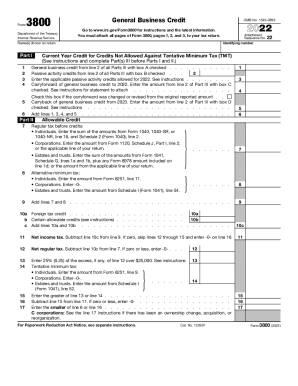
The IRS Form 3800 is used to claim general business credits. Filling out this form online can streamline the process, ensuring you include all necessary information accurately. This guide provides step-by-step instructions to help users navigate the form with confidence.
Follow the steps to successfully complete the IRS 3800 online.
- Click ‘Get Form’ button to obtain the form and open it in the editor.
- Begin with the identifying information at the top of the form, including the name(s) as shown on the return and the identifying number. Make sure these details match your tax return.
- Proceed to Part I, which requires you to report the current year credit for credits not allowed against tentative minimum tax. Fill in any applicable amounts for general business credit and passive activity credits as necessary.
- In Part II, provide details about the allowable credits. Follow the instructions for entering amounts related to alternative minimum tax as applicable for individuals, corporations, estates, and trusts.
- Fill out the relevant sections in Part III based on the specific credits you are claiming. Ensure that you complete a separate Part III for each credit type and attach any required forms.
- After filling in all necessary sections and ensuring accuracy in your entries, review the entire form for completeness.
- Finally, save your changes. You can then choose to download, print, or share the completed form as needed.
Complete your IRS documents online today for a hassle-free filing experience.
Get form
Experience a faster way to fill out and sign forms on the web. Access the most extensive library of templates available.
Step 1: Calculate Your Regular Tax Liability. ... Step 2: Calculate Your Alternative Minimum Tax. ... Step 3: Calculate Your Allowable General Business Credit. ... Step 4: Carry Over Individual Business Tax Credits. ... Step 5: Claim Carryforwards and Carrybacks.
Get This Form Now!
Use professional pre-built templates to fill in and sign documents online faster. Get access to thousands of forms.