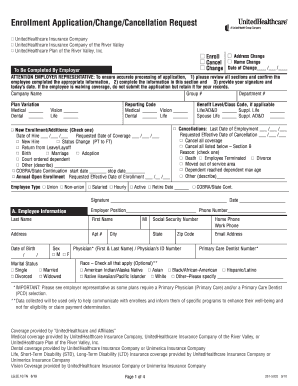
Get United Healthcare Enrollment Application Change Cancellation Request Form
How it works
-

Open form follow the instructions
-

Easily sign the form with your finger
-

Send filled & signed form or save
How to fill out the United Healthcare Enrollment Application Change Cancellation Request Form online
This guide offers clear and concise instructions on filling out the United Healthcare Enrollment Application Change Cancellation Request Form online. Whether you are enrolling, making changes, or requesting cancellation, this step-by-step approach will assist you in completing the form accurately and efficiently.
Follow the steps to complete the form online
- Click the ‘Get Form’ button to access the United Healthcare Enrollment Application Change Cancellation Request Form and open it in the editor.
- Begin with Section A, where you will provide your employee information. Include your last name, first name, address, date of birth, and social security number. Ensure all information is accurate, as this will be critical for processing your application.
- Move to Section B, labeled Family Information. Here, list all individuals who are enrolling, changing, or cancelling their coverage. Be sure to include their names, social security numbers, birthdates, and relationships to you.
- In Section C, follow the prompts to select the types of coverage you or your dependents require, such as medical, dental, and vision. Clearly indicate if the coverage applies to the employee, spouse, or dependents.
- Proceed to Section D to provide information about any other medical coverage. Indicate if you, your spouse, or your dependents are currently covered by another health plan and provide necessary details.
- If applicable, complete Section E to waive coverage. Specify who is declining coverage and the reason for the waiver, such as having other insurance.
- Finally, review your completed form thoroughly for any errors or omissions. After confirming everything is correct, provide your signature and date in Section F, and include any additional required signatures.
- Once the form is filled out, you can save changes, download the form, or print it for submission. Ensure to keep a copy for your records.
Take a moment to complete the United Healthcare Enrollment Application Change Cancellation Request Form online and ensure your healthcare needs are met.
To talk to a real person at UnitedHealthcare, you can call their customer service number listed on their website. Be prepared with your member ID and any necessary documentation, such as the United Healthcare Enrollment Application Change Cancellation Request Form, in case your inquiry relates to enrollment changes. Alternatively, you may use their live chat feature on the website for quick assistance. Employing these options ensures you connect with a representative who can help address your questions thoroughly.
Industry-leading security and compliance
-
In businnes since 199725+ years providing professional legal documents.
-
Accredited businessGuarantees that a business meets BBB accreditation standards in the US and Canada.
-
Secured by BraintreeValidated Level 1 PCI DSS compliant payment gateway that accepts most major credit and debit card brands from across the globe.