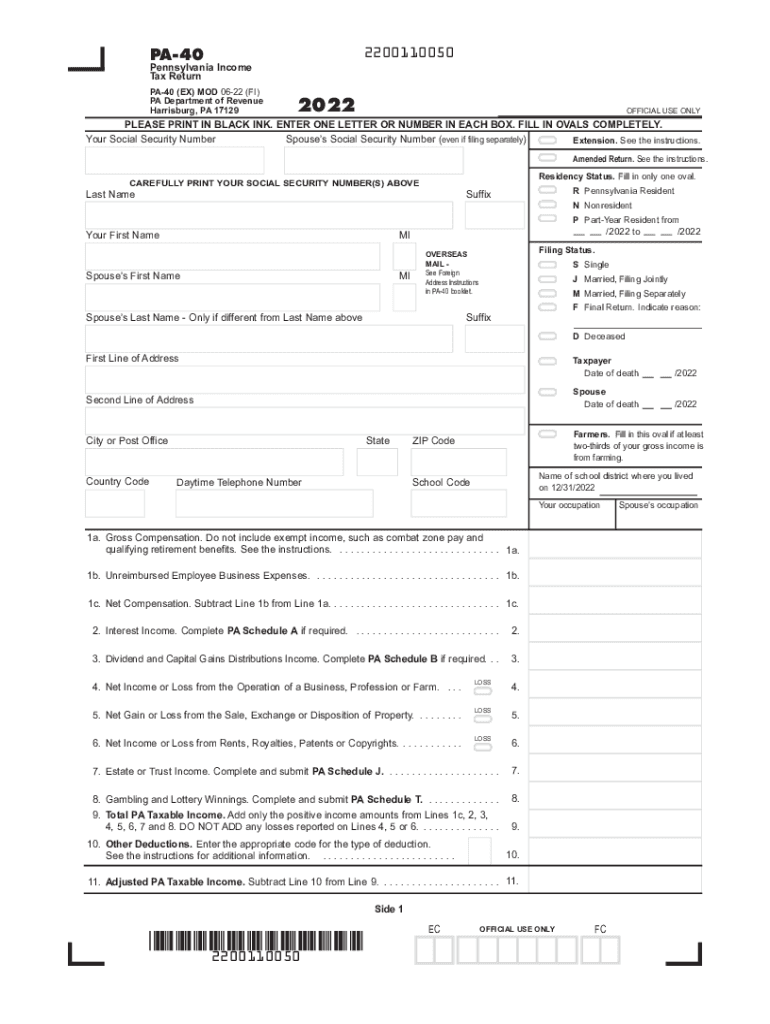
T OFFICIAL USE ONLY 2022 OFFICIAL USE ONLY PLEASE PRINT IN BLACK INK. ENTER ONE LETTER OR NUMBER IN EACH BOX. FILL IN OVALS COMPLETELY. Your Social Security Number Spouse s Social Security Number (even if filing separately) Extension. See the instructions. Amended Return. See the instructions. Residency Status. Fill in only one oval. CAREFULLY PRINT YOUR SOCIAL SECURITY NUMBER(S) ABOVE Last Name R Pennsylvania Resident Suffix N Nonresident Your First Name P Part-Year Resident.
Loading

Open form follow the instructions

Easily sign the form with your finger

Send filled & signed form or save
How to fill out the PA DoR PA-40 online
Filling out the Pennsylvania Income Tax Return, PA-40, online can streamline your tax filing process and ensure accurate submissions. This guide provides a clear, step-by-step approach to help you complete your form efficiently.
Follow the steps to complete your PA DoR PA-40 form online.
- Click ‘Get Form’ button to obtain the document and open it in your preferred online editor.
- Carefully print your Social Security Number in the designated area at the top of the form. If you are filing jointly, include your partner’s Social Security Number as well.
- Indicate your residency status by filling in only one oval: Resident, Nonresident, or Part-Year Resident. Provide the relevant dates if applicable.
- Select your filing status by marking the appropriate oval: Single, Married Filing Jointly, Married Filing Separately, or Final Return.
- Complete your address details accurately, including the first line, second line, city, state, ZIP code, and daytime telephone number.
- For income fields, begin with Line 1a to report your gross compensation. Continue to report any unreimbursed employee business expenses on Line 1b and calculate your net compensation in Line 1c.
- Continue filling out the form by entering amounts for additional income types such as interest, dividends, business income, and more as detailed in the sections up to Line 9.
- Document any deductions and calculate your adjusted taxable income on Lines 10 and 11.
- Proceed to calculate your PA tax liability on Line 12 and report withheld amounts, estimated payments, nonresident taxes, and gather all totals on the necessary lines.
- Complete the Donations section only if you wish to donate part of your refund, entering organization codes and donation amounts as applicable.
- Review the signature section, ensuring all parties required to sign have done so, and include the date.
- After completing the form, save your changes, and utilize options to download, print, or share your completed PA DoR PA-40 form.
Complete your PA DoR PA-40 form online today for a smooth tax filing experience.
Experience a faster way to fill out and sign forms on the web. Access the most extensive library of templates available.
Related content
Use professional pre-built templates to fill in and sign documents online faster. Get access to thousands of forms.
If you believe that this page should be taken down, please follow our DMCA take down process here.