Loading
Get Ga Dor 5347 2018-2026
How it works
-

Open form follow the instructions
-

Easily sign the form with your finger
-

Send filled & signed form or save
How to fill out the GA DoR 5347 online
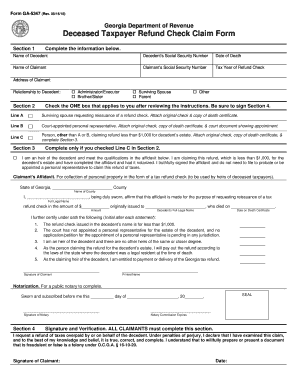
The GA DoR 5347 form is used to claim a refund on behalf of a deceased taxpayer. This guide will walk you through each section of the form to ensure you complete it accurately and efficiently.
Follow the steps to fill out the GA DoR 5347 online.
- Click ‘Get Form’ button to obtain the GA DoR 5347 form and open it in the editor.
- In Section 1, fill in the decedent's full name, social security number, and date of death. Input your name, social security number, address, and your relationship to the decedent.
- Move to Section 2 and check the box that applies to your relationship with the decedent. If you are the surviving spouse, attach the original check and a copy of the death certificate. If you are the court-appointed representative, include the court document showing your appointment.
- If you selected Line C in Section 2, complete Section 3 with the necessary affidavit information. Ensure to initial each statement to affirm its truthfulness and have the affidavit notarized.
- Once all sections are complete, sign and date Section 4, confirming that the claim is true and complete.
- After verifying all information, save your changes, then download, print, or share the completed form as necessary.
Complete your documents online to ensure efficient processing of your claims.