Loading
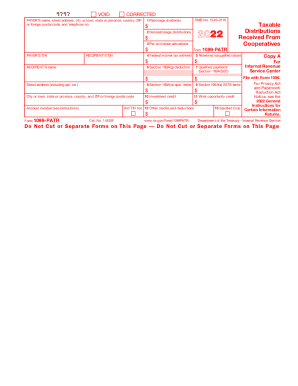
Get Irs 1099-patr 2022-2026
How it works
-

Open form follow the instructions
-

Easily sign the form with your finger
-

Send filled & signed form or save
How to fill out the IRS 1099-PATR online
Filling out the IRS 1099-PATR form online is crucial for reporting taxable distributions received from cooperatives. This guide offers a clear, step-by-step approach to ensure accurate completion of the form.
Follow the steps to accurately complete your IRS 1099-PATR online.
- Click ‘Get Form’ button to access the form and open it in your preferred editor.
- Enter the payer’s name, street address, city or town, state or province, country, ZIP or foreign postal code, and telephone number in the designated fields.
- Provide the payer’s taxpayer identification number (TIN) and the recipient’s TIN as required.
- Fill out the relevant income sections, including boxes for patronage dividends, nonpatronage distributions, per-unit retain allocations, and any federal income tax withheld.
- Complete sections regarding specific deductions, including section 199A(g) deductions and qualified payments, ensuring all amounts are correctly reported in their respective boxes.
- Review all entries for accuracy and completeness, ensuring the information reflects the correct amounts for each category.
- Once all fields are correctly filled out, save your changes and proceed to download, print, or share the completed form as needed.
Start filling out your IRS 1099-PATR form online today for accurate tax reporting.
The 1099-PATR income should be shown as Other Income reported on Form 1040, Schedule 1, Part I, Line 8. You should report it as 1099-PATR profits from your co-op and list the co-op's Tax Payer Identification Number (TIN).