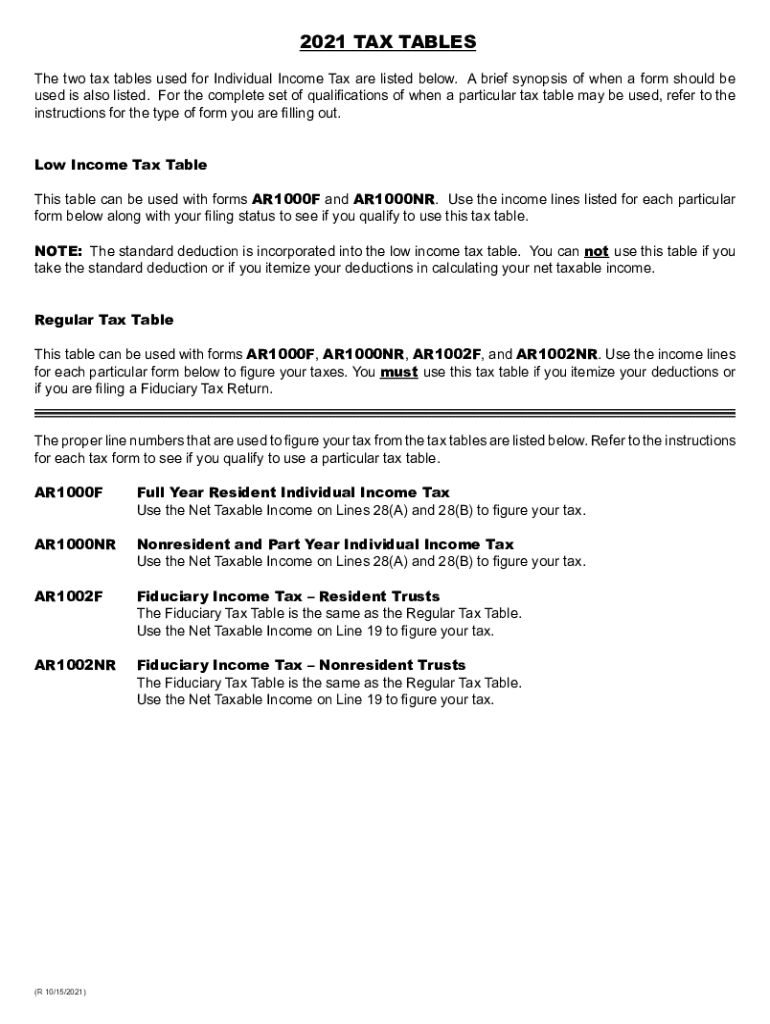
2021 TAX TABLES The two tax tables used for Individual Income Tax are listed below. A brief synopsis of when a form should be used is also listed. For the complete set of qualifications of when a.
Loading

Open form follow the instructions

Easily sign the form with your finger

Send filled & signed form or save
How to fill out the AR Tax Tables online
Filling out the AR Tax Tables is an essential step for users preparing their individual income tax returns in Arkansas. This guide provides clear and concise instructions, ensuring that all users, regardless of their experience level, can confidently complete this process online.
Follow the steps to complete the AR Tax Tables online.
- Click ‘Get Form’ button to obtain the AR Tax Tables and open it in your preferred online editor.
- Review the Low Income Tax Table and determine if you qualify based on your total income and filing status. Ensure that your total income falls within the limits specified before proceeding.
- If you are using the Regular Tax Table, identify your net taxable income from Line 28 based on your filing status. Cross-reference this amount with the corresponding tax amounts listed in the table.
- Complete any necessary calculations by subtracting the standard deduction from your adjusted gross income if you use the Regular Tax Table.
- Once all necessary fields are filled and calculations completed, review your information for accuracy.
- Finally, save your changes, download, print, or share the completed form as necessary.
Start filling out the AR Tax Tables online today and ensure your tax submission is accurate and compliant.
Experience a faster way to fill out and sign forms on the web. Access the most extensive library of templates available.
Related content
Title, Posted. AR4506 Request for Copies of Arkansas Tax Return(s), 03/07/2018...
Deduct the Personal Exemption Credit to determine Income Tax to be withheld. See the...
7.6.1.1 The AFC Tax Table; 7.6.1.2 Sample Code to Retrieve Taxes ..... 02/23/ 2018 0051...
Get answers to your most pressing questions about US Legal Forms API.
How is a bonus taxed in 2019?
While bonuses are subject to income taxes, they don't simply get added to your income and taxed at your top marginal tax rate. Instead, your bonus counts as supplemental income and is subject to federal withholding at a 22% flat rate.
What is the tax rate on bonuses in 2019?
The first $1 million is subject to a 22% withholding rate as of 2019. Just like that, your bonus shrinks to $780,000 because $220,000 goes to the IRS right off the top. Now brace yourself.
What is the tax rate on bonuses in Arkansas?
As an employer in Arkansas, you have to pay unemployment insurance to the state. The 2019 rates range from 0.1% to 14% on the first $10,000 in wages paid to each employee in a calendar year. If you're a new employer (congratulations on getting started!), you pay a flat rate of 2.9%.
Can you pay Arkansas state taxes online?
The State of Arkansas allows payments to be made for Individual Income Tax liabilities by Credit Card. The credit card transactions are made through the Official Payments Corporation. (1-800-272-9829) or over the internet by visiting www.officialpayments.com and clicking the "Payment Center Link".
Is Arkansas a high tax state?
Arkansas' state tax rate is 6.50 percent, ranking No. 9 overall, but the state comes in at No. 2 when combined with an average local tax rate of 2.69 percent, bringing the combined rate to 9.19 percent. ... For example, Washington State has high sales taxes but no income tax; Oregon has no sales tax but high income taxes.
What is Arkansas State Income Tax percent?
Arkansas' state income tax rates do not change based of your marital status. Instead the state's system is based on an individual's income level. There are seven tax brackets with rates ranging from 0.9% on your first $4,399 up to a rate of 6.9% on income above $77,401.
What is the Arkansas standard deduction?
The standard deduction in Arkansas is lower than the federal standard deduction. For most filers, the deduction is $2,200, but for married persons filing jointly, it is twice that amount.
How do I figure out my take home pay?
The amount of your gross pay. If you earn a fixed salary, this is easy to figure out. Just divide the annual amount by the number of periods each year. If you are paid hourly, multiply that rate by 40 hours to determine your weekly pay.
Is it better to claim 1 or 0 on your taxes?
Claiming 1 allowance means that a little less tax will be withheld from your paycheck than if you claimed 0 allowances. Here's when I would recommend you claim one allowance. If you're filing status is single this is the safe choice. ... Though it will be smaller than if you claim zero allowances.
What is the tax bracket for 2019?
The new rates, which relate to the tax return you'll file in 2019, are 10 percent, 12 percent, 22 percent, 24 percent, 32 percent, 35 percent and 37 percent. NerdWallet broke down the 2018 and 2019 federal income tax brackets. Below are the 2018 brackets, which relate to the tax return you're filing in 2019.
Use professional pre-built templates to fill in and sign documents online faster. Get access to thousands of forms.
If you believe that this page should be taken down, please follow our DMCA take down process here.
This form is available in several versions. Select the version you need from the drop-down list below.