Loading
Get Ks K-59 2016
How it works
-

Open form follow the instructions
-

Easily sign the form with your finger
-

Send filled & signed form or save
How to fill out the KS K-59 online
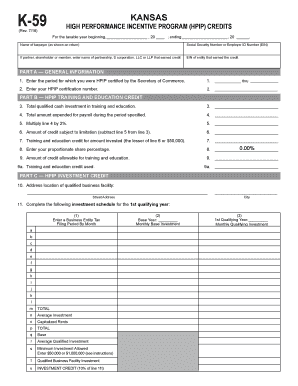
The KS K-59 form is essential for claiming credits under the High Performance Incentive Program (HPIP) in Kansas. This guide provides detailed, step-by-step instructions to help you complete the form accurately online.
Follow the steps to successfully complete the KS K-59 form online.
- Press the ‘Get Form’ button to access the KS K-59 form and open it in your preferred online document editor.
- Enter the taxable year period in the designated fields at the top of the form. This includes the start and end dates of the taxable year.
- Provide the taxpayer's name as it appears on the tax return, along with the relevant Social Security Number or Employer ID Number (EIN). If applicable, enter the name of the partnership or corporation that earned the credit.
- Complete Part A by entering the HPIP certification period as certified by the Secretary of Commerce and your HPIP certification number.
- In Part B, report your total qualified cash investments in training and education, as well as the total amount spent on payroll. Perform the required calculations to determine the allowable training and education credits.
- Move to Part C, where you will enter the address of the qualified business facility and fill out the investment schedule, detailing the required investment information.
- In Part D, provide information about jobs created or retained due to the qualified business facility investment, including specifics about payroll and additional revenue.
- Lastly, complete Part E by detailing the carry forward schedule for any credits not used in the current year. Ensure all fields are filled out accurately.
- Once all sections are completed, review your entries for accuracy, and then save your changes. You can download, print, or share the completed form as needed.
Complete your KS K-59 form online today to take advantage of available tax credits.
Get form
Experience a faster way to fill out and sign forms on the web. Access the most extensive library of templates available.
The K3 tax form is designed for pass-through entities in Kansas to report income, deductions, and tax credits. It plays an essential role in ensuring that income is accurately taxed at the individual level. If you're navigating these complexities, consider using the resources available on the uslegalforms platform to streamline the process and ensure accuracy.
Get This Form Now!
Use professional pre-built templates to fill in and sign documents online faster. Get access to thousands of forms.