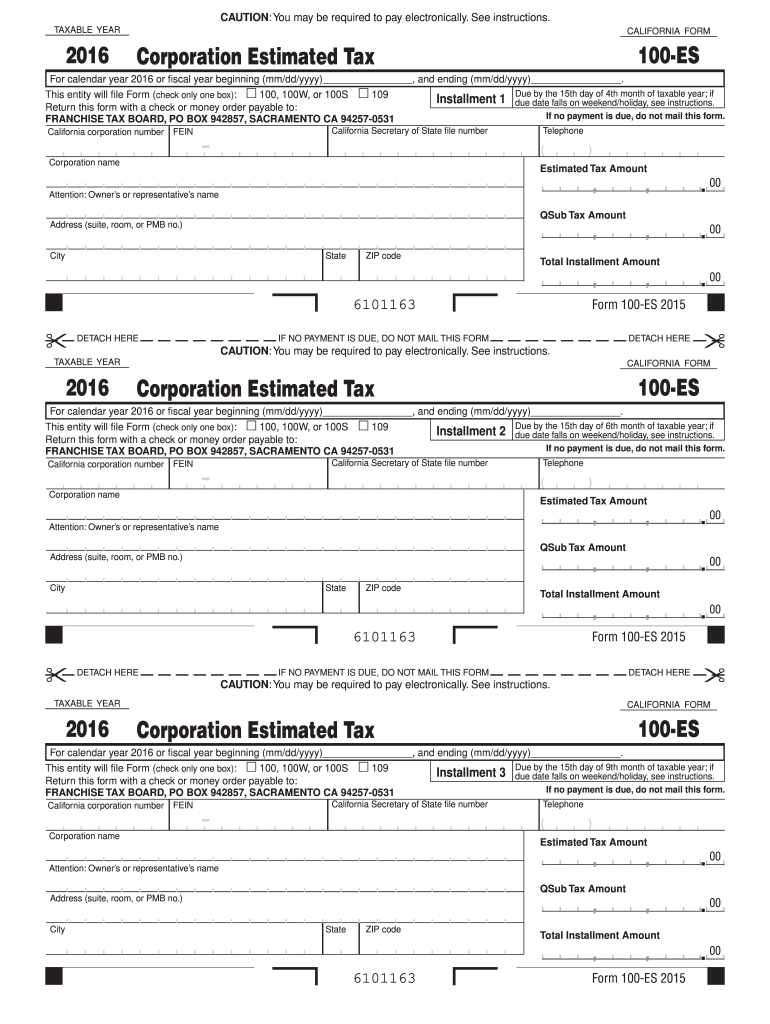
Ce. Go to ftb.ca.gov for more information. You can s schedule your payments up to one year in advance. Do not mail this form if you use Web Pay. DETACH HERE IF NO PAYMENT IS DUE, DO NOT MAIL THIS FORM DETACH HERE CAUTION: You may be required to pay electronically. See instructions. TAXABLE YEAR 2016 CALIFORNIA FORM 100-ES Corporation Estimated Tax For calendar year 2016 or fiscal year beginning (mm/dd/yyyy) , and ending (mm/dd/yyyy) . by the 15th.
Loading

Open form follow the instructions

Easily sign the form with your finger

Send filled & signed form or save
How to fill out the CA FTB 100-ES online
Filling out the CA FTB 100-ES form helps corporations calculate and pay their estimated taxes in California. This guide will walk you through each section of the form in a clear and user-friendly manner, ensuring a streamlined online experience.
Follow the steps to complete the CA FTB 100-ES online.
- Click ‘Get Form’ button to retrieve the form and open it in the designated online editor.
- Enter the taxable year at the top of the form. Ensure to specify whether it is for the calendar year 2016 or a fiscal year by providing the starting and ending dates.
- Check only one box that corresponds to the form you intend to file: Form 100, 100W, 100S, or 109.
- Fill in your California corporation number and Federal Employer Identification Number (FEIN). These numbers are essential for tax identification.
- Provide the California Secretary of State file number to further establish your corporation's identity.
- Enter your corporation's name, along with the attention of the owner or authorized representative.
- List the estimated tax amount in the respective field. If applicable, enter the QSub tax amount.
- Fill in your business address, including suite, room, or PMB number, city, state, and ZIP code.
- Calculate and enter the total installment amount due for the estimated tax.
- Once all necessary fields are filled out, review your entries for accuracy. You can then save your changes, download the form, or print it out for your records.
Complete your CA FTB 100-ES online for a simplified tax filing experience.
Experience a faster way to fill out and sign forms on the web. Access the most extensive library of templates available.
Related content
Use Form 100-ES to figure and pay estimated tax for a corporation. Estimated tax is the...
This guide provides an overview of the basis of California tax. It intends to help you...
100 – (30 and. 40 Series). 180 – (20 and. 27-180 only). N = Non-Hold. Open. A =...
Get answers to your most pressing questions about US Legal Forms API.
How to calculate California corporate estimated tax payments?
Calculating California corporate estimated tax payments involves determining your expected taxable income for the year. You can find guidance and worksheets on the CA FTB 100-ES form to assist with your calculations. Generally, you'll estimate your tax liability based on your prior year's taxes or anticipated income. This estimation requires careful planning to ensure compliance and avoid penalties.
How to fill out an Employee Withholding Exemption Certificate?
To fill out an Employee Withholding Exemption Certificate, begin by obtaining the correct form, which can often be found on the CA FTB website. Ensure you accurately provide your personal information, and clearly indicate any exemptions you qualify for under the current tax law. Remember to review the filling instructions carefully to avoid common mistakes. Utilizing this form properly can help in managing your tax withholdings effectively.
What is form 100/100S, 100W, or 100X?
Form 100/100S, 100W, and 100X are various tax forms used for reporting income and paying franchise taxes in California. Form 100 is for traditional corporations, while Form 100S is specifically for S corporations. Form 100W relates to exempt organizations, and 100X is utilized for amended returns. Understanding these forms is crucial for compliance, especially when filling out the CA FTB 100-ES.
Where do I file form 100 for FTB?
You can file form 100 for the California Franchise Tax Board either online through their website or by mailing a paper form. The online method is often faster and more convenient, allowing for quicker processing times. You should be sure to include the CA FTB 100-ES when submitting your forms to keep your tax situation in order. Choosing the right method of filing helps streamline your tax obligations.
What is the 100 es estimated income tax in California?
The 100 ES estimated income tax in California represents the advance tax payments that individuals or businesses must submit throughout the year. This is particularly important if you expect to owe $500 or more when filing your taxes. By using the CA FTB 100-ES form, you can calculate these estimated payments accurately and submit them on time to avoid hefty fines. Knowing your estimated income tax obligations helps you manage your finances better.
What is a 1099r tax form?
R tax form reports distributions from pensions, annuities, retirement plans, or other retirement accounts. It is essential for recipients of these distributions to calculate their tax obligations correctly. If you're receiving retirement funds, this form provides necessary information for your income tax return. Remember that while it is separate from the CA FTB 100ES, they both play vital roles in your overall tax reporting.
What is the tax form for 100es?
The tax form for 100-ES is specifically designed for corporate estimated tax payments in California. This form is vital for corporations that need to prepay taxes to avoid penalties. By submitting Form 100-ES, you demonstrate your commitment to meeting tax obligations. Ensure you fill it out accurately for effective tax compliance and management.
Where do I mail my estimated tax payments to the franchise tax board?
To mail your estimated tax payments to the California Franchise Tax Board, you should send them to the appropriate address listed for the type of payment you are making. For personal estimated tax payments using the CA FTB 100-ES, be sure to check the latest guidelines and addresses on the official FTB website. Proper mailing ensures your payments are processed on time and reduces issues with your account.
What is form 100es?
Form 100-ES is the Estimated Tax for Corporations in California, allowing businesses to prepay their tax liabilities. This form enables corporations to make estimated tax payments based on expected yearly income. By using Form 100-ES, you can avoid penalties for underpayment and ensure smoother financial planning for your corporation. It's an important tool for managing your tax responsibilities effectively.
Who must file California form 100?
California form 100 is required for corporations operating within the state. If your business generates income and operates in California, filing this form is mandatory, regardless of your organization type. It's crucial for corporate tax reporting and ensures you meet obligations with the California Franchise Tax Board. Don't forget that the CA FTB 100-ES relates to estimated tax payments for individuals and should also be considered.
Use professional pre-built templates to fill in and sign documents online faster. Get access to thousands of forms.
If you believe that this page should be taken down, please follow our DMCA take down process here.
This form is available in several versions. Select the version you need from the drop-down list below.