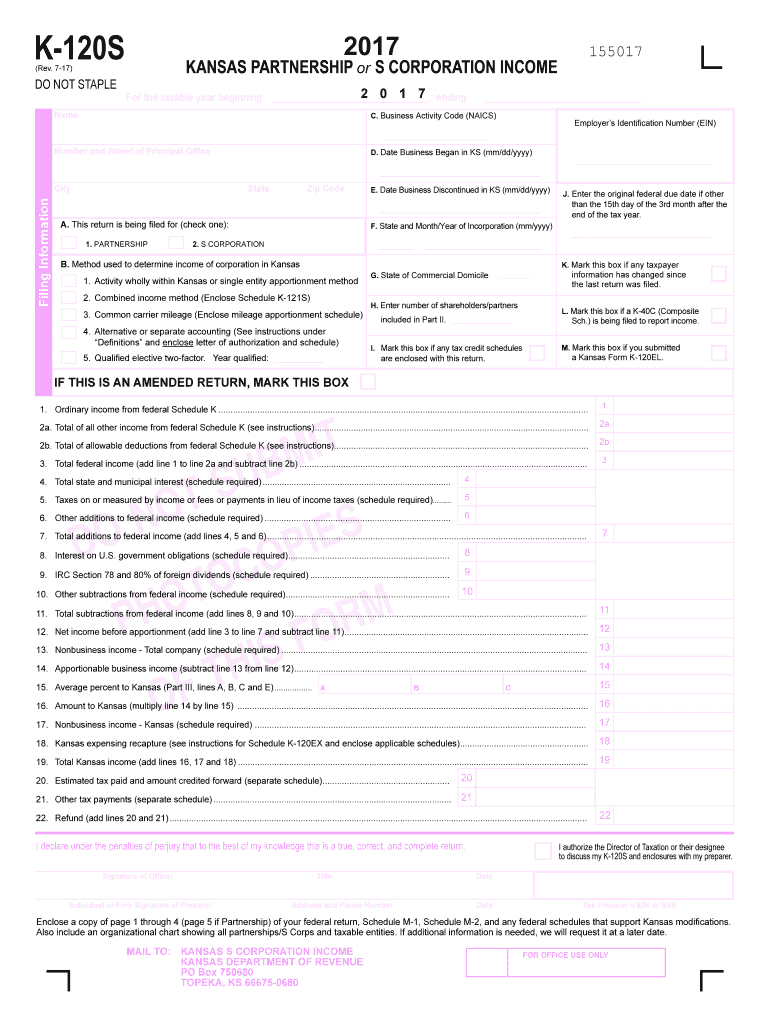
He fourth month following the end of your tax year. Conformity to Federal Due Dates: Kansas small business returns are due on or before the 15th day of the fourth month following the close of the taxable year. If the federal original due date is not the 15th day of the third month after the close of a taxable year, complete item J on the front of Form K-120S, and enclose a letter indicating the authorizing federal statute. Do not enter your extended due date. Amended Returns: If the amende.
Loading

Open form follow the instructions

Easily sign the form with your finger

Send filled & signed form or save
How to fill out the KS DoR K-120S online
Filing the Kansas Department of Revenue K-120S form online can streamline your business tax reporting process. This guide provides step-by-step instructions for entering the necessary information accurately, ensuring compliance and efficiency.
Follow the steps to fill out the KS DoR K-120S form online.
- Press the ‘Get Form’ button to obtain the form and open it in your preferred online editor.
- Indicate whether the return is for a partnership or S corporation by checking the appropriate box.
- Fill in the beginning and ending dates for the tax year, as well as the name and address of the entity.
- Enter the Employer Identification Number (EIN) and the NAICS code as provided in relevant publications.
- Complete the income section by adding the federal ordinary income, total of all other income, and applicable deductions.
- Calculate total additions and subtractions to federal income, ensuring to provide the necessary supporting schedules.
- Complete the apportionment section by entering the applicable percentages for Kansas and calculating the amount to be reported.
- Accurately fill in the partner’s or shareholder’s distribution of income in Part II and ensure that all details are correct.
- Sign and date the return, confirming that all information provided is true and complete.
- Once finished, save your changes, and either download, print, or share the form per your requirements.
Begin your K-120S online filing now to make your business tax report seamless and efficient.
Experience a faster way to fill out and sign forms on the web. Access the most extensive library of templates available.
Related content
A Partnership return (K-120S) must be completed by any business partnership, syndicate...
by J Scharwächtera · Cited by 1 — ABSTRACT. The formation and evolution of young...
Você poderá conectar um equipamento externo na tomada para CD Changer localizada na...
Get answers to your most pressing questions about US Legal Forms API.
When should I receive my K-1?
You should receive your K-1 by March 15, assuming the entity that issued it filed on time. This timeframe allows you to incorporate the information into your tax return accurately. If you haven't received it by this date, it’s important to follow up with the issuer. Utilizing tools and services from platforms like uslegalforms can help manage due dates and document requests efficiently.
How do I get a copy of my K-1?
To obtain a copy of your K-1, contact the entity that issued it to you, such as a partnership or S corporation. They are responsible for sending you this form, often by the end of March. If you do not receive it, reach out promptly to avoid complications during tax filing. Additionally, resources on uslegalforms can guide you in managing your financial documents effectively.
Can I file my taxes without my K-1?
Filing taxes without your K-1 can lead to issues, as it reports critical income and tax deductions. It is generally advised to wait until you have all necessary documents, including the K-1. If you're in a hurry, consider filing for an extension but be mindful of potential penalties. Platforms like uslegalforms can help you understand your obligations and provide the necessary forms for extensions.
How do I get a copy of my schedule 1?
You can get a copy of your Schedule 1 by accessing your tax return documents. If you filed electronically, you may download a copy from your e-filing service. If you need it from paper records, contact the IRS or your tax preparer for assistance. Utilizing services like uslegalforms can help you maintain a system for tracking and retrieving important tax documents like Schedule 1.
How can I get my IRS transcripts immediately?
To obtain your IRS transcripts immediately, visit the IRS website and use their online request tool. You can also call the IRS directly to request them, but online access is typically faster. Ensure you have your personal information handy and be prepared to verify your identity. For organized management of your financial documents, consider using uslegalforms, which can streamline your paperwork.
Can I set up an S corp by myself?
Yes, you can set up an S corporation by yourself, but the process requires attention to detail. You will need to file the appropriate paperwork, including the KS DoR K-120S form, with the state. It's essential to follow all legal requirements, as mistakes can lead to delays or complications. For assistance, consider legal form platforms like uslegalforms, which provide guidance and ready-to-use templates.
Where can I pick up Kansas tax forms?
You can pick up Kansas tax forms, including the KS DoR K-120S, at local tax offices, libraries, and some government buildings. Additionally, you can download these forms conveniently from the Kansas Department of Revenue website. Having access to these forms online saves you time and makes it easier to get started on your tax preparation. Consider using platforms like uslegalforms for printable versions and related resources.
What is a K-120S form?
The KS DoR K-120S form is a single-member LLC tax return for Kansas residents. It allows you to report income, deductions, and credits related to your business. By using this form, you ensure compliance with state tax regulations. It is crucial for both individuals and business owners managing their tax filings efficiently.
What is the 2% rule for S Corp?
The 2% rule for S Corporations indicates that shareholders who own 2% or more of the company must report their allocable share of the company’s income on their personal tax returns. This rule plays a crucial role in how distributions are treated for tax purposes. Understanding this concept is essential for accurately navigating the KS DoR K-120S and ensuring compliance.
Can I fill out my own K-1?
Filling out your own K-1 isn't the usual scenario, as the entity is responsible for issuing the K-1 to shareholders or partners. However, you can review the K-1 details for accuracy before submitting it with your tax return. Familiarizing yourself with the KS DoR K-120S requirements will help streamline your overall tax process.
Use professional pre-built templates to fill in and sign documents online faster. Get access to thousands of forms.
If you believe that this page should be taken down, please follow our DMCA take down process here.
This form is available in several versions. Select the version you need from the drop-down list below.