Loading
Get Fl Case Management Report
How it works
-

Open form follow the instructions
-

Easily sign the form with your finger
-

Send filled & signed form or save
How to fill out the FL Case Management Report online
Completing the FL Case Management Report online is an essential step in managing your case effectively. This guide will provide you with clear instructions on how to fill out each section of the report, ensuring you have all necessary information accurately recorded.
Follow the steps to complete the FL Case Management Report online.
- Click ‘Get Form’ button to access the FL Case Management Report and open it in the editor.
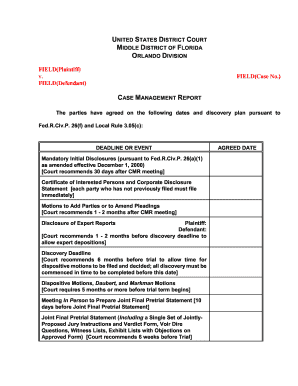
- Begin by entering the names of the parties involved in the case in the designated fields marked 'Plaintiff' and 'Defendant.' Also, provide the case number in the appropriate field.
- In the 'Deadline or event' section, input the agreed dates for mandatory initial disclosures, motions to add parties, disclosure of expert reports, and discovery deadlines. Fill this section according to the agreements reached by both parties.
- Record the estimated length of the trial and whether it will be a jury or non-jury trial in the specified fields.
- Complete the mediation section by entering the deadline, mediator's name, address, and telephone number. Indicate if mediation is mandatory.
- In the 'Meeting of Parties in Person' section, note the date and place where the meeting was held, along with the names of the attendees.
- Under 'Pre-Discovery Initial Disclosures of Core Information,' check the appropriate box to indicate if the parties have exchanged information or agree to exchange it. Fill in the agreed date for disclosure.
- In the electronic discovery section, indicate whether either party anticipates disclosure of electronically stored information. Provide details on the discussed issues regarding ESI.
- For the 'Agreed Discovery Plan' portion, ensure you fill out whether a Certificate of Interested Persons and Corporate Disclosure Statement has been filed, including any amendments.
- Review all fields for completeness and accuracy before saving your changes. You can then download, print, or share the completed form as needed.
Complete the FL Case Management Report online today to streamline your case management process.
Related links form
Typically, the attorney for a party in a Florida case files the case management statement. However, if a party is representing themselves, they have the option to file the statement directly. It's important that this statement aligns with the FL Case Management Report to provide an accurate picture of the case status.