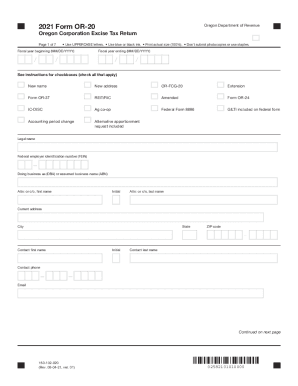
Don t submit photocopies or use staples. Fiscal year beginning (MM/DD/YYYY) / Fiscal year ending (MM/DD/YYYY) / / / See instructions for checkboxes (check all that apply) New name New address OR-FCG-20 Extension Form OR-37 REIT/RIC Amended Form OR-24 IC-DISC Ag co-op Federal Form 8886 GILTI included on federal form Accounting period change Alternative apportionment request included Legal name Federal employer identification number (FEIN) Doing business as (DBA) o.
Open form follow the instructions
Easily sign the form with your finger
Send filled & signed form or save
How to use or fill out the OR OR-20 online
The OR OR-20 is the Oregon Corporation Excise Tax Return form required for corporations operating in Oregon. This guide provides step-by-step instructions to help you accurately complete the form online.
Follow the steps to fill out the OR OR-20 online.
- Click ‘Get Form’ button to obtain the OR OR-20 document and open it in the editor.
- Enter the fiscal year beginning and ending dates in the MM/DD/YYYY format. This indicates the tax period for which you are filing.
- Fill in the legal name of the corporation, along with the federal employer identification number (FEIN). If applicable, include the doing business as (DBA) or assumed business name (ABN).
- Only complete questions A through D if this is your first return, or if there have been changes during the tax year. This includes information about incorporation and business activity location.
- Enter any additions or subtractions from schedule computations as directed by the form's instructions.
- Sign and date the form, providing your title and the details of any preparer if someone else assisted in filling it out.
Complete your OR OR-20 form online today to ensure timely filing and compliance.
Experience a faster way to fill out and sign forms on the web. Access the most extensive library of templates available.
Related content
Form OR-20-V, Oregon Corporation Tax Payment Voucher and Instructions .... Form OR-20...
Dec 20, 2017 - In the early morning hours of December 20, 2017, the Senate passed H.R.1...
Get answers to your most pressing questions about US Legal Forms API.
How do I use TurboTax step by step?
Step 1 -> Tell TurboTax about your tax situation. ... Step 2 -> Select Your Plan. ... Step 3 -> Tell them More About Yourself & Your Financial Picture. ... Step 4 > Enter in self-employment information. ... Step 5 -> Finish entering in your personal information.
When should I file my first tax return?
For individuals, the personal income tax filing deadline is April 30th. If you are self-employed, or earn self-employed income, you must file your taxes on or before June 17, 2019.
When can you start filing taxes 2019?
Filing a tax year 2018 tax return will start after January 1, 2019. However, the IRS will probably not start to accept any 2018 tax return until late January 2019.
How do I file taxes for the first time?
Collect required documents such as TDS certificates (Form16/16A), capital gains statements. ... Download and check Form 26AS. ... Rectify the errors in Form 26AS, if any. ... Compute total income for the financial year.
How do I fill out a tax form for work?
Step 1: Your Information. ... Step 2: Your SSN. ... Step 3: Your Marital Status. ... Step 4: Name Changes. ... Step 5: Total Allowances.
What is needed for tax return?
Income documentation The first piece of information you'll need to start preparing your tax return is the total amount of income you earned during the year. Any employer that pays your salary must send you a W-2 form each year that reports your annual income and how much tax was withheld.
How do I fill in my tax return online?
Login to e-Filing website with User ID, Password, Date of Birth /Date of Incorporation and Captcha. Go to e-File and click on "Prepare and Submit ITR Online". ... Select the Income Tax Return Form ITR 1/ITR 4S and the Assessment Year. Fill in the details and click the "Submit" button.
How do I fill in a tax return?
Login to e-Filing website with User ID, Password, Date of Birth /Date of Incorporation and Captcha. Go to e-File and click on "Prepare and Submit ITR Online". ... Select the Income Tax Return Form ITR 1/ITR 4S and the Assessment Year. Fill in the details and click the "Submit" button.
How do you fill out a tax return?
Step 1: Download the Form. Step 2: Fill-in your personal information. ... Step 3: Determine How Many Exemptions You're Eligible For. ... Step 4: Lines 7-22: (Income) Step 5: Lines 23-37 (Deductions to Arrive at Your Adjusted Gross Income ) ... Step 6: Lines 38-55 (Tax and Credits) ... Step 7: Lines 56-60 (Other Taxes)
How many allowances should I claim if I'm single?
If you're a single filer with one job and no dependents, you should claim either one or two allowances. One allowance will most likely leave you getting a refund. Claiming two allowances will get you closer to paying your exact tax liability (i.e. how much you owe in taxes).
Use professional pre-built templates to fill in and sign documents online faster. Get access to thousands of forms.
If you believe that this page should be taken down, please follow our DMCA take down process here.
This form is available in several versions. Select the version you need from the drop-down list below.