Loading
Get Mo Mo-5090 2021-2026
How it works
-

Open form follow the instructions
-

Easily sign the form with your finger
-

Send filled & signed form or save
How to fill out the MO MO-5090 online
Filling out the MO MO-5090 requires careful attention to detail to accurately report your net operating loss modifications. This guide provides clear, step-by-step instructions to help you complete the form with confidence and accuracy.
Follow the steps to effectively fill out the MO MO-5090 online.
- Click ‘Get Form’ button to access the MO MO-5090 online and open it in your preferred document editor.
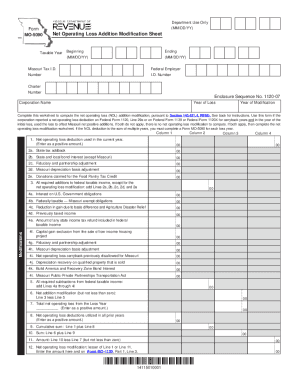
- Enter your Missouri Tax ID number in the designated field. This is essential for identifying your corporation within the state's taxation system.
- Fill in your Federal Employer Identification Number (EIN) in the appropriate box. This number is crucial for federal tax purposes.
- Provide the name of your corporation in the specified section. Ensure that it matches the name used in your other tax filings.
- Indicate the beginning and ending dates of the taxable year for which the net operating loss (NOL) is being reported. This should be formatted as MM/DD/YY.
- On Line 1, enter the net operating loss deduction from the applicable federal return (Federal Form 1120, Line 29a). Ensure the amount is entered as a positive figure.
- Complete Lines 2a to 2e by entering any required additions from the loss year to federal taxable income, as specified in the form instructions.
- Calculate the total required additions by summing Lines 2a to 2e and enter this total on Line 3.
- For Lines 4a to 4l, enter all necessary subtractions from federal taxable income. Ensure each entry reflects the correct adjustments as directed.
- Add together the amounts from Lines 4a to 4l and record this total on Line 5.
- To find the net addition modification, subtract Line 5 from Line 3 on Line 6. Ensure that the result is not less than zero.
- Document the total net operating loss from the loss year on Line 7. Enter the amount as a positive figure.
- Indicate the total amount of net operating loss deductions utilized in prior years on Line 8, again entering this as a positive figure.
- Complete Line 9 by summing Line 1 and Line 8. Record this total.
- Add your results from Line 6 and Line 9, and enter this total on Line 10.
- Calculate Line 11 by subtracting Line 7 from Line 10, ensuring the result is not less than zero.
- On Line 12, enter the lesser amount of Line 1 or Line 11. This figure will also need to be reported on Form MO-1120, Part 1, Line 3.
- Once you have filled out all sections, save your changes. You can download, print, or share the completed form as needed.
Complete your documents online to ensure accuracy and compliance.
How much does it cost to start a Missouri LLC? The Missouri Corporations Division charges a $50 fee for filing Articles of Organization online. There's also a $1.25 credit card processing fee or a $0.50 eCheck fee. Filing with a paper form comes with a much higher price tag a $105 filing fee.