Loading
Get Pa Pa-1000 2021-2026
How it works
-

Open form follow the instructions
-

Easily sign the form with your finger
-

Send filled & signed form or save
How to fill out the PA PA-1000 online
The PA PA-1000 form is essential for individuals seeking property tax or rent rebates in Pennsylvania. This guide provides detailed instructions on how to complete the form online, ensuring you can efficiently submit your claim.
Follow the steps to fill out the PA PA-1000 form online.
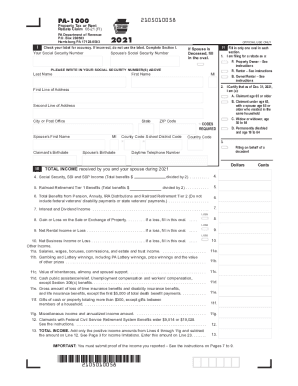
- Click the ‘Get Form’ button to access the PA PA-1000 form and open it on your device.
- In Section I, enter your Social Security Number and your spouse's Social Security Number if applicable. Ensure to use accurate information.
- Complete your name, address, city, state, ZIP code, and county code accurately.
- Select the appropriate option regarding your status as a property owner, renter, or both by filling in the corresponding oval.
- Certify your age or status by selecting the correct option as of December 31, 2021, and provide the necessary birthdates.
- Enter your total income and other financial details as prompted in Section II, making sure to submit proof of income as required.
- For property owners, input your total property tax. For renters, input your total rent paid and calculate your rent rebate.
- If applicable, fill in your banking information for direct deposit, ensuring it is within the U.S.
- Review all entered information for accuracy, sign the form, and ensure any necessary attachments are included.
- Save your changes, download a copy of the completed form, print it if required, and share it as needed for submission.
Complete your PA PA-1000 form online today to ensure you receive your property tax or rent rebate!
www.revenue.pa.gov The Property Tax/Rent Rebate program benefits eligible Pennsylvanians age 65 and older; widows and widowers age 50 and older; and people with disabilities age 18 and older. The income limit is $35,000 a year for homeowners and $15,000 annually for renters.