Loading
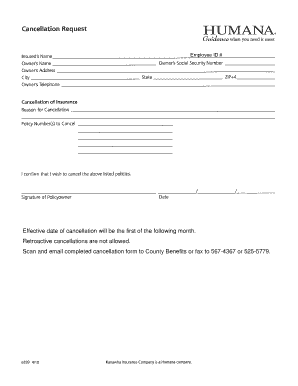
Get Humana Cancellation Form 2020-2026
How it works
-

Open form follow the instructions
-

Easily sign the form with your finger
-

Send filled & signed form or save
How to fill out the Humana Cancellation Form online
Filling out the Humana Cancellation Form online can seem daunting, but with clear guidance, it becomes a manageable task. This guide provides a step-by-step approach to ensure you complete the form accurately and efficiently.
Follow the steps to complete your Humana Cancellation Form online.
- Press the ‘Get Form’ button to obtain the cancellation form and open it in your preferred editor.
- Enter your employee ID number in the designated field. This information is necessary for processing your cancellation request promptly.
- Specify the effective date of cancellation. Remember, the cancellation will take effect on the first of the following month.
- Review the section that indicates retroactive cancellations. Note that they are not allowed, so ensure the effective date is set correctly.
- After filling out the required information, save your changes to ensure no data is lost.
- Lastly, choose to download or print the completed cancellation form. You can then scan and email it to County Benefits, or fax it to the provided numbers: 567-4367 or 525-5779.
Complete your Humana Cancellation Form online today and ensure your cancellation is processed timely.
Cancellation of Medicare Advantage plans generally results from various financial and regulatory pressures. Companies like Humana adjust their offerings to align with these factors. Using the Humana Cancellation Form can help you manage your Medicare options adequately in response to these changes.