Loading
Form preview
  • US Legal Forms
  • Other Templates
  • Tax Forms
  • Oregon Tax Forms
  • Or Dor 41 2021

Get Or Dor 41 2021

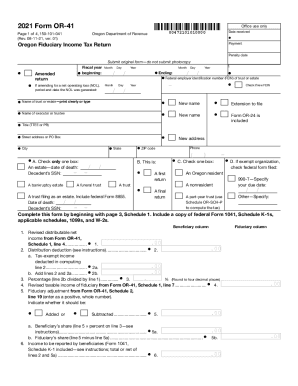
Clear form2021 Form OR41Office use only Date received00472101010000Oregon Department of RevenuePage 1 of 4, 150101041 (Rev. 081121, ver. 01)Oregon Fiduciary Income Tax ReturnPayment Penalty dateSubmit.

How it works

  1. Open form

    Open form follow the instructions

  2. Easily sign form

    Easily sign the form with your finger

  3. Share form

    Send filled & signed form or save

How to use or fill out the OR DoR 41 online

This guide provides a comprehensive overview of how to fill out the Oregon Fiduciary Income Tax Return, known as the OR DoR 41, online. By following these step-by-step instructions, users will be able to successfully complete and submit the form with confidence.

Follow the steps to accurately complete the OR DoR 41 online.

  1. Click ‘Get Form’ button to obtain the OR DoR 41 and open it for online editing.
  2. Indicate the payment type and whether this is an amended return. For 'fiscal year beginning' and 'ending' dates, select the appropriate month, day, and year.
  3. Enter the Federal Employer Identification Number (FEIN) of the trust or estate and check if it is a new FEIN.
  4. Clearly print or type the name of the trust or estate, along with the name and contact details of the executor or trustee.
  5. Select the applicable box to specify the type of estate or trust, including dates of death and Social Security Numbers where required.
  6. Include any extension forms as required, and fill in the standard credits and tax information as listed in the relevant sections.
  7. Complete the beneficiary and fiduciary columns by calculating and entering the net income, distribution deductions, and related adjustments.
  8. Once all fields are completed correctly, save your changes. You can download, print, or share the form as needed.

Complete your OR DoR 41 online today for a smooth filing experience.

Get form

Experience a faster way to fill out and sign forms on the web. Access the most extensive library of templates available.

Related content

2015 Forms and ... - Oregon Department of Revenue...
Schedule 6, Cigar Tax on Cigars Subject to Cap, 150-605-015, 2015, Form .... Form 41...
Learn more
Forms – Alabama Department of Revenue
Schedule K1 (Form 41 Only), Fiduciary Income Tax Beneficiary Information...
Learn more
Kaba 11/11/2015 Update On Dorma+kaba Group ...
Nov 11, 2015 - Press release. Page 1 of 2. dorma+kaba Holding AG. Hofwisenstrasse 24. |...
Learn more

Related links form

Rti Form Sadarem Certificate Status Gipdoc Dole11 Net Pwd Forms

Questions & Answers

Get answers to your most pressing questions about US Legal Forms API.

Contact support

What tax forms do I need to file my taxes? First and foremost, all individuals who must file income taxes will need to submit Form 1040. In fact, the full name for Form 1040 is the U.S. Individual Income Tax Return so when people talk about their tax returns, this is the form they're referring to.

Form 1040A is used by U.S. taxpayers to file an annual income tax return. For Tax year 2018, you will no longer use Form 1040-A, but instead use the redesigned Form 1040.

Form 1040EZ: Income Tax Return for Single and Joint Filers with No Dependents was the shortened version of Internal Revenue Service (IRS) Form 1040. This form was for taxpayers with basic tax situations and offered a fast and easy way to file income taxes.

A simple federal income tax return is one with almost no options. The Internal Revenue Service offers two streamlined versions of its 1040 individual income tax return. The simplest is 1040EZ, for taxpayers with very basic tax situations and usually the quickest refunds.

There is absolutely no reason to file an early tax return for 2018. Filing a tax year 2018 tax return will start after January 1, 2019. However, the IRS will probably not start to accept any 2018 tax return until late January 2019.

File your taxes manually, filling out a form called a 1040, according to instructions provided by the IRS; and mail it to the IRS, along with any payments you owe. Use a tax software program or the website of a service like TurboTax or H&R Block.

Step 1 -> Tell TurboTax about your tax situation. ... Step 2 -> Select Your Plan. ... Step 3 -> Tell them More About Yourself & Your Financial Picture. ... Step 4 > Enter in self-employment information. ... Step 5 -> Finish entering in your personal information.

For individuals, the personal income tax filing deadline is April 30th. If you are self-employed, or earn self-employed income, you must file your taxes on or before June 17, 2019.

Filing a tax year 2018 tax return will start after January 1, 2019. However, the IRS will probably not start to accept any 2018 tax return until late January 2019.

Collect required documents such as TDS certificates (Form16/16A), capital gains statements. ... Download and check Form 26AS. ... Rectify the errors in Form 26AS, if any. ... Compute total income for the financial year.

Get This Form Now!

Use professional pre-built templates to fill in and sign documents online faster. Get access to thousands of forms.
If you believe that this page should be taken down, please follow our DMCA take down processhere.
Get OR DoR 41
  • Adoption
  • Bankruptcy
  • Contractors
  • Divorce
  • Home Sales
  • Employment
  • Identity Theft
  • Incorporation
  • Landlord Tenant
  • Living Trust
  • Name Change
  • Personal Planning
  • Small Business
  • Wills & Estates
  • Packages A-Z
  • Affidavits
  • Bankruptcy
  • Bill of Sale
  • Corporate - LLC
  • Divorce
  • Employment
  • Identity Theft
  • Internet Technology
  • Landlord Tenant
  • Living Wills
  • Name Change
  • Power of Attorney
  • Real Estate
  • Small Estates
  • Wills
  • All Forms
  • Forms A-Z
  • Other Templates
  • Legal Hub
  • About Us
  • Help Portal
  • Legal Resources
  • Blog
  • Affiliates
  • Contact Us
  • Delete My Account
  • Site Map
  • Industries
  • Forms in Spanish
  • Localized Forms
  • State-specific Forms
  • Forms Kit
  • Real Estate Handbook
  • All Guides
  • Notarize
  • Incorporation services
  • For Consumers
  • For Small Business
  • For Attorneys
  • USLegal
  • FormsPass
  • pdfFiller
  • signNow
  • altaFlow
  • DocHub
  • Instapage
Form Packages
  • Adoption
  • Bankruptcy
  • Contractors
  • Divorce
  • Home Sales
  • Employment
  • Identity Theft
  • Incorporation
  • Landlord Tenant
  • Living Trust
  • Name Change
  • Personal Planning
  • Small Business
  • Wills & Estates
  • Packages A-Z
Form Categories
  • Affidavits
  • Bankruptcy
  • Bill of Sale
  • Corporate - LLC
  • Divorce
  • Employment
  • Identity Theft
  • Internet Technology
  • Landlord Tenant
  • Living Wills
  • Name Change
  • Power of Attorney
  • Real Estate
  • Small Estates
  • Wills
  • All Forms
  • Forms A-Z
  • Other Templates
Customer Service
  • Legal Hub
  • About Us
  • Help Portal
  • Legal Resources
  • Blog
  • Affiliates
  • Contact Us
  • Delete My Account
  • Site Map
  • Industries
  • Forms in Spanish
  • Localized Forms
  • State-specific Forms
  • Forms Kit
Legal Guides
  • Real Estate Handbook
  • All Guides
Prepared for you
  • Notarize
  • Incorporation services
Our Customers
  • For Consumers
  • For Small Business
  • For Attorneys
Our Sites
  • USLegal
  • FormsPass
  • pdfFiller
  • signNow
  • altaFlow
  • DocHub
  • Instapage
Social Media
Call us now toll free:
+1 833 426 79 33
As seen in:
© Copyright 1999-2026 airSlate Legal Forms, Inc. 17 Station Street, Suite 303, Brookline, MA 02445
  • Your Privacy Choices
  • Terms of Service
  • Privacy Notice
  • Content Takedown Policy
  • Bug Bounty Program
OR DoR 41
This form is available in several versions.
Select the version you need from the drop-down list below.
2023 OR DoR 41
Select form
  • 2023 OR DoR 41
  • 2022 OR DoR 41
  • 2021 OR DoR 41
  • 2020 OR DoR 41
  • 2015 OR DoR 41
  • 2014 OR DoR 41
  • 2013 OR DoR 41
  • 2012 OR DoR 41
Select form