Loading
Get Irs W-8ben-e 2021-2026
This website is not affiliated with IRS
How it works
-

Open form follow the instructions
-

Easily sign the form with your finger
-

Send filled & signed form or save
How to fill out the IRS W-8BEN-E online
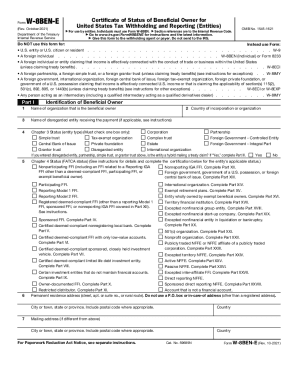
The IRS W-8BEN-E form is essential for entities that are foreign to the United States, allowing them to claim benefits or exemptions under U.S. tax law. This guide provides clear, step-by-step instructions to help users navigate and accurately complete the form online.
Follow the steps to successfully complete the W-8BEN-E form online.
- Click ‘Get Form’ button to obtain the W-8BEN-E form and open it for editing.
- In Part I, enter the name of the organization that is the beneficial owner in the appropriate field.
- If applicable, provide the name of any disregarded entity receiving the payment.
- Select the entity type by checking the corresponding box under Chapter 3 Status.
- Provide the country of incorporation or organization in the designated field.
- Fill out the permanent residence address, ensuring to exclude P.O. boxes.
- If required, include the U.S. taxpayer identification number (TIN) and any foreign TIN as applicable.
- Complete Part II if a disregarded entity is involved, providing relevant details.
- In Part III, check the certifications related to tax treaty benefits, if applicable.
- Review and complete any additional parts that apply based on your entity’s classification, following the prompts for each section.
- Verify all information for accuracy before submitting.
- Finally, save your changes, and download, print, or share the completed form as necessary.
Start completing your W-8BEN-E form online now for efficient tax compliance.
Essentially, it serves an opposite function to the W-8BEN-E. Whereas the W-8BEN-E form exempts a foreign entity from the 30% tax rate based on a country's treaty status, the W-8BEN form documents a business as owing the full 30% rate, and ensures that the tax is filed as payable.