Loading
Form preview
  • US Legal Forms
  • Other Templates
  • More Forms
  • More Multi-State Forms
  • Atomy Thailand Registration 2020

Get Atomy Thailand Registration 2020-2026

How it works

  1. Open form

    Open form follow the instructions

  2. Easily sign form

    Easily sign the form with your finger

  3. Share form

    Send filled & signed form or save

How to fill out the Atomy Thailand Registration online

Completing the Atomy Thailand Registration form online is a straightforward process that ensures your membership with Atomy is established efficiently. This guide will provide you with detailed steps to effectively fill out the registration form.

Follow the steps to complete your registration successfully.

  1. Press the ‘Get Form’ button to access the registration form and open it in your preferred editor.
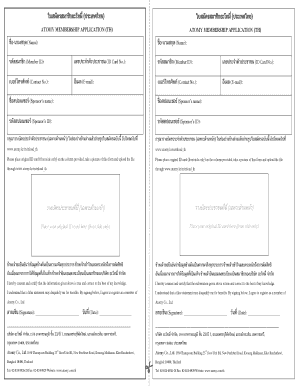
  2. Fill in your name in the 'ชื่อ-นามสกุล (Name)' field, ensuring that it reflects your legal name.
  3. Enter your Member ID in the designated 'รหัสสมาชิก (Member ID)' field. If you do not have a Member ID yet, you may leave this blank or inquire for a new ID.
  4. Provide your ID card number in the 'เลขประจาตัวประชาชน (ID Card No.)' field. Make sure this number is accurate and matches your identification.
  5. Input your contact number in the 'เบอร์โทรศัพท์ (Contact No.)' section. This number will be used for correspondence regarding your membership.
  6. Fill in your email address in the 'อีเมล (E-mail)' field. Ensure that this email is correct to receive important notifications.
  7. In the 'ชื่อสปอนเซอร์ (Sponsor’s name)' field, enter the name of your sponsor, if applicable.
  8. Add the sponsor's ID in the 'รหัสสปอนเซอร์ (Sponsor’s ID)' field. This ensures that your application is associated with the correct sponsor.
  9. Place your original ID card in the indicated area, ensuring that only the front side is visible. Take a clear photograph of the completed form.
  10. Upload the photograph of your completed form and ID card to the specified link, ensuring all files meet the upload requirements.
  11. Finally, review all the entered information for accuracy. Once confirmed, save the changes or download the completed form for your records.

Begin your Atomy Thailand registration online today by following these guided steps.

Get form

Experience a faster way to fill out and sign forms on the web. Access the most extensive library of templates available.
Get form

Related content

Establishment Registration & Device Listing - FDA
... Atomy Herb Day Large; Atomy Herb Day Medium; Atomy Herb Day Pantyliner 14 ... BAGS AND...
Learn more
... r---
It is expected thai a registration schedule shall not be worked out on a trial basis;...
Learn more
Abandoned Building/List/Chungcheongnam-do
Nov 15, 2025 — Currently, Atomy is taking over this site and is trying to build a...
Learn more

Related links form

Performance Appraisal System (PAS) Supervisory Manual &quot Application For Solar Feed-in Tariff - E.On ATT-300LLA_Coin_Operated_Amusement_Machine_Location_License_Aplication

Questions & Answers

Get answers to your most pressing questions about US Legal Forms API.

Contact support

To ensure the authenticity of Atomy products, visit the official Atomy website and use their authenticity checker tool. By entering product details or scanning a QR code, you can verify if the products are legitimately sourced. This adds an extra layer of assurance post your Atomy Thailand Registration.

As mentioned earlier, Atomy membership remains valid indefinitely. You need to actively engage with your account through purchases or participation. This allows you to leverage the benefits from your Atomy Thailand Registration without worrying about expiration.

Activating your Atomy account is straightforward. After completing your Atomy Thailand Registration, follow the link in the confirmation email to verify your account. Once verified, you can log in and start exploring the various products and the community offered by Atomy.

To apply for Atomy, you need to go to the official Atomy website, where you can find the application form. Make sure to provide all required information accurately to ensure a smooth Atomy Thailand Registration process. Once submitted, you will receive an email confirmation regarding your application status.

No, your Atomy membership does not expire as long as you continue to make purchases or maintain activity within your account. This means that once you complete your Atomy Thailand Registration, you can enjoy the benefits of membership indefinitely as long as you stay engaged with the platform.

Becoming a member of Atomy is simple. You start by completing the Atomy Thailand Registration process on their website. After registering, you will gain access to exclusive benefits, training materials, and tools to help you succeed in your Atomy journey.

You can earn a commission from Atomy by sharing its products with others and building your own network. When your referrals make purchases, you will receive a percentage of the sales from their orders. This system makes Atomy Thailand Registration a great opportunity for those looking to earn an income while promoting quality products.

To register for Atomy online, visit the official Atomy website and click on the registration button. You will need to fill in your personal details such as your name, email address, and contact information. After submitting your application, you will receive a confirmation email to finalize your Atomy Thailand Registration.

Registering in Atomy Canada follows a similar approach to the Atomy Thailand Registration. All you need to do is visit the Atomy Canada website, fill out the registration form, and select Canada as your specific region. After submitting your details, a confirmation email will be sent, allowing you to activate your account and start exploring Atomy's Canadian product range.

To register a new member on Atomy, you first need to ensure the individual completes their Atomy Thailand Registration. You can guide the new member through filling out the necessary form on the Atomy website. Once they provide their personal details and submit the form, you can assist them in verifying their account to ensure they are fully registered and ready to enjoy Atomy's offerings.

Get This Form Now!

Use professional pre-built templates to fill in and sign documents online faster. Get access to thousands of forms.
Get form
If you believe that this page should be taken down, please follow our DMCA take down processhere.
Get Atomy Thailand Registration
Get form
  • Adoption
  • Bankruptcy
  • Contractors
  • Divorce
  • Home Sales
  • Employment
  • Identity Theft
  • Incorporation
  • Landlord Tenant
  • Living Trust
  • Name Change
  • Personal Planning
  • Small Business
  • Wills & Estates
  • Packages A-Z
  • Affidavits
  • Bankruptcy
  • Bill of Sale
  • Corporate - LLC
  • Divorce
  • Employment
  • Identity Theft
  • Internet Technology
  • Landlord Tenant
  • Living Wills
  • Name Change
  • Power of Attorney
  • Real Estate
  • Small Estates
  • Wills
  • All Forms
  • Forms A-Z
  • Other Templates
  • Legal Hub
  • About Us
  • Help Portal
  • Legal Resources
  • Blog
  • Affiliates
  • Contact Us
  • Delete My Account
  • Site Map
  • Industries
  • Forms in Spanish
  • Localized Forms
  • State-specific Forms
  • Forms Kit
  • Real Estate Handbook
  • All Guides
  • Notarize
  • Incorporation services
  • For Consumers
  • For Small Business
  • For Attorneys
  • USLegal
  • FormsPass
  • pdfFiller
  • signNow
  • altaFlow
  • DocHub
  • Instapage
Form Packages
  • Adoption
  • Bankruptcy
  • Contractors
  • Divorce
  • Home Sales
  • Employment
  • Identity Theft
  • Incorporation
  • Landlord Tenant
  • Living Trust
  • Name Change
  • Personal Planning
  • Small Business
  • Wills & Estates
  • Packages A-Z
Form Categories
  • Affidavits
  • Bankruptcy
  • Bill of Sale
  • Corporate - LLC
  • Divorce
  • Employment
  • Identity Theft
  • Internet Technology
  • Landlord Tenant
  • Living Wills
  • Name Change
  • Power of Attorney
  • Real Estate
  • Small Estates
  • Wills
  • All Forms
  • Forms A-Z
  • Other Templates
Customer Service
  • Legal Hub
  • About Us
  • Help Portal
  • Legal Resources
  • Blog
  • Affiliates
  • Contact Us
  • Delete My Account
  • Site Map
  • Industries
  • Forms in Spanish
  • Localized Forms
  • State-specific Forms
  • Forms Kit
Legal Guides
  • Real Estate Handbook
  • All Guides
Prepared for you
  • Notarize
  • Incorporation services
Our Customers
  • For Consumers
  • For Small Business
  • For Attorneys
Our Sites
  • USLegal
  • FormsPass
  • pdfFiller
  • signNow
  • altaFlow
  • DocHub
  • Instapage
Social Media
Call us now toll free:
+1 833 426 79 33
As seen in:
© Copyright 1999-2026 airSlate Legal Forms, Inc. 17 Station Street, Ste. 203, Brookline, MA 02445
  • Your Privacy Choices
  • Terms of Service
  • Privacy Notice
  • Content Takedown Policy
  • Bug Bounty Program