Loading
Get Oh It Nrc 2021-2026
How it works
-

Open form follow the instructions
-

Easily sign the form with your finger
-

Send filled & signed form or save
How to fill out the OH IT NRC online
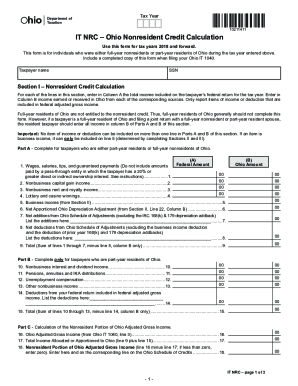
Completing the OH IT NRC form is essential for individuals who were full-year nonresidents or part-year residents of Ohio during the tax year. This guide provides step-by-step instructions to help you accurately fill out and submit the form online.
Follow the steps to complete your OH IT NRC form online.
- Click ‘Get Form’ button to obtain the OH IT NRC form and open it in the editor.
- Begin by entering your taxpayer name and Social Security Number (SSN) in the designated fields at the top of the form.
- In Section I, Nonresident Credit Calculation, list the total income from your federal return in Column A and the income earned or received in Ohio in Column B for each specified type of income.
- For Part A, provide details if you are a part-year resident or full-year nonresident. Ensure that the income items are only reported once and that business income is included correctly as per the guidelines.
- If applicable, fill out Part B only if you are a part-year resident, detailing any additional income sources that pertain to this status.
- In Section II, report each business from which you received income during the tax year. List these in descending order based on Ohio apportioned income.
- For Section III, complete a separate section for each business with Ohio apportionment where required, ensuring to calculate the apportionment ratios and report the corresponding business income and deductions accordingly.
- Once you have filled in all required sections and reviewed for accuracy, save your changes to the document. You may then download, print, or share the completed OH IT NRC form as needed.
Complete your OH IT NRC form online to ensure accurate tax filing.