Loading
Get Oh Odt Pr 2021-2026
How it works
-

Open form follow the instructions
-

Easily sign the form with your finger
-

Send filled & signed form or save
How to fill out the OH ODT PR online
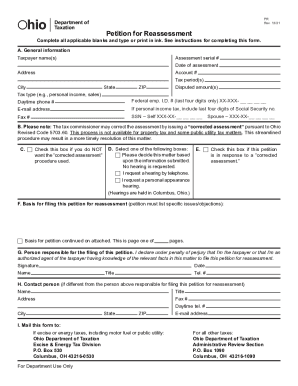
The OH ODT PR form, or the Petition for Reassessment, is a crucial document for addressing tax assessment disputes with the Ohio Department of Taxation. This guide aims to assist users in completing the form accurately and efficiently, ensuring a smooth filing process.
Follow the steps to complete the OH ODT PR form online
- Press the ‘Get Form’ button to access the OH ODT PR form and open it in your preferred online editor.
- In section A, enter general information such as your name, address, and contact details. Use the assessment document as a reference to ensure accuracy.
- Fill in the assessment serial number, which can be located on your assessment notice. Include the date of assessment and the tax period(s) in question.
- Indicate the disputed amount that you are contesting. In most cases, you do not need to pay this amount before filing the petition.
- If applicable, check the boxes in section C to indicate if you want to request a corrected assessment or a hearing.
- In section F, provide a detailed basis for your filing. List specific objections related to the assessment.
- In section G, declare your status as the taxpayer or an authorized agent with knowledge of the case, and provide your signature and date.
- If different from the person responsible for the filing, fill out section H with the contact person's details.
- Finally, review the completed form for accuracy. You can then save changes, download, print, or share the form as necessary.
Complete your OH ODT PR form online today to address your tax assessment dispute!
Related links form
Generally, the IRS can include returns filed within the last three years in an audit. If we identify a substantial error, we may add additional years. We usually don't go back more than the last six years. The IRS tries to audit tax returns as soon as possible after they are filed.