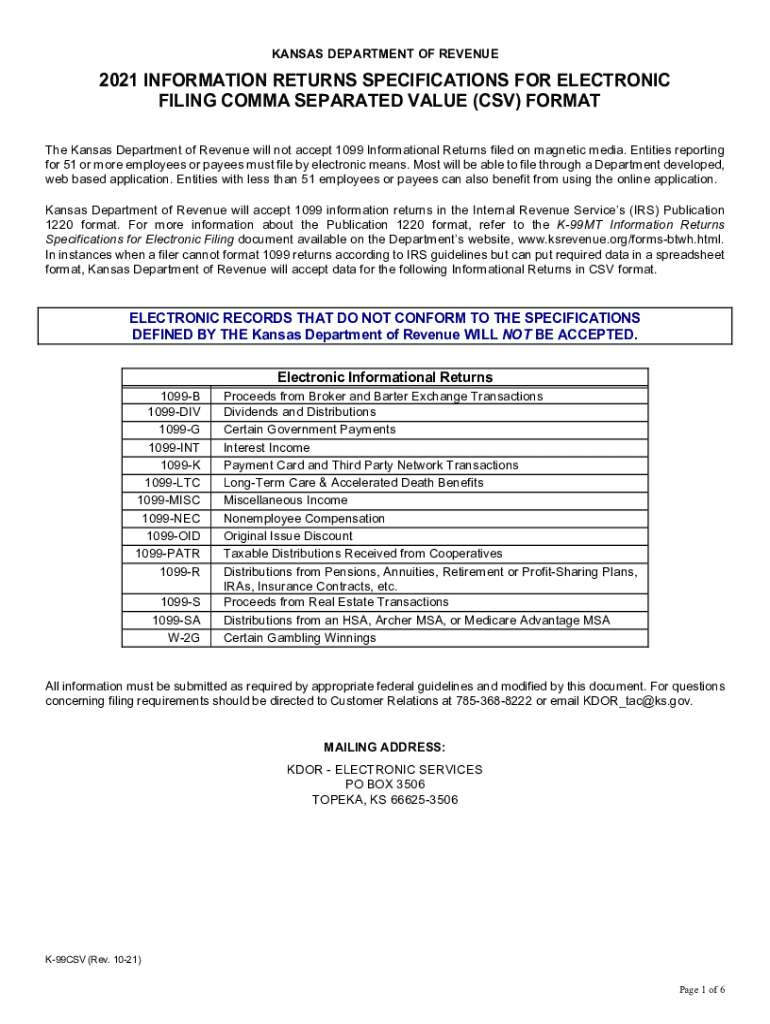
KANSAS DEPARTMENT OF REVENUE2021 INFORMATION RETURNS SPECIFICATIONS FOR ELECTRONIC FILING COMMA SEPARATED VALUE (CSV) FORMAT The Kansas Department of Revenue will not accept 1099 Informational Returns.
Loading

Open form follow the instructions

Easily sign the form with your finger

Send filled & signed form or save
How to fill out the KS K-99CSV online
This guide provides comprehensive instructions on completing the KS K-99CSV form online. Whether you are familiar with digital document management or new to the process, these clear steps will help you navigate each section of the form efficiently.
Follow the steps to fill out the KS K-99CSV online seamlessly.
- Press the ‘Get Form’ button to obtain the form and open it in your preferred editor.
- Begin with the general information section. Fill in the 'Form_Type' field with the appropriate 1099 type such as '1099B', '1099DIV', etc. Next, enter the payer's Social Security Number (SSN) or Federal Employer Identification Number (FEIN) ensuring accuracy.
- Provide the payer's last name, first name, middle name (if applicable), and suffix. Make sure to complete the Address section with street address (line 1 and line 2 if necessary), city, state, zip code, and phone number.
- Proceed to input the recipient's information. Enter the recipient's SSN or FEIN, followed by their last name, first name, and middle name (if applicable). Fill in the address fields similarly as you did for the payer.
- Once personal and address information is complete, move on to the specific sections relevant to the 1099 form type you are filing. For example, if you selected '1099-B', make sure you fill out the sections related to proceeds, date sold, and gross amounts.
- After completing all relevant fields, review your entries for any errors or omissions. Ensuring all data is correctly filled is crucial to prevent issues during submission.
- Finally, save your changes, and then choose to download, print, or share the filled-out form as necessary.
Complete your KS K-99CSV form online today for a smooth filing experience.
Experience a faster way to fill out and sign forms on the web. Access the most extensive library of templates available.
Related content
of Form K-4 to report additional amounts of Kansas tax to be withheld. ... be formatted as...
E U L IPI:IPI00750796.1|TREMBL:A2AS33|ENSEMBL: 50 KSK. ... DYD L...
2020-04-19, 178, 131, 262, 13, 52, 204, 20, 76, 99, 13, 14, 4, 1,066, 32,655, +3.4%, 110...
Get answers to your most pressing questions about US Legal Forms API.
How much is Kansas withholding?
Income tax rates in Kansas are 3.1%, 5.25% and 5.7%.
Do I have to file Kansas state income tax?
If you were a Kansas resident for the entire year, you must file a Kansas Individual Income Tax return if: ... A married couple filing jointly would not be required to file a Kansas return unless their gross income is over $10,500.
Does the state of Kansas tax Social Security benefits?
Kansas is moderately tax-friendly for retirees. It exempts all Social Security income for seniors with Adjusted Gross Income (AGI) of $75,000 or less. Public pension income is also exempt but other forms of retirement income are not. ... The state does not have an estate or inheritance tax.
How do I check the status of my Kansas State Tax Refund?
To check your current year tax refund go to our website or call 1-785-368-8222 for automated refund information. You will need your Social Security number(s) and the expected amount of your refund.
How long are Kansas State tax refunds taking?
Check the status of your Kansas refund using these resources. Note: Please wait at least 21 days before checking the status of your refund on returns electronically filed. It can take up to 20 weeks to receive your refund if you filed a paper return.
Does Kansas have an e file authorization form?
You must have your IRS e-file authorization before you can e-file Kansas Individual Income tax returns. ... As soon as you receive your IRS EFIN and your Kansas approved software, you can begin e-filing Individual Income tax returns.
What is the Kansas standard deduction for 2018?
Kansas allows itemized deductions, but only for taxpayers who claim itemized deductions on their federal tax return. Otherwise, taxpayers can claim the Kansas standard deduction, which is $3,000 for single filers, $7,500 for joint filers, $3,750 for married persons filing separately and $5,500 for heads of household.
When can you file Kansas taxes?
Kansas State Income Tax Return forms for Tax Year 2018 (Jan. 1 - Dec. 31, 2018) can be e-Filed in conjunction with an IRS Income Tax Return until October 15, 2019. In January 2020, you can e-File Tax Year 2019.
Do I need to file a state tax return in Kansas?
If the taxable income (line 7, Form K-40) is zero, a return is not required. However, you must file a Kansas Individual Income Tax return to receive any refund of taxes withheld, regardless of the amount of total income.
What is Kansas standard deduction?
Kansas standard deductions If you took a standard deduction on your federal income tax return, you must also take the Kansas standard deduction. Here are the Kansas standard deductions for 2018. $3,000 for single filers. $7,500 for those married filing jointly. $5,500 for head of household.
Use professional pre-built templates to fill in and sign documents online faster. Get access to thousands of forms.
If you believe that this page should be taken down, please follow our DMCA take down process here.