Loading
Get Ks St-28b 2021-2026
How it works
-

Open form follow the instructions
-

Easily sign the form with your finger
-

Send filled & signed form or save
How to fill out the KS ST-28B online
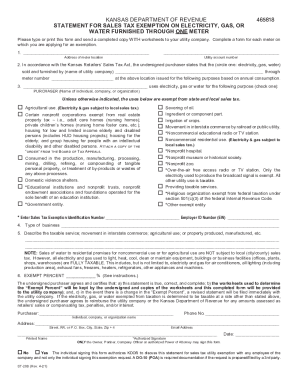
The KS ST-28B is a crucial form for those seeking a sales tax exemption on electricity, gas, or water provided through a single meter. This guide will walk you through the process of completing the form accurately and effectively online.
Follow the steps to complete the KS ST-28B form online.
- Click the ‘Get Form’ button to access the KS ST-28B form and open it for editing.
- Provide the address of the meter location along with the utility account number in the designated fields.
- Indicate the type of utility provided (electricity, gas, or water) and the name of the utility company. Also, enter the meter number.
- Fill in the name of the purchaser, which can be an individual, company, or organization, and specify the purpose for using the utility.
- Select the appropriate exemption category by checking the relevant box based on your usage — for example, agricultural use or nonprofit organization.
- Enter the exemption identification number and employer ID number (EIN), if applicable.
- Describe the type of business and elaborate on the nature of the taxable service or use.
- Calculate and enter the exempt percentage based on your annual consumption as referenced in the provided instructions.
- Sign and date the form. Ensure that only authorized individuals, such as the owner or a company officer, sign the document.
- Review all entries for accuracy, then save the completed form, and choose to download, print, or share it as needed.
Complete your KS ST-28B and other forms online to ensure a smooth process.