Loading
Get Ny Dtf Ct-636 2021-2026
How it works
-

Open form follow the instructions
-

Easily sign the form with your finger
-

Send filled & signed form or save
How to fill out the NY DTF CT-636 online
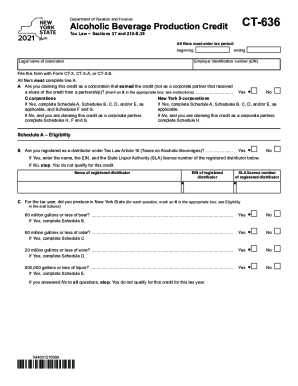
The NY DTF CT-636 is a crucial form for individuals and corporations claiming the alcoholic beverage production credit. This guide will provide you with detailed instructions on how to accurately complete the form online, making the process as seamless as possible.
Follow the steps to successfully complete your NY DTF CT-636 online.
- Press the ‘Get Form’ button to access the form and open it in your preferred editing tool.
- Enter the tax period for which you are filing, including the beginning and ending dates.
- Provide the legal name of the corporation as well as its Employer Identification Number (EIN).
- Complete line A, indicating whether you are claiming this credit as a corporation that earned it (mark an X in the appropriate box).
- For New York S corporations or C corporations, if applicable, complete Schedule A, Schedules B, C, D, and/or E.
- If you are not claiming as a corporation that earned the credit but as a corporate partner, instead complete Schedule H along with Schedules F and G.
- Answer questions in Schedule A regarding your registration as a distributor under Tax Law Article 18 by marking the appropriate box.
- If registered, input the name, EIN, and State Liquor Authority license number of the registered distributor.
- Proceed to answer eligibility questions for production capacity for beer, cider, wine, and liquor, completing relevant schedules as applicable.
- In Schedules B through E, enter the total gallons of each alcoholic beverage produced, and follow the instructions for calculating credits.
- Continue to Schedule F to calculate the total credit if applicable, then move on to Schedule G for the computation of tax credit usage.
- If filing as a partnership, complete Schedule H with the required information about the partnership and its credits.
- Finally, ensure all information is accurate, then save your changes, and download, print, or share your completed form as needed.
Complete your NY DTF CT-636 form online today to ensure you receive the appropriate credits.