Loading
Get Va Dot St-11 2021
How it works
-

Open form follow the instructions
-

Easily sign the form with your finger
-

Send filled & signed form or save
How to fill out the VA DoT ST-11 online
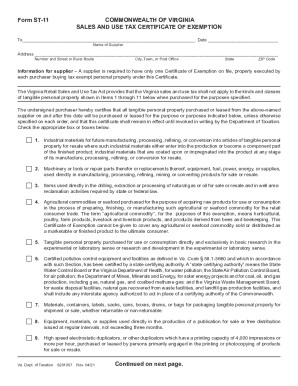
Filling out the VA DoT ST-11 Form is essential for obtaining a sales and use tax certificate of exemption in Virginia. This guide provides a step-by-step approach to help you complete the form accurately and effectively.
Follow the steps to complete the VA DoT ST-11 online.
- Press the ‘Get Form’ button to access the VA DoT ST-11 form and open it in your browser.
- In the first section, enter the supplier's name in the designated field. Make sure to provide accurate and complete information to avoid any discrepancies.
- Next, fill in the supplier's address, including the street number, city or town, state, and ZIP code. Ensure all details are correct.
- In the section for the purchaser, add your name as the purchaser and, if applicable, your trading name in the appropriate fields.
- Complete the address for the purchaser similar to the supplier’s, including the street, city, state, and ZIP code.
- Indicate the kind of business engaged in by the purchaser in the specified field. This step is crucial for validating the exemption.
- Sign and date the form in the signature section. Ensure that the person signing is authorized to do so by your organization.
- Finally, you can save your changes, download the completed form for your records, print it, or share it as needed.
Complete your VA DoT ST-11 form online today to secure your sales and use tax exemption.
Get form
Experience a faster way to fill out and sign forms on the web. Access the most extensive library of templates available.
Get This Form Now!
Use professional pre-built templates to fill in and sign documents online faster. Get access to thousands of forms.