Get In Form Bt-1 2018
How it works
-

Open form follow the instructions
-

Easily sign the form with your finger
-

Send filled & signed form or save
How to fill out the IN Form BT-1 online
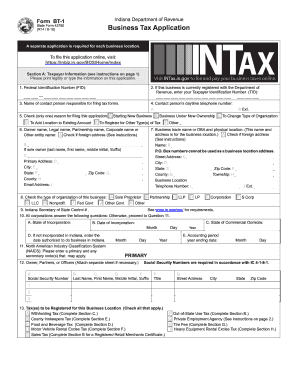
The IN Form BT-1 is a crucial document for individuals or businesses registering for various taxes with the Indiana Department of Revenue. This guide provides clear and concise instructions to help users complete the form accurately and efficiently in a user-friendly online format.
Follow the steps to fill out the IN Form BT-1 online:
- Press the ‘Get Form’ button to access the application. This action will open the form in an online editor ready for you to complete.
- Fill in Section A: Taxpayer Information. Start by entering your Federal Identification Number (FID) if applicable. If your business is currently registered, provide your Taxpayer Identification Number (TID).
- Select the reason for filing the application by checking one of the options provided. These include starting a new business, business under new ownership, changing the organization type, adding a location, or registering for other tax types.
- Proceed to register for the appropriate taxes related to your business by checking the boxes next to the relevant tax types, such as withholding tax, sales tax, food and beverage tax, etc.
Complete your IN Form BT-1 now to ensure your business is registered for all necessary tax obligations.
Get form
Related links form
Title 1 Indiana refers to a specific section of the Indiana Code that outlines general provisions and standards for the state’s tax laws. This title encompasses various tax obligations, including income and sales tax rules. Understanding Title 1 is essential for businesses and residents to navigate the complexities of Indiana's tax system effectively. For detailed insights into tax forms like the IN Form BT-1, you might find US Legal Forms to be an invaluable resource.