Loading
Get Nj Dot A-3128 2021-2026
How it works
-

Open form follow the instructions
-

Easily sign the form with your finger
-

Send filled & signed form or save
How to fill out the NJ DoT A-3128 online
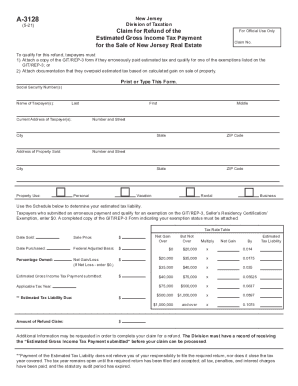
The NJ DoT A-3128 form is used to claim a refund for estimated gross income tax payments made for the sale of New Jersey real estate. This guide provides clear, step-by-step instructions to assist you in completing the form online, ensuring a smooth and accurate submission process.
Follow the steps to accurately complete the NJ DoT A-3128 form online.
- Click the ‘Get Form’ button to obtain the NJ DoT A-3128 form and open it in the editor.
- Carefully print or type your social security number in the designated field.
- Enter the names of the taxpayer(s). Include the last name, first name, and middle initial as required.
- Fill in the current address of the taxpayer(s), including number and street, city, state, and ZIP code.
- Provide the address of the property sold, including number and street, city, state, and ZIP code.
- Indicate the property use by selecting one of the options: personal, vacation, rental, or business.
- Record the date sold and date purchased of the property.
- List the sale price of the property, federal adjusted basis, and net gain/loss. If there is a net loss, enter $0.
- Enter the total estimated gross income tax payment that you submitted.
- Determine and calculate the estimated tax liability using the provided tax rate table and enter the amount.
- Specify the amount of refund you are claiming based on your calculations.
- Sign and date the form. If someone else is preparing the form, include the Appointment of Taxpayer Representative.
- Mail the completed A-3128 form along with the Settlement Statement or Closing Disclosure form to the Division of Taxation.
Complete your NJ DoT A-3128 form online today to ensure your refund claim is processed swiftly.