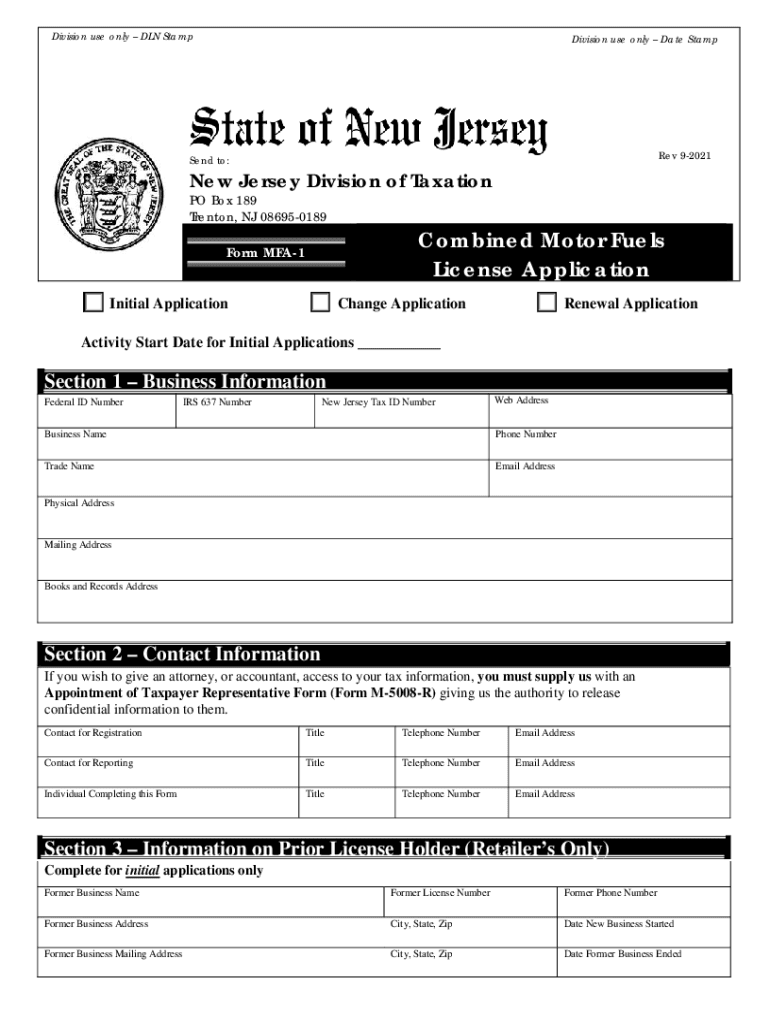
You blend Fuels List the types of fuels you blend and the blendstocks used. You sell Aviation Fuel. You must file a separate MFA-1 for each retail establishment. The applicant agrees to provide accurate and timely reports and to make timely payments. Inaccurate or incomplete information in any section is cause for denial of the requests made in Section 15 or 16 and/or the denial of the entire application. New Jersey Form MFA-1 Instructions Complete all appropriate sections and remit this to State of New Jersey LMF to Be sure to check whether this is an Initial Change or changes of Address Activity etc check Change. Division use only DLN Stamp Send to Rev 12-2013 New Jersey Division of Taxation PO Box 189 Trenton NJ 08695-0189 Combined Motor Fuels License Application Form MFA-1 Initial Application Change Application Renewal Application Section 1 Business Information Federal ID Number IRS 637 Number New Jersey Tax ID Number Does your company internet access Business Name Webpage Address ....
Loading

Open form follow the instructions

Easily sign the form with your finger

Send filled & signed form or save
How to fill out the NJ DoT MFA-1 online
The New Jersey Department of Transportation Motor Fuels Application (MFA-1) is essential for various motor fuels licenses. This guide offers a clear, step-by-step process to assist users in completing the form accurately and efficiently online.
Follow the steps to successfully complete your application.
- Press the ‘Get Form’ button to obtain the MFA-1 form and open it in your browser.
- Begin by entering the 'activity start date' for initial applications in the designated field.
- Fill out Section 1 with your business information including federal ID number, IRS 637 number, New Jersey Tax ID number, web address, business name, phone number, trade name, email address, and physical, mailing, and books and records addresses.
- In Section 2, provide contact information for the registration, reporting, and the individual completing the form.
- If applicable, complete Section 3 with information on the prior license holder, including their former business name and addresses.
- In Section 4, indicate your type of ownership by selecting from the provided options such as sole proprietorship or corporation.
- In Section 5, list the owner information for the sole proprietor, all partners, or principal officers, including their names and contact details.
- Complete Section 6 by providing details about relationships with other organizations, if relevant.
- Mark the types of products you will be handling in Section 7 by checking each applicable box.
- In Section 8, indicate your business activity and any licenses you are applying for by checking the relevant boxes.
- Fill out Sections 9 through 14 with details on consumer registration, fuel customers, terminals, storage tank information, and bond information as required.
- If applicable, complete Sections 15 and 16 regarding optional elections for supplier status.
- Finally, ensure all signatures are provided in Section 17, affirming the correctness of the information submitted.
- Once you have filled out the entire form, save your changes, and proceed to download, print, or share the completed document as necessary.
Complete your NJ DoT MFA-1 application online today to ensure compliance and gain the necessary licenses.
Experience a faster way to fill out and sign forms on the web. Access the most extensive library of templates available.
Related content
Jul 19, 2019 - NJ-REG WITH INSTRUCTIONS, NEW JERSEY COMPLETE BUSINESS ... MFA-1, MOTOR...
the 2 of 3 and 4 0 5 to 6 a 7 in 8 1 9 for 10 image 11 2 12 is 13 3 14 or 15 on 16...
13-02, 1015 UTC: MDZhB 58 161 MAGAYR 39 51 55 78. 13-02, 1027 UTC: ...... 16720 kHz...
Get answers to your most pressing questions about US Legal Forms API.
How do I turn on 2 step verification?
On your Android phone or tablet, open your device's Settings app Google Google Account. At the top, tap Security. Under "Signing in to Google," tap 2-Step Verification. Tap Get started. Follow the steps on the screen.
Does Netflix have two factor authentication?
Netflix: why no 2FA for the login process?! 2FA, also known as multi-factor authentication or two factor authentication provides an additional layer of security for an authentication mechanism. Netflix does not currently offer any forms of the above security.
How do you use two factor authentication?
Click the Expand button to the right of Two-Factor Authentication and then click Setup Two-Factor Authentication. You can sign up to receive code via SMS or an authentication app. You can then get backup codes to print out.
How do I turn off two factor authentication on my iPhone 2019?
Turn off two-step verification Sign in to your Apple ID account page. In the Security section, click Edit. Click Turn Off Two-Step Verification. Click again to confirm.
How do I set up two factor authentication?
Go to Settings > [your name]. If you're using iOS 10.2 or earlier, go to Settings > iCloud and tap your Apple ID. Tap Password & Security. If asked, enter your Apple ID password. Tap Turn On Two-Factor Authentication.
How do I change my MFA in Office 365?
Log on to the Office 365 portal. In the top right corner select the widget and choose Office 365 Settings. Click on Additional security verification. On the right, click the link that says Update my phone numbers used for account security.
How do I bypass Microsoft two step verification?
Go to Security settings and sign in with your Microsoft account. Under the Two-step verification section, choose Set up two-step verification to turn it on, or choose Turn off two-step verification to turn it off. Follow the instructions.
How do I enable Azure MFA?
Sign in to the Azure portal. On the left, select Azure Active Directory > Users. Select Multi-Factor Authentication. Under Multi-Factor Authentication, select service settings. Select Save.
How do I enable MFA?
In the navigation pane, choose Users. In the User Name list, choose the name of the intended MFA user. Choose the Security credentials tab. ... In the Manage MFA Device wizard, choose Virtual MFA device, and then choose Continue. ... Open your virtual MFA app.
How do I turn on my MFA?
Go to the Microsoft user management page. Sign in with your username and password. Choose the accounts for which you want MFA. Look for the enable link on the right-hand bottom. Click on this link and you'll see a dialog box.
Use professional pre-built templates to fill in and sign documents online faster. Get access to thousands of forms.
If you believe that this page should be taken down, please follow our DMCA take down process here.