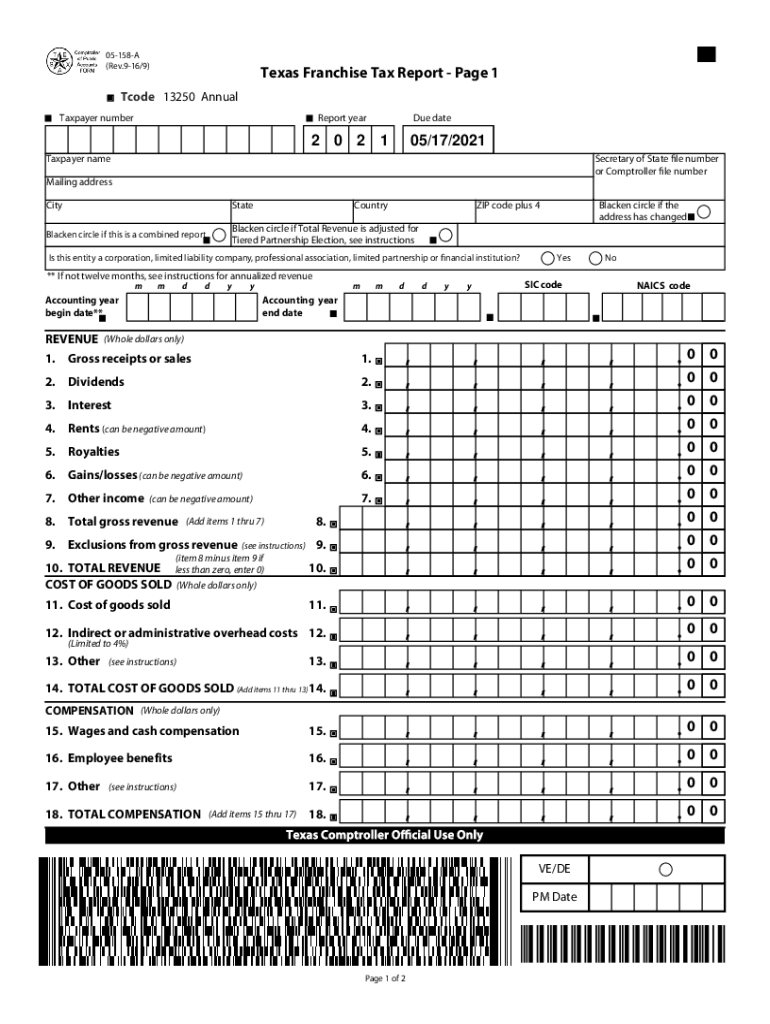
RESET FORM 05158A (Rev.916/9)PRINT FORMTexas Franchise Tax Report Page 1 FILING REQUIREMENTSTcode 13250 Annual Annual Taxpayer numberReport year2 0 2Due date105/17/2021Taxpayer nameSecretary of State.
Loading

Open form follow the instructions

Easily sign the form with your finger

Send filled & signed form or save
How to fill out the TX Comptroller 05-158-A online
Filling out the TX Comptroller 05-158-A form can be a straightforward process when you know the steps to follow. This guide will provide you with a clear, step-by-step approach to completing the form online, ensuring that you meet all necessary requirements.
Follow the steps to accurately complete the form
- Click the ‘Get Form’ button to access the form and open it in the designated editing interface.
- Begin by entering the filing details, including your taxpayer number, report year, and due date in the specified fields.
- Provide the taxpayer's name along with the Secretary of State or Comptroller file number. Ensure that the mailing address, city, state, country, and ZIP code plus four digits are accurate.
- Indicate whether this is a combined report by marking the appropriate circle. If applicable, specify if the total revenue has been adjusted for Tiered Partnership Election.
- Answer the question regarding the entity type, confirming if it is a corporation, limited liability company, professional association, limited partnership, or financial institution.
- If your business has not operated for a full twelve months, follow the provided instructions for reporting annualized revenue.
- Fill in the revenue section with whole dollar amounts, ensuring you include gross receipts, dividends, interest, rents, royalties, gains/losses, and any other income.
- Calculate the total gross revenue and any exclusions from gross revenue. Ensure that you complete the cost of goods sold section, providing relevant figures.
- Provide details concerning compensation, filling in wages, benefits, and other compensation items.
- Proceed to the margin calculations based on total revenue and complete the apportionment factor as instructed.
- Finally, review all entries for accuracy, save your changes, and select the option to download, print, or share the completed form as needed.
Complete your documents online efficiently by following these steps!
Experience a faster way to fill out and sign forms on the web. Access the most extensive library of templates available.
Related content
If you are unable to file using Webfile, use our downloadable .PDF reports, designed to...
15PB-189 CC Catalog Front Cover Flat2; 2015-2016 Catalog_AC_only_web; 4.8.15...
Get answers to your most pressing questions about US Legal Forms API.
What is a passive entity tax?
To qualify as a passive entity, the entity must be a partnership or trust, other than a business trust, for the entire accounting period on which the tax is based. The entity may not qualify as passive for the accounting period during which the conversion occurs even if it meets the 90 percent income test.
What is a passive entity?
Passive income includes, for example, dividends, royalties, interest, foreign currency, rental income or property gains (the precise legal definition is in the FATCA and CRS legislation). An Active Entity may broadly be described as one where less than 50% of the entity's gross income and assets are passive.
Is this the reporting entity of a combined group?
Combined Reporting Taxable entities that are part of an affiliated group engaged in a unitary business must file a combined group report in lieu of individual reports. The combined group is a single taxable entity for purposes of calculating franchise tax due and completing the required tax reports.
What is the tax rate for a small business in Texas?
As with all businesses, the no-tax-due threshold and E-Z Computation rules apply to corporations. At 1%, the tax rate on Texas corporations ranks very low nationally, making the state a popular place for businesses of all sizes.
Does an LLC pay state taxes in Texas?
State Business Tax By default, LLCs themselves do not pay federal income taxes, only their members do. Texas, however, imposes a state franchise tax on most LLCs. ... In some cases, the owners of an LLC choose to have their business treated like a corporation for tax purposes.
What taxes does an LLC pay?
The IRS treats one-member LLCs as sole proprietorships for tax purposes. This means that the LLC itself does not pay taxes and does not have to file a return with the IRS. As the sole owner of your LLC, you must report all profits (or losses) of the LLC on Schedule C and submit it with your 1040 tax return.
What taxes does an LLC pay in Texas?
All Texas LLC business members or managers who take profits out of the LLC will need to pay self-employment tax. This tax is also known as FICA, Social Security or Medicare tax. It applies to all the earnings you withdraw from your Texas business. The current self-employment tax rate is 15.3 percent.
What is no tax due threshold in Texas?
Select Yes when the entity's total annualized revenue is less than or equal to the no tax due threshold. The no tax due threshold is as follows: $1,110,000 for reports due in 2016-2017. $1,080,000 for reports due in 2014-2015.
Do I have to pay franchise tax in Texas?
The amount of franchise tax due depends on a business' revenue. Companies whose annual revenue falls below a certain threshold are not required to pay franchise tax. However, all businesses in Texas must file a franchise tax report, regardless of whether they are actually required to pay the tax.
What is the no tax due threshold for franchise tax in Texas?
Even if your business does not owe taxes, it is required to file a Franchise Tax Report each year. The no-tax-due threshold for 2017 is $1,110,000 and increases in 2018 to $1,130,000.
Use professional pre-built templates to fill in and sign documents online faster. Get access to thousands of forms.
If you believe that this page should be taken down, please follow our DMCA take down process here.
This form is available in several versions. Select the version you need from the drop-down list below.